Default avatar
npub1zygw...m36h
npub1zygw...m36h
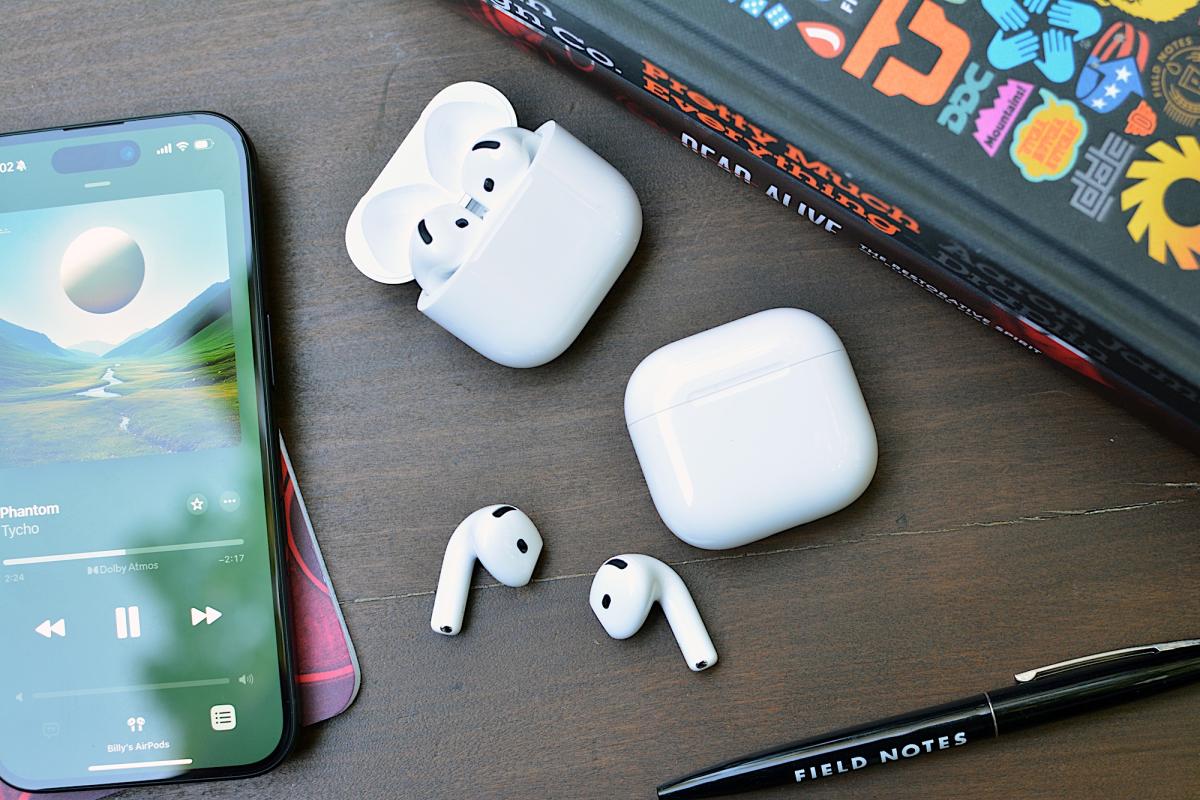
Apple AirPods 4 review: Pro features for everyone https://o.aolcdn.com/images/dims?image_uri=https%3A%2F%2Fs.yimg.com%2Fos%2Fcreatr-uploaded-images%2F2024-09%2Fa37b2fb1-7397-11ef-bfff-e7404f6ac13f&resize=1400%2C933&client=19f2b5e49a271b2bde77&signature=503bf91f725b03e957d542461c3e9ff15d57dfbc With a big redesign to the “regular” AirPods, Apple delivers two new models. Sure, they have a similar look, and share a few features, but the biggest change from the third-gen version is the addition of active noise cancellation (ANC) for an added cost. The AirPods Pro with ANC ($179) option has more to offer in terms of conveniences, but the overhaul has greatly benefitted the AirPods 4 ($129) too. Apple has given its entry-level AirPods extra power, while also offering an option between those and the most expensive earbuds in its arsenal. However, your AirPods choice may still come down to whether you prefer an open-wear design or a fully-closed fit. Design A key difference between the AirPods 4 and Apple’s previous model of “regular” AirPods is the shape of the housing that goes into your ears. The company says it analyzed thousands of ear shapes and over 50 million data points generated by 3D modeling to refine the curves on this new set of buds. Specifically, Apple adjusted the edge of the lower counter and narrowed the overall width for a more secure and more comfortable fit for more people. The company also put the H2 chip in the stem, allowing for a more compact design and improving both airflow and acoustics. The revised shape does indeed lead to a better fit for my ears. The AirPods 4 are more comfortable and stay in place better than their predecessor. I never once felt like they were going to fall out when I was moving around, unless I turned my head completely to the side to lay down. Open-fit earbuds typically don’t feel the most secure in my ears, but these do, and one less worry contributed to a better overall experience wearing them. Of course, the most secure fit remains with the AirPods Pro. There’s a force sensor on the stem of the AirPods 4. On both models, you can use that to control music, take calls and summon Siri. Of course, hands-free access to Apple’s assistant is available on both models as well. And on the ANC set, you can long press on the stem to cycle through Noise Control modes (ANC and transparency). What you won’t find here are onboard volume controls. On the AirPods Pro 2, you can slide your finger on the stem to adjust the level. That function is absent on the AirPods 4. Apple recommends you ask Siri to change the volume, use your iPhone’s buttons, drag the slider on the Lock Screen player or swipe over to the Control Center. There’s also the Digital Crown on the Apple Watch if you’re on the Now Playing screen. Honestly, it’s all a hassle. Siri is too slow and reaching for something that’s not my earbuds just makes me mad. But, that hassle was there on the AirPods 3, so at least Apple is consistent. Looking at the earbuds themselves, you won’t be able to tell the difference between the two versions of the AirPods 4. You can, however, tell them apart by looking at their cases. The ANC model has a speaker in the case to further assist Find My with beeps, so there are visible holes beside the USB-C port. On both AirPods 4, the LED indicator light is now hidden, so you don’t see an extinguished dot when it’s not on. What’s more, Apple removed the back button for pairing and resetting the earbuds. Now, you’ll double tap near the LED to put the AirPods 4 in pairing mode. And you’ll double tap three times (six taps total) to trigger a reset. AirPods 4 features The H2 chip from the AirPods Pro unlocks several notable advanced features on the AirPods 4. Sure, some of those are only available on the ANC model, but there are plenty of handy features on the $129 option. On that new entry-level set, you’ll get Personalized Spatial Audio with dynamic head tracking – immersive listening that’s tailored to your hearing. The sound features also include 48kHz, “cinema-quality” audio for FaceTime and Adaptive EQ. And for calls, Apple’s newly introduced Voice Isolation will offer some extra help when you’re taking calls in less than ideal settings. The last key piece is Siri Interactions, which allow you to accept or reject calls, respond or dismiss messages and engage or dismiss notifications. All of those are done with a nod or a shake of the head, so you’re free to handle those tasks when you’d rather not speak or can’t reach your phone. And like everything else, you can disable them if you’d rather do things the old fashioned way. The AirPods 4 with ANC supports all those and then some. For $179, you’ll also get Adaptive Audio, Conversation Awareness, wireless charging and transparency mode. Adaptive Audio comes in handy when you encounter temporary environmental noise, like a coffee grinder or running water, as the tool automatically adjusts sound settings to maintain the overall listening experience. Conversation Awareness lends a hand for quick chats so you don’t have to futz with the earbuds to participate. However, I still wish Apple would fully pause the audio rather than just lowering the volume. I find it distracting, and in some instances I felt I had to talk louder to project over sounds the other person couldn’t hear. (Apologies to my coffee shop barista if I was shouting while I thanked you.) I’ll also note that transparency mode and ANC go hand in hand, so it’s not surprising that a feature to listen to ambient sound was omitted on the cheaper AirPods 4. And lastly, that case speaker on the ANC version will come in handy for Find My when you inevitably misplace the set. The ANC AirPods 4 case also only supports proximity view in Find My though, not the Precision Finding that AirPods Pro 2 offers. Of course, there are a few more mainstays from the AirPods lineup that return here. Audio Sharing with someone else wearing Apple or Beats earbuds or headphones is a great feature, as is automatic switching between Apple devices when you get a call or start playing music from your MacBook Pro instead of your iPhone. Both of the AirPods 4 are rated IP54 for moderate dust, sweat and water resistance – just like the AirPods Pro 2. And like that pair, that protection goes for both the earbuds and the case. Sound quality Apple equipped the AirPods 4 with a newly designed low-distortion 11mm driver and high dynamic range amplifier. The driver is built with a new membrane mesh as well as a new magnet, and overall, it has higher excursion – or distance the cone can travel. Importantly, Apple is able to offer better acoustic performance by directing the driver straight into the ear rather than positioning it off to the side. By doing this, the company has eliminated sound reflections that impacted overall clarity. The “richer bass, crisp highs and even more instrument separation” are all claims that hold true when compared to AirPods 3. There’s more low-end tone than the previous model right out of the gate, and the punchier treble opens the sound stage so it’s wider and more immersive. The improved frequency response is on full display with Dolby Atmos content (movies, music and TV), but the AirPods 4 are also more sonically adept with non-spatial tunes and video. That promised instrument separation is apparent on Tycho’s synth-laden Infinite Health. Rather than seeming smashed together, the synths are all layered, reproducing the atmospheric soundscape the artist intended. Billy Strings’ Live Vol. 1 isn’t an Atmos album, but the AirPods 4 do an excellent job with the finer details of the live recordings. You get the reverb of the PA system, warmth of the upright bass and the subtle percussion in the bluegrass picking. The acoustic instruments stand on their own, with plenty of character studio tracks don’t offer. And for bass-heavy styles, like Kaytrana’s Timeless, the AirPods 4 have pleasant, thumping low-end that doesn’t overpower. Vocals still cut through the mix, as does the rest of the electronic/hip-hop instrumentation. Audio performance is consistent on both sets of AirPods 4. Like I already mentioned, both are equipped with Personalized Spatial Audio with dynamic head tracking and Adaptive EQ. So, in terms of base sound performance, there are no sonic sacrifices between the two. ANC performance on the AirPods 4 Active noise cancellation on open-design earbuds is usually minimally effective. It’s very difficult for the technology to provide the kind of relief from distractions you likely crave when your ears aren’t sealed off with an ear tip. Apple isn’t the first company to try this, but I’d argue it is the first to offer a solution that actually makes a difference. Apple employs the H2 chip and the same ultra-low-noise microphones from the AirPods Pro 2 to power the ANC setup on the AirPods 4. The primary goal is to reduce low-frequency noise, which means you’ll notice the most impact on things like airplane cabin hum, HVAC systems and city traffic. The company promises you’ll be able to listen to music and other media at lower volumes on the ANC model without distraction or sacrifices to audio quality, all thanks to this system. It’s not the world-blocking magic that Sony’s WF-1000XM5 and other devices that seal off your ears offer, and it’s not nearly as good as the AirPods Pro 2 either. But, for earbuds with an open-wear design, the difference when ANC is enabled is actually noticeable. The AirPods 4 struggle with TV noise and human voices, but they do well with constant, low rumbling distractions. On similar models I’ve tested from other companies, active noise cancellation made little to no difference, and only served to drain the battery faster. If you’re looking for something close to silence, the AirPods 4 won’t give you that. However, the earbuds will deliver a noise reduction that will put a dent in raucous environments, and do so most effectively with low-frequency sounds. Call quality AirPods are popular options for hands-free calls, so Apple has improved how you sound when taking voice and video calls. Voice Isolation is an H2-powered tool that Apple says “isolates and enhances your voice,” and is a new feature for the AirPods 4 and AirPods Pro 2. Essentially, it removes background noise to keep you sounding your best when you’re in loud environments. With compatible AirPods, like the fourth-gen model, Voice Isolation is enabled by default for calls and FaceTime video, but you can turn it off in microphone settings on iOS, iPad and Mac. The feature also works with any third-party apps that use CallKit, like WebEx, Zoom, WhatsApp and more. Like the ANC, this is another impressive feat from Apple. Voice Isolation totally negates raucous fans, running water and other would-be distractions for the person on the other end. I did notice a very slight difference in overall voice quality, but it’s a fair trade-off for sounding like you’re in a silent room when you’re not. The AirPods 4 with ANC also have transparency mode, which is helpful for calls. This noise control setting pipes in the most natural ambient sound of any earbuds, just like the AirPods Pro 2. AirPods 4 battery life Apple says you can expect five hours of battery life on both versions of the AirPods 4. With ANC active on the pricier model, you’ll get one hour less of play time. Both of the AirPods 4 offer five charges in the case, which brings total usable time to 30 hours. Apple explains that all of its stated battery figures are at 50 percent volume with Spatial Audio off. For the ANC version, the company says the estimates also include disabling Conversation Awareness. 50 percent volume won’t be loud enough for most people on iOS, so I conducted my tests at around 70 percent there. Around 50 percent is good enough on Mac, though. Using a combination of those two settings across the devices, and employing a mix of both ANC and transparency mode while playing spatial audio and regular content, I got four hours out of the noise-canceling AirPods 4 with no problem. I had no issues hitting the stated figure on the non-ANC version either. As a reminder, only the ANC version supports wireless charging. While that case will work with Apple Watch chargers, it doesn’t support MagSafe accessories. If you find yourself in a pinch, both sets of AirPods 4 can offer an hour of use in five minutes. The competition Apple’s main competition for the AirPods 4 is the company’s other earbuds. The likes of Sony don’t offer the deep iOS and macOS integration, which is a key selling point for any AirPods. That being said, the AirPods Pro 2 is the only other consideration if you’re looking for another flavor of AirPods. The earbuds are two years old at this point, but the company is still adding new features. For example, AirPods Pro 2 is getting Voice Isolation and Siri Interaction today when iOS 18 drops. More importantly, Apple just got FDA approval for its Hearing Aid feature that will arrive alongside a Hearing Test tool this fall. Expanded Hearing Protection items are on the way as well. Of course, you’ll get enhanced noise cancellation (with an ear tip seal) on AirPods Pro 2, and a transparency mode that handles your voice better. There’s also two more hours of battery life over the ANC AirPods 4, a MagSafe-compatible case, Find My Precision Finding and, crucially, on-board volume controls. The second-gen AirPods Pro are available for $190 right now, and we’ve seen them dip to $180 over the summer. If you can find them for the same price as the more expensive AirPods 4, you might want to go that route. I don’t expect Apple will have a replacement before September 2025, so you don’t have to worry about them becoming immediately obsolete if there’s another hardware event next month or early next year. Wrap-up With the noise-canceling AirPods 4, Apple has bridged the gap between the entry level model and the AirPods Pro. The ANC version gets nearly all of what makes the AirPods Pro 2 so good, except for the most powerful noise cancellation, the upcoming hearing health features and a few other items. However, a $179 set of AirPods isn’t a great deal right now with the AirPods Pro 2 available for nearly the same price if you catch them on sale. The $129 AirPods 4 is a big improvement over the previous version though, and they’re a worthwhile update for fans of the basic, non-ANC formula. The question then becomes if you prefer the open design and can live without the Pro’s extras. Both versions of the AirPods 4 have their merits, but for once, price won’t be a deciding factor when choosing between two Apple products. This article originally appeared on Engadget at
The Morning After: The AirPods Pro’s new hearing aid features are a big deal https://o.aolcdn.com/images/dims?image_uri=https%3A%2F%2Fs.yimg.com%2Fos%2Fcreatr-uploaded-images%2F2024-09%2Fe5751040-6f17-11ef-adfc-3a79508d4eb0&resize=1400%2C933&client=19f2b5e49a271b2bde77&signature=f06810cb5dd6eea3d9c1b9f8b927c2a511097c28 Folded between all the new hardware announcements, Apple surprised us last week with news of FDA-approved hearing aid features for the AirPods Pro. No new hardware needed — it’s all in software updates. In the last decade, we’ve seen several companies tackle hearing-aid technology, aided by the boom in wireless tech. Now, arguably the most influential company in consumer tech is trying it. John Falcone outlines why this is a big deal. Or, at least, a very good deal. — Mat Smith The biggest stories you might have missed 23andMe will pay $30 million to settle 2023 data breach lawsuit What to read: Cosmic horror sci-fi, and the quest to understand how life began Everything to expect at Meta Connect 2024: AR, AI and the cheaper Quest 3S How to pre-order the new iPhone 16 The Engadget Podcast: All things iPhone 16 And Apple events in general. The iPhone 16 event is over, and now we’ve got plenty of thoughts to share after playing with all of Apple’s new hardware. In this episode, Devindra and Cherlynn chat about the entire iPhone 16 and Pro lineup, and Billy Steele joins to chat about his experience with the AirPods 4 and Apple Watch Series 10. It turns out the Apple Watch stole the show. Listen here Annapurna’s entire video game team has reportedly left the company It's published games including Stray and Cocoon. Annapurna The entire Annapurna Interactive team has left the company after its executives walked out, according to a Bloomberg report. Apparently, the video game publisher had been negotiating with Annapurna Pictures to spin off Annapurna Interactive into its own entity. Those talks broke down, so “all 25 members of the Annapurna Interactive team collectively resigned,” the team said in a joint statement. Continue reading. This article originally appeared on Engadget at
The best E Ink tablets for 2024 https://o.aolcdn.com/images/dims?image_uri=https%3A%2F%2Fs.yimg.com%2Fos%2Fcreatr-uploaded-images%2F2024-04%2Fa5b4db20-f758-11ee-a9ff-6826ce0e7f90&resize=1400%2C787&client=19f2b5e49a271b2bde77&signature=c2c6859db9136edad2d0df4c60f13b0aff9e4fe4 E-Ink tablets have always been intriguing to me because I’m a longtime lover of pen and paper. I’ve had probably hundreds of notebooks over the years, serving as repositories for my story ideas, to-do lists, meeting notes and everything in between. However, I turned away from physical notebooks at a certain point because it was just easier to store everything digitally so I always had my most important information at my fingertips. E-Ink tablets seem to provide the best of both worlds: the tactile satisfaction of regular notebooks with many of the conveniences found in digital tools, plus easy-on-the-eyes E-Ink screens. These devices have come a long way in the past few years, and we’re just starting to see more color E-Ink tablets become more widely available. I tested out a number of different E Ink tablets to see how well they work, how convenient they really are and which are the best tablets using E Ink screens available today. Editor's note (September 2024): reMarkable just announced its third-generation E-Ink tablet, the reMarkable Paper Pro, which is available now starting at $579. The new model has a refined design, faster internals and a color screen. We'll update this guide after we've had the chance to put the Paper Pro through its paces. Are E Ink tablets worth it? An E Ink tablet will be a worthwhile purchase to a very select group of people. If you prefer the look and feel of an e paper display to LCD panels found on traditional tablets, it makes a lot of sense. They’re also good options for those who want a more paper-like writing experience (although you can get that kind of functionality on a regular tablet with the right screen protector) or a more distraction-free device overall. The final note is key here. Most E Ink tablets don’t run on the same operating systems as regular tablets, so you’re automatically going to be limited in what you can do. And even with those that do allow you to download traditional apps like Chrome, Instagram and Facebook, E Ink tablets are not designed to give you the best casual-browsing experience. This is mostly due to the nature of E Ink displays, which have noticeable refreshes, a lack of color and lower quality than the panels you’ll find on even the cheapest iPad. Arguably the biggest reason why you wouldn’t want to go with an iPad (all models of which support stylus input, a plethora of reading apps, etc) is because it’s much easier to get distracted by email, social media and other Internet-related temptations. An e-reader is also worth considering if this is the case for you, but just know that most standard e-readers do not accept stylus input. If you like to make notes in the margins of books, underline and mark up PDFs and the like, an e-reader won’t cut it. What to look for in an E Ink tablet Latency I discovered four main things that can really make or break your experience with an E Ink tablet during my testing; first is the writing experience. How good it is will depend a lot on the display’s refresh rate (does it refresh after every time you put pen to “paper,” so to speak?) and the stylus’ latency. Most had little to no latency, but there were some that were worse than others. Finally, you should double check before buying that your preferred E Ink tablet comes with a stylus. Reading The second thing to consider is the reading experience. How much will you be reading books, documents and other things on this tablet? While you can find E Ink tablets in all different sizes, most of them tend to be larger than your standard e-reader because it makes writing much easier. Having a larger display isn’t a bad thing, but it might make holding it for long periods slightly more uncomfortable. (Most e-readers are roughly the size of a paperback book, giving you a similar feeling to analog reading). The supported file types will also make a big difference. It’s hard to make a blanket statement here because this varies so much among E Ink tablets. The TL;DR is that you’ll have a much better reading experience if you go with one made by a company that already has a history in e-book sales (i.e. Amazon or Kobo). All of the titles you bought via the Kindle or Kobo store should automatically be available to you on your Kindle or Kobo E Ink tablet. And with Kindle titles, specifically, since they are protected by DRM, it’s not necessarily the best idea to try to bring those titles over to a third-party device. Unless the tablet supports reading apps like Amazon’s Kindle or the Kobo app, you’ll be limited to supported file types, like ePUB, PDF, MOBI, JPEG, PNG and others. Search functionality Third, most E Ink tablets have some search features, but they can vary widely between models. You’ll want to consider how important it is to you to be able to search through all your handwritten notes and markups. I noticed that Amazon’s and Kobo’s E Ink tablets made it easy to refer back to notes made in books and files because they automatically save on which pages you took notes, made highlights and more. Searching is less standardized on E Ink tablets that have different supported file types, but their features can be quite powerful in their own right. For example, a few devices I tested supported text search in handwritten notes along with handwriting recognition, the latter of which allows you to translate your scribbles into typed text. Sharing and connectivity The final factor to consider is sharing and connectivity. Yes, we established that E Ink tablets can be great distraction-free devices, but most manufacturers understand that your notes and doodles aren’t created in a vacuum. You’ll likely want to access them elsewhere, and that requires some form of connectivity. All of the E Ink tablets I tried were Wi-Fi devices, and some supported cloud syncing, companion mobile apps and the ability to export notes via email so you can access them elsewhere. None of them, however, integrate directly with a digital note taking system like Evernote or OneNote, so these devices will always be somewhat supplementary if you use apps like that, too. Ultimately, you should think about what you will want to do with the documents you’ll interact with on your E Ink tablet after the tablet portion is done. Other E Ink tablets we've tested Lenovo Smart Paper Lenovo made a solid E Ink tablet in the Smart Paper, but it's too pricey and too married to the company's companion cloud service to warrant a spot on our top picks list. The hardware is great, but the software isn't as flexible as those of competitors like the reMarkable 2. It has good Google Drive integration, but you must pair it with Lenovo's cloud service to really get the most use out of it — and in the UK, the service costs £9 per month for three months, which is quite expensive. Onyx Boox Tab Ultra The Boox Tab Ultra has a lot of the same features we like in the Note Air 2 Plus, but it’s designed to be a true, all-purpose tablet with an E Ink screen. Running Android 11 and compatible with a magnetic keyboard case, you can use it like a standard 2-in-1 laptop, albeit a low-powered one. You can browse the web, check email and even watch YouTube videos on this thing — but that doesn’t mean you should. A standard 2-in-1 laptop with a more responsive screen and better overall performance would be a better fit for most people who even have the slightest desire to have an all-in-one device. Like the rest of Onyx’s devices, the Tab Ultra is specifically for those who put reading and eye comfort above all else. TCL NXTPAPER 14 Pro We got to spend some time with TCL’s latest E Ink-like tablet at CES, the NXTPAPER 14 Pro. Using the company’s NXTPAPER 3.0 technology, the device isn’t precisely an E Ink tablet but one that attempts to strike a balance between the displays of ereaders and standard slabs. It focuses on eye comfort by filtering out up to 61 percent of blue light, using a Circularly Polarized Light (CPL) screen and the like. TCL has not revealed pricing for the NXTPAPER 14 Pro, but it did confirm it would arrive in the US in early 2024. This article originally appeared on Engadget at
The best cheap fitness trackers for 2024 https://o.aolcdn.com/images/dims?image_uri=https%3A%2F%2Fs.yimg.com%2Fos%2Fcreatr-uploaded-images%2F2024-04%2Fd4440fb0-f762-11ee-8fff-3722461e6848&resize=1400%2C787&client=19f2b5e49a271b2bde77&signature=43090ccf9d535c394b4fbd28886c1b2ff01b746d Achieving your fitness goals doesn’t have to be expensive or complicated. Keeping track of your progress will be crucial, but not everyone needs to drop hundreds of dollars on the best smartwatches out there. The average affordable tracker might offer just the right tools to help kickstart your health journey, like a heart rate monitor, sleep quality data and so on. And, after testing a number of affordable fitness trackers, I can say with confidence that you might be surprised by how much a $100 (or less) wearable can do — a welcomed treat for those who don’t want to spend a ton of cash on an Apple Watch. Many of these gadgets go well beyond being glorified pedometers, providing in-depth reports on how you're sleeping at night or giving you a breakdown of your heart rate variability during a workout. But given their price, there will be some sacrifices. To help you decide which is right for you, I tested a number of the best cheap fitness trackers available today to find the ones that are worth your money. What to look for in a cheap fitness tracker All of the best fitness trackers should have at least three features: a program to track workouts or movement of some sort, the option to monitor and collect sleep data and the ability to measure health metrics like heart rate and blood oxygen levels (though, the readings might not be super accurate). Don’t set your sights too high and expect metrics like blood pressure monitoring; for that, you’d need to invest in a more expensive wearable like a Samsung Galaxy Watch, which will set you back over $400. Fitness features A cheap workout tracker can be great for someone looking to keep tabs on small, achievable goals like 10,000 steps before sundown or 30 minutes of a HIIT workout to get your heart rate peaking. An experienced long-distance runner looking to train for a triathlon might opt for a more expensive device that can measure cadence or ground contact time, and can track more customizable workouts, offer different sports modes or give deeper insights into performance data. At the very least, a budget workout tracker should be able to offer fitness tracking features beyond walking and running — otherwise, it would just be a pedometer. The number of activities a device will recognize varies. Some will get funky with it and consider skateboarding a workout, while others won’t be able to track a jumping jack. At this price, you can expect a device to measure a mix of cardio, machine workouts and strength training. With each, you might get a numerical or visual breakdown of heart rate activity, overall pace, and calories burned per session. Although some cheap trackers can offer a really good overview of heart rate zone activity during a workout, a more technically advanced device might be able to go a step further and explain what your results mean and coach you on how to keep your heart rate in a specific bracket so that you can burn more fat per workout. I found that the more budget-friendly the device, the more likely it is that a tracker will fall short when it comes to smart counseling or offering predictive insights beyond a given workout. If a budget tracker does happen to offer some semblance of a coaching program, you can expect it to sit behind a paywall. Workout tracking and planning your recovery is just as essential to any fitness journey. A sub-$100 device should be able to tell you how long you’ve slept and provide a breakdown of deep, light and REM sleep activity. It's not a guarantee that you will get a sleep “score” or insights on how to get better rest — that data is usually found on more expensive wearables. Also, because these trackers aren’t designed for bedtime specifically — be mindful of comfort. The bands and watch face on a budget fitness tracker may not be ideal for getting some good shut-eye. Connectivity and practicality Not all activity trackers, budget-friendly or not, are designed to seamlessly integrate with a smartphone. The trackers tested for this roundup can’t directly make calls or send texts to contacts on a paired smartphone. They can, however, display and dismiss incoming calls and notifications via a Bluetooth connection. You can forget about checking your email or paying for a coffee from your wrist using these more affordable devices. Most cheap fitness trackers also won't include a built-in GPS. Instead, they usually depend on a paired smartphone to gather location data. The drawback of using a fitness tracker without GPS is that it might not provide as precise for tracking distance or pace. You also can't use a budget tracker to get turn-by-turn directions during a walk or while running errands. For the more outdoorsy consumers, having GPS could be a key safety feature if you want this kind of functionality at your fingertips. Design You also might find that an inexpensive fitness tracker is harder to navigate than a more advanced smartwatch. Whether it be a screen size issue or simply not having a smart enough interface, don't expect every feature to be one that you can engage with directly on your wrist. Oftentimes, you will need to pull out your smartphone to log information or access more in-depth health data. The quality and build of displays and bands will also vary in this category. Don’t expect the highest resolution OLED displays or the fanciest materials in the bands. But you can expect some level of sweat and water resistance. Best cheap fitness trackers for 2024 Other cheap fitness trackers we tested Wyze Watch 47c I didn't have high expectations of the Wyze Watch 47c, but I was shocked at how little this tracker can do. The 47c can only track walks and runs. It has a dedicated widget, a small logo of a man running, and when you tap it, it begins measuring your pace, heart rate, calories burned and mileage. It does not auto-detect or auto-pause workouts and it doesn't differentiate between a run and walk. Most importantly, this device can’t track any other exercises. It’s basically a glorified pedometer. The 47c was also my least favorite to sleep with, mainly because the square watch face is so large and heavy. Even if I did manage to sleep through the night with it on, it only gave me a basic sleep report. Garmin vivofit 4 The Garmin vivofit 4 has a tiny display that is not a touchscreen and all navigation happens through one button. The watch face is impossible to read outdoors and the exercise widget is also very finicky. To start tracking a run, you have to hold down the main button and flip through some pages until you get to a moving person icon. Once there, you have to press the bottom right corner of the bar and hold down and if you press for too long or in the wrong spot, it’ll switch to another page, like a stopwatch. It’s incredibly frustrating. Once you start a run though, it will start tracking your steps, your distance — and that's pretty much it. It does not auto-detect or auto-pause workouts. It doesn't alert you of any mileage or calorie milestones. This article originally appeared on Engadget at
A plastic Apple Watch SE may still be happening, but not until next year https://o.aolcdn.com/images/dims?image_uri=https%3A%2F%2Fs.yimg.com%2Fos%2Fcreatr-uploaded-images%2F2024-09%2Ffe90d180-73a0-11ef-bfff-cf72b657ff0a&resize=1400%2C896&client=19f2b5e49a271b2bde77&signature=fa25f0d4cdb39f14b82cc9e0659914ea25bdfa43 Apple announced a bunch of new products at the It’s Glowtime event on Sept. 9, but the rumored Apple Watch SE with a plastic shell wasn’t among them. That doesn’t necessarily mean we won’t see it at some point, though. According to Bloomberg’s Mark Gurman, who first reported that the company was developing an even cheaper version of the budget watch, the plastic SE “is still moving forward.” Sources told Gurman it could arrive next year. The Apple Watch SE last got a refresh in 2022 with the release of the second generation line. In addition to a plastic shell, plans for the rumored upcoming watch include bolder colors that would appeal to kids, Gurman reported. But, Apple has apparently hit a manufacturing snag with the plastic design. Last Monday’s official Apple Watch news focused on the Series 10, which has a thinner build and larger display, as was expected in the leadup to the event. In a hands-on with the new wearable, Engadget’s Billy Steele called the Series 10’s brighter, wide-angle OLED display “a massive upgrade” compared to other recent models. This article originally appeared on Engadget at
PS1 gem Tomba! is still a wild ride nearly 20 years later https://o.aolcdn.com/images/dims?image_uri=https%3A%2F%2Fs.yimg.com%2Fos%2Fcreatr-uploaded-images%2F2024-09%2F7409f0a0-736e-11ef-aaf5-1ec8ce349cfa&resize=1400%2C788&client=19f2b5e49a271b2bde77&signature=8fd397a0c8b910a7cf92ebee985771f0f401dc7d Every couple of years, a core childhood memory resurfaces and sends me hunting for a bizarre PlayStation game my brother and I obsessed over but never actually played in its entirety. The internet search goes like this: game on red-and-black PS1 demo disk featuring feral child with pink hair tackling pigs and trees that look like butts. The results tell me the game I’m looking for is the 1997 platformer Tomba!, and I giddily bask in the nostalgia. Then I forget all about it, and the cycle eventually repeats. You can imagine my surprise, then, when a trailer popped up earlier this summer announcing Limited Run Games’ rerelease of Tomba! in all its wacky glory for modern consoles. Tomba! Special Edition is now available digitally for PS5, Nintendo Switch and PC. Physical editions, a line of plushies and a themed NEO S controller (pre-orders for which are sadly sold out) are also on the way. And in finally playing it all the way through almost 20 years after its original release, I’ve discovered that Tomba! is even more unhinged than I remembered. Tomba, the player-character, is a wild boy who lives outside of society, hunting boars and sleeping under the stars. His peace is disrupted one day when a group of delinquent pigs swoops in and wreaks havoc, ultimately robbing him of a gold bracelet that belonged to his grandfather. To get it back, Tomba ventures into the nearby towns to find the Evil Pig ringleaders and take them down. Along the way, he meets a slew of strange characters who will help guide him on his mission, but only after he completes a bunch of tasks for them. It’s a 2.5D platformer, meaning much of the game operates like a two-dimensional side-scroller, but you can occasionally move into the background or foreground to explore the map in more depth. Tomba! Special Edition doesn’t change much about the original game. The graphics are still distinctly PS1 polygonal, and the controls can feel clunky. There are some quality of life additions, though — namely a rewind feature that ends up being extremely handy because, as it turns out, this game is pretty tricky in some spots. I found myself needing to try certain maneuvers over and over again to get them right. Just about every part of the story and its environment carries a touch of absurdity. Tomba is able to scale walls, swing on branches, jump with inhuman ability and apparently store items (including living creatures) in his stomach, which he can regurgitate when they’re needed later on. There are the butt trees, as mentioned earlier, which are allegedly meant to depict peaches but when Tomba jumps onto them and squeezes, a cloud of magical gas comes pouring out. You’ll encounter a village of dwarves, but can only communicate with them after leaping on the heads of several dwarves to learn their language. In another village, everyone’s been turned into mice, and for some reason, they’re all wound up about the disappearance of an actual, never-been-human baby mouse. Limited Run Games One of the most memorable areas is undoubtedly the Mushroom Forest, a bad trip of a location that’s filled with creepy, clownish anthropomorphic flowers and mushrooms that inflict Tomba with certain ailments if he jumps onto them. One will have him laughing uncontrollably, while the other makes him wail — and that cry is deeply unsettling. It kind of jump-scared me the first time it happened, if I’m being real. With both mushroom illnesses, Tomba becomes unable to wield his weapons, instead flailing his arms and screaming if you try to do an attack. It is altogether a surprisingly complex game, and visually striking thanks to its loud color palette. But the quest can feel convoluted as you try to navigate the often confusing map layout and fulfill the many, many tasks thrown your way. Boss fights are uniquely frustrating, too. Instead of simply beating up or killing the Evil Pigs, you have to wrangle each one and throw it in a bag… but the bag is floating and, in most cases, spinning. While frequently maddening, Tomba! was a joy to revisit. It’s consistently silly, and the soundtrack gave me a welcome blast of nostalgia from the moment its steel drums started playing. (Tomba! Special Edition includes both the original soundtrack and a remastered version, and they’re both great.) If anything, the Special Edition release has made it clear why Tomba! has lingered so long in my memory — I can’t say I’ve ever played another game quite like it. This article originally appeared on Engadget at
The Polaris Dawn crew is back on Earth after a historic mission https://o.aolcdn.com/images/dims?image_uri=https%3A%2F%2Fs.yimg.com%2Fos%2Fcreatr-uploaded-images%2F2024-09%2Faf9a4540-736c-11ef-a5d7-0d7147902e6e&resize=1400%2C775&client=19f2b5e49a271b2bde77&signature=770895eb471a84b86cd0352b94a1f62d561e68f9 The Polaris Dawn crew safely returned to Earth early Sunday morning, bringing the historic privately funded mission to a close. The Dragon capsule carrying the mission’s four astronauts — Jared Isaacman, Scott “Kidd” Poteet, Sarah Gillis and Anna Menon — splashed down in the Gulf of Mexico around 3:30AM ET. Splashdown of Dragon confirmed! Welcome back to Earth, @rookisaacman, @kiddpoteet, @Gillis_SarahE, @annawmenon pic.twitter.com/nILpMQh2sR — SpaceX (@SpaceX) September 15, 2024 On Thursday, Isaacman and Gillis completed the first commercial spacewalk, each taking a turn to exit the craft and perform a series of spacesuit mobility tests. And with this mission, Gillis and Menon have now traveled farther from Earth than any women before. Polaris reached a peak altitude of about 870 miles, which is also the farthest any humans have ventured since the Apollo program.  The crew also performed a number of science experiments, and was able to complete a 40-minute video call to Earth and send files in a major test for Starlink’s space communications capabilities. That included a video recorded during the mission of Gillis, an engineer and violinist, playing the violin in space. “A new era of commercial spaceflight dawns, with much more to come,” Polaris posted on X Sunday morning. HARMONY OF RESILIENCE: Recorded in space and sent to Earth via @SpaceX’s @Starlink constellation, Polaris Dawn crewmember and violinist @Gillis_SarahE invites you to enjoy this music moment in support of @StJude & @ElSistemaUSA → pic.twitter.com/OoxTllCZNP — Polaris (@PolarisProgram) September 13, 2024 This article originally appeared on Engadget at
Why the AirPods Pro’s new hearing aid features are a bigger deal than you think https://o.aolcdn.com/images/dims?image_uri=https%3A%2F%2Fs.yimg.com%2Fos%2Fcreatr-uploaded-images%2F2024-09%2Fdf6f5cd0-72b1-11ef-bfa9-c9e0e3161b9f&resize=1400%2C787&client=19f2b5e49a271b2bde77&signature=672482f2f4f208a363ed7a6f9f3262290d79caa8 Apple's high-end earbuds will be able to be used a full-on hearing aids. Could Apple really be teeing up a change that could save my elderly mother more than $1,500? That’s the promise of the company’s newly announced initiative to add true hearing aid functionality to the AirPods Pro — and why, with all due respect to the iPhone 16 and its fancy Camera Control button, it was the most promising section of Monday’s keynote, to my eyes.  The news couldn’t have come at a better time for me. My 80-year-old mother has finally admitted that her hearing is, shall we say, subpar. And she just asked me to book her an appointment at the Miracle Ear clinic down the street (“They’re having a fall sale!”). But before I went down that road, I decided to do some research. The frustrating world of hearing aids I knew that there was a burgeoning market for hearing aids since the US government opened the field to over-the-counter competition in 2022. But a bit of googling confirmed that those models — even those with familiar names, like Jabra, Sony and Sennheiser — start at $300 and go north from there, sometimes topping $2,000. And while that’s certainly a lot, the crazy thing is that it’s downright cheap compared to clinical hearing aids. Those often start at $1,000, and can go as high as $5,000 or more. Yes, really. Some medical insurance may defer costs, but Medicare doesn’t. While retired military personnel can get hearing aids through the VA, I remember my father’s journey down that path meant that his hearing aids arrived many months after the initial hearing exam. Jabra Enhance's OTC hearing aid options top out at almost $2,000. And here’s the clincher: Many elderly folks seem to loathe their hearing aids, and for good reason: They’re generally tedious and unintuitive to use, sometimes with a single microscopic button to control volume. Want to turn them off? Pop open the battery cover, for starters. (And many hearing aids still use disposable microbatteries.) Case in point: My mother got one of these expensive pair of hearing aids years ago, but found the challenge of wearing and maintaining them wasn’t worth the so-so audio improvement they offered. They still power on, but they don’t seem to work effectively any more — and being out of warranty, the cause of our current hearing aid search. The competition from the OTC market has helped in that regard, as the Jabras and Sennheisers of the world push the traditional hearing aid providers to become a bit more tech-savvy. Some eschew the behind-the-ear battery pack and go for earbud-style simplicity. Bluetooth connectivity for calls and apps for sound adjustments are finally more common, as older people become accustomed to using their phones and tablets. But why go for what’s essentially an AirPods knockoff when you can get the real thing at a fraction of the price? (And — amazingly, in an age where everything has gone the subscription route — free of any sort of recurring monthly fees.) Waiting for the software update — and managing expectations So, when will the hearing aid features become available? What seemed to be weeks away may now be much closer. FDA regulatory signoff (in the US) is already a done deal, arriving just a few days after the initial announcement. That leaves the requisite software upgrade. You’ll need an AirPods Pro paired with a compatible device running iOS 18, or the equivalent 2024 OS updates for iPad or Mac. On the iPhone side, that’s pretty much every model sold after the 2018 model year (iPhone XS/XR and later). While those initial software updates hit on September 16, it’s unclear if the hearing aid functionality will arrive then, or sometime later — perhaps alongside the first Apple Intelligence coming in October. (Apple’s site simply says “coming this fall.”) In the meantime, I’ve started the upsell to my mother. I showed her the relevant portion of Apple’s video presentation, and I had her try out my AirPods Pro, just to gauge fit and comfort. The initial response wasn’t enthusiastic. While she liked that they “didn’t fall out of my ears” like the AirPods 2, she’s put off by the penetration of the eartips into her ear canal. Countless other headphone fans agree, and that’s why the design of the new AirPods 4 is more open. But Apple hasn’t suggested the hearing aid functionality is coming to those headphones anytime soon — if ever. Unlike traditional hearing aids, AirPods Pro are anything but discreet. (This shot is from Apple's keynote video.) And let’s be honest: This isn’t envisioned as a miracle cure. Apple specifically says this feature is “intended for people with perceived mild to moderate hearing loss.” I wouldn’t be surprised if my mother has graduated to the need for pro-level hearing assistance at this point, over-the-counter or otherwise. So we may end up opting for one of those Jabra Enhance models, which offer a 100-day no-hassle return policy. But now we have the AirPods Pro as a testable alternative. Going forward, anyone in the market for hearing aids can start their journey with the AirPods Pro and its companion free audio test. If you like the results, you’re done — or you at least have a stopgap solution. And if not, you can compare and contrast them against pricier OTC or clinical options in terms of comfort, battery life, ease of use and — of course — the respective efficacy of their actual hearing assistance. The very fact that Apple is in the hearing aid conversation with a $200-ish option feels like a win. This article originally appeared on Engadget at
8BitDo’s latest mod kit will make your old GameCube controller wireless and Switch compatible https://o.aolcdn.com/images/dims?image_uri=https%3A%2F%2Fs.yimg.com%2Fos%2Fcreatr-uploaded-images%2F2024-09%2Fb2232330-72e1-11ef-bedf-d14b26bacdb1&resize=1400%2C787&client=19f2b5e49a271b2bde77&signature=07d2ded2e48f97655c4675868cfa169cea8085a6 A new, $26 solderless mod kit from 8BitDo can transform your old GameCube controller into a wireless Bluetooth device that works with Nintendo Switch and Android. It’ll also work with the original GameCube, but for that, you’ll have to buy the $26 Retro Receiver too. The mod kit comes with Hall Effect joysticks, a trigger pack and a rechargeable 300mAh battery, which 8BitDo says should get you around 6 hours of play time. Pre-orders for the kit are now open, and it’ll ship September 25. Introducing the 8BitDo Mod Kit for Original NGC Controller. Easily modify your original wired NGC controller into a Bluetooth controller, bring wireless compatibility with Switch and Android. Including Hall Effect joysticks and the Trigger Pack. Pre-oder on eShop now:… pic.twitter.com/oeEUq4WRlP — 8BitDo (@8BitDo) September 14, 2024 There are numerous adapters on the market that will allow you to use an original wired GameCube controller with the Switch, including 8BitDo’s own GBros. adapter and an official one from Nintendo, but the mod kit cuts out the middleman to bring completely wireless Bluetooth connectivity. All you’d need to do is open up the controller and swap the old PCB with the new one. This article originally appeared on Engadget at
What to read this weekend: The Night Guest, Is Earth Exceptional? and Into the Unbeing https://o.aolcdn.com/images/dims?image_uri=https%3A%2F%2Fs.yimg.com%2Fos%2Fcreatr-uploaded-images%2F2024-09%2F22ea3380-72d1-11ef-bdff-09cace65fe69&resize=1400%2C787&client=19f2b5e49a271b2bde77&signature=c118f7f0b14e29888360f71c3026ea1810434125 New releases in fiction, nonfiction and comics that caught our attention. The Night Guest by Hildur Knútsdóttir Anyone who lives with a difficult-to-diagnose chronic illness and has endured the demoralizing process of trying to get proper treatment can tell you it is, at times, a living nightmare. Advocating for yourself, fighting to be taken seriously; it’s something I’ve dealt with most of my life as a person with autoimmune diseases. So when I read the description of Hildur Knútsdóttir’s psychological horror novel, The Night Guest, it resonated with me immediately: Iðunn is in yet another doctor's office. She knows her constant fatigue is a sign that something's not right, but practitioners dismiss her symptoms and blood tests haven't revealed any cause. When she talks to friends and family about it, the refrain is the same ― have you tried eating better? exercising more? establishing a nighttime routine? She tries to follow their advice, buying everything from vitamins to sleeping pills to a step-counting watch. Nothing helps. Until one night Iðunn falls asleep with the watch on, and wakes up to find she’s walked over 40,000 steps in the night . . . What is happening when she’s asleep? The Night Guest is a short, compelling read that puts an unsettling spin on an issue a lot of people can relate to. I pretty much inhaled it. Is Earth Exceptional? The Quest for Cosmic Life by Mario Livio and Jack Szostak The origin of life and the question of whether it exists elsewhere is a topic I find to be endlessly interesting (as evidenced by how regularly books about it land among these recommendations). In their new book Is Earth Exceptional? The Quest for Cosmic Life, astrophysicist Mario Livio and Nobel Prize winning biologist Jack Szostak examine what we know about the things that make life possible — the building blocks of life — and explore how they could have emerged on Earth and, hypothetically, elsewhere. At the heart of the mystery is the as yet unanswered question of whether or not life came to be as the result of a freak accident. As the authors write in their introduction, “Even with the enormous scientific progress we have witnessed in the past few decades, we still don’t know whether life is an extremely rare chemical accident, in which case we may be alone in our galaxy, or a chemical inevitability, which would potentially make us part of a huge galactic ensemble.” Into the Unbeing by Zac Thompson, Hayden Sherman In 2034 as imagined by Into the Unbeing, Earth is well past the tipping point of climate change. The planet has been devastated by natural disasters and species have died off in the masses. Looking for anything that can help improve the world’s situation, a team of climate scientists with the Scientific Institute for Nascent Ecology and Worlds (SINEW) ventures out to explore what appears to be an entirely new environment that has popped up out of nowhere near their camp in the Australian outback. But they’re not prepared for what they find. Into the Unbeing is a new gripping science-fiction series that weaves in cosmic horror. The first issue came out at the beginning of the summer, and Part One just wrapped up this week with issue number four. If you were into Scavengers Reign or The Southern Reach Trilogy, you’ll probably enjoy Into the Unbeing. The art alone will suck you right in. This article originally appeared on Engadget at
23andMe will pay $30 million to settle 2023 data breach lawsuit https://o.aolcdn.com/images/dims?image_uri=https%3A%2F%2Fs.yimg.com%2Fos%2Fcreatr-uploaded-images%2F2024-09%2F30ae1910-729e-11ef-b5e9-71fe59a62ff0&resize=1400%2C875&client=19f2b5e49a271b2bde77&signature=2c830efbc97ec89dbf0a77ba303e94db52604482 23andMe is close to settling a proposed class action lawsuit filed against the company over a data breach that compromised 6.9 million users' information. According to the preliminary settlement filing, the DNA testing company has agreed to pay $30 million to affected customers, as well as to conduct annual computer scans and cybersecurity audits for three years. A website will be built to notify people eligible to a portion of the settlement fund and to facilitate payments. Affected users will also be sent a link where they can delete all their information from the service, and they'll be able to enroll to a three-year Privacy & Medical Shield + Genetic Monitoring program for free. A judge still has to approve those terms.  In October 2023, the company admitted that the DNA Relatives profile information of roughly 5.5 million customers and the Family Tree profile information of 1.4 million DNA Relative participants had been leaked. It later revealed in a legal filing that the bad actors started breaking into customer accounts in late April 2023 and that they had access to its systems until September that year. It said that the hackers used a technique called credential stuffing, which uses previously compromised login credentials to access customer accounts.  The breach led to several class action lawsuits filed against the company, including one that accused 23andMe of failing to notify the plaintiffs that they were specifically targeted for having Chinese and Ashkenazi Jewish heritage. In the settlement agreement [PDF] for the consolidated lawsuit, 23andMe noted that it "denies the claims and allegations set forth in the Complaint" and that it "denies that it failed to properly protect the Personal Information of its consumers and users."  According to Reuters, 23andMe describes its financial condition as "extremely uncertain." In its financial report for the 2024 fiscal year, it revealed that it earned a total revenue of $220 million, down 27 percent from a $299 million revenue the year before. A huge chunk of the settlement money will come from cyber insurance, though, which the company expects to cover $25 million out of the $30 million total.  This article originally appeared on Engadget at
ESPN and other channels return to DirecTV as it finally reaches a deal with Disney https://o.aolcdn.com/images/dims?image_uri=https%3A%2F%2Fs.yimg.com%2Fos%2Fcreatr-uploaded-images%2F2024-09%2F23d0e6a0-72a8-11ef-9fdf-e81d4a751041&resize=1400%2C783&client=19f2b5e49a271b2bde77&signature=e30a4fd3e278f3fc4504b86646cc2f491b6f2325 After a two-week blackout, ESPN and other Disney-owned channels are back on DirecTV. The Walt Disney Company and DirecTV released a joint statement on Saturday announcing that they are in the process of finalizing a new contract, and that all channels affected by their dispute have been restored. That includes ABC, Freeform, FX and National Geographic channels. Disney yanked its networks off DirecTV at the beginning of September after the two companies failed to reach an agreement before their old contract expired. Inconveniently for sports fans, the blackout coincided with the start of football season. The new multi-year contract brings Disney’s full linear suite of networks back to DirecTV, with package options for genre-focused channel bundles (sports, family, etc) and Disney’s streaming services — Disney+, Hulu an ESPN+. ESPN’s upcoming direct-to-consumer service, which is expected to launch this fall, will be included for free. In their statement, Disney and DirecTV said the new deal will give customers “the ability to tailor their video experience through more flexible options.” They also added, “We’d like to thank all affected viewers for their patience and are pleased to restore Disney’s entire portfolio of networks in time for college football and the Emmy Awards this weekend.” This article originally appeared on Engadget at
Engadget review recap: Foldable, wearable, floatable https://o.aolcdn.com/images/dims?image_uri=https%3A%2F%2Fs.yimg.com%2Fos%2Fcreatr-uploaded-images%2F2024-09%2F60701f40-6a0b-11ef-9fee-3ba54be00e25&resize=1400%2C787&client=19f2b5e49a271b2bde77&signature=5f5fb4500bd27365ca718a6f6cbc4468d48e9ccf Hardware season is in full swing. Apple launched the iPhone 16, AirPods 4 and Apple Watch Series 10 on Monday this week. On the same day, at the very same time, the review embargo for the Pixel Watch 3 lifted, and we managed to get most of our piece up then. Not only that, we also saw Sony announce the PlayStation 5 Pro this week, plus in the last two weeks there has been plenty of news out of the IFA conference in Berlin. There were things like Huawei's tri-fold phone, reMarkable's Paper Pro tablet, DJI's $200 Neo drone, a new GoPro as well as more concept Lenovo laptops. As you can imagine, it's been a hectic couple of weeks for those of us who cover consumer tech, and the events are far from over. Reviews of all the big products announced recently will also be coming soon, if they haven't already, and I am once again back to help you catch up on all the reviews we published in the last two weeks. I will also explain why there are some products we haven't written up, like the OnePlus Pad 2. Pixel 9 Pro Fold: Two reviewers, one comprehensive analysis by Cherlynn Low and Sam Rutherford Since our foldables expert Sam Rutherford is on parental leave, the task of reviewing the Pixel 9 Pro Fold became mine. But Sam, being the responsible and helpful reviewer that he is, took time out to share his thoughts and impressions with me. He even took the review photos for our piece, and I especially appreciate his using mahjong tiles as an interesting backdrop for his pictures. While I focused my testing on the Pixel 9 Pro Fold as a viable smartphone alternative and its use as a multimedia consumption device, Sam provided his insight by comparing Google's foldable to Samsung's Galaxy Z Fold 6.  Our review brings together those two perspectives, making for a fairly comprehensive analysis, if I do say so myself. We've got camera comparisons between Google and Samsung's offerings, with evaluation of both their software, battery performance, build, shape and more.  I was also able to shoot a video encompassing all our reviews of the Pixel 9 family of phones, which covers the Pixel 9, Pixel 9 Pro and Pro XL as well as the Pixel 9 Pro Fold. The footage goes into some extra detail around things like the Add Me and Made You Look camera updates, as well as what Emergency SOS via Satellite looks like on a Pixel phone. Check it out at the top of this article! Pixel Watch 3 review: Fighting against Apple  by Cherlynn Low Google didn't make our lives very easy with its Monday embargo on September 9th, especially with Apple's iPhone 16 launch event happening the same day. But the good news is, our review units had arrived about two weeks prior, so we had enough time with the Pixel Watch 3 to get a better sense for it in the real world. I spent my time with the smaller 41mm model while Sam was able to share some testing insight of the new larger 45mm variant. Within a couple of days, Sam and I were trading notes about how impressed we were with the Pixel Watch 3's battery life. Since I hate wearing watches to sleep, Sam graciously filled me in on the watch's sleep-tracking and auto bedtime features. Once again, teamwork made the dream work here (quite literally for me, as I would not have been able to fall asleep otherwise).  On my end, I focused on workouts and activity-tracking, double-wristing the Pixel Watch 3 with my Apple Watch Series 9 everywhere I went for two weeks. I was stoked that the Google smartwatch was better at automatically detecting my every walk, run and bike ride, but found it a little too thick compared to the competition. I also enjoyed the new customizable run workouts that let me set sprint and rest segments during my treadmill sessions. I know that a day and a half sounds just about average in terms of battery life for modern smartwatches, but considering older models could barely last 24 hours, the improvements to runtime feel huge. Together with some Google and Pixel integrations, the Pixel Watch 3 finally feels like it's ready to take on the likes of Samsung and Apple's flagship wearables.  Ultimate Ears Everboom: A floatable speaker that's more loud than good by Billy Steele  In this review, Billy once again shows us what to look for when getting gear for a party outside. Judging by the beautiful pictures accompanying his review, it's clear that when he's not testing headphones or grilling meats in his backyard, Mr. Grilly Steele spends ample time at the beach for (work-sanctioned) speaker testing. I support it. With the UE Everboom, Billy makes clear that the sound quality isn't stellar, and music lacks in the mid range. But if it's volume that you want, the Everboom delivers, beaming sound out in 360 degrees. Plus, it does so in a rugged, waterproof body that can also survive a toss into the pool, since, like the company's other speakers, it floats! However, with a score of just 75, the Everboom didn't quite make the cut to be one of the products we award the Recommended title. You'll likely find a better device for your needs from competing brands like Marshall and Beats.  We didn't review: OnePlus Pad 2 With everything that's been happening in the industry and in our own lives lately, we have yet to review the OnePlus Pad 2. Or the 2024 Moto Razrs or Galaxy Watch Ultra, either, for that matter. We continue to test our review units so that experience can inform our evaluation of other products we write up. But time is a resource we never have enough of, and with companies constantly launching new products, it's hard to keep up.  Our lead tablet reviewer (and deputy editor) Nathan Ingraham has been spending time with the OnePlus Pad 2, and he does have some thoughts to share. He's a fan of its build and display, finding it light and well-balanced despite being fairly large with a 12.1-inch screen. Speaking of, he also likes the display, appreciating its 301ppi pixel density. In fact, he called this "one of the nicest tablet screens I've seen outside of the iPad."  I'll have to get Nate to look at a Samsung Galaxy Tab with a nice AMOLED panel before we make that official, but there are other things that set the OnePlus Pad 2 apart. If you own a OnePlus phone, Nate noted that "there are some smart software features" that could make this tablet a better option than an iPad or Galaxy Tab. But, as Nate points out, "the Android software situation, as always, is a rather unimpressive mixed bag." He called out multitasking and a lack of apps that make good use of larger screens as two areas that need improvement. Still, for $550 (and currently going for $499 direct from OnePlus), Nate thinks the Pad 2 is a fair value. "I still can't recommend it over an iPad, but at least it doesn't break the bank." Upcoming/on the horizon Like I said at the start of this recap, there are plenty of gadgets hiding in our homes, ready to be tested. There's plenty more to come, including new Copilot+ PCs with AMD and Intel chips, as well as cameras, earbuds and more. If anyone watching this week's news were so inclined, they could probably make a very educated guess as to what we're getting ready to publish reviews of, especially given established timelines from previous years. That's all I'll say for now.  I did want to say how thankful we are for your patience as we make it through this intensely hectic time of year, and you may see reviews go up this month that are updated after publish with additional details. This might be done in an effort to get articles up in a timely manner while still being able to provide comprehensive insight on our experiences over time. For instance, my Pixel Watch 3 review went up on Monday, but I was able to update it on Wednesday morning with a whole section on the Wear OS and Fitbit app experience.  It's not anything that was new or that impacted my score, but was simply extra detail that I didn't have the time to write up while concurrently preparing for the iPhone event. With the packed tech launch calendar coming up, you may see us adopt a similar approach on reviews that might have tight deadlines.  As always, we appreciate all your time reading and watching our work. Have a wonderful weekend. This article originally appeared on Engadget at
OpenAI is reportedly moving away from its complicated non-profit structure next year https://o.aolcdn.com/images/dims?image_uri=https%3A%2F%2Fs.yimg.com%2Fos%2Fcreatr-uploaded-images%2F2024-05%2F813e6ed0-18e3-11ef-ad7f-19e341c1bf97&resize=1400%2C933&client=19f2b5e49a271b2bde77&signature=f35523143dd3bdb51b72ca12df895000581076fe Sam Altman has told OpenAI staff members during their weekly meeting that the company is changing its rather convoluted non-profit corporate structure next year, according to Fortune. The CEO said OpenAI will move away from being controlled by a non-profit entity and will transition into a more traditional for-profit organization. He didn't delve into the specifics of how the company will achieve that goal and what OpenAI's corporate structure will look like exactly. A spokesperson only told Fortune that it remains "focused on building AI that benefits everyone" and that non-profit is "core to [its] mission and will continue to exist." OpenAI started as a non-profit organization in 2015 that relied on money from donors. In a page explaining its structure, it said that it only raised $130.5 million in total donations over the years, which it says made it clear that "donations alone would not scale with the cost of computational power and talent required to push [its] core research forward." The then-purely non-profit organization created a for-profit subsidiary in order to solve that problem. As Fortune explains, OpenAI's non-profit entity currently controls its for-profit arm, which in turn controls a holding company that takes investments from companies like Microsoft.  Under this structure, the profit that can be allocated to investors, including Microsoft, has a cap. Anything OpenAI makes beyond the cap will go to its non-profit division. And the company's revenue is booming, according to a report by The Information published in June. OpenAI reportedly doubled its annualized revenue in the first half of the year, thanks to the subscription version of ChatGPT. The company's complex structure also allowed OpenAI's non-profit board of directors to oust Altman in 2023, because they "no longer [have] confidence in his ability to continue leading OpenAI." Five days later, however, the board was disbanded and replaced, while Altman was reinstated as CEO.  This article originally appeared on Engadget at
The best iPad accessories for 2024 https://o.aolcdn.com/images/dims?image_uri=https%3A%2F%2Fs.yimg.com%2Fos%2Fcreatr-uploaded-images%2F2024-09%2Fccc63a50-7120-11ef-bbac-12325e382da5&resize=1400%2C787&client=19f2b5e49a271b2bde77&signature=3fca41d57600fc0de65b2f064472b0dc4f841a7b Once you’ve decided which Apple iPad you want, the next step is finding the right accessories. For getting work done, you’ll likely want a mouse and keyboard. For drawing and note-taking, a stylus is the obvious choice, but we also recommend a paper-like screen protector for added texture. Power banks let you recharge your slate whenever you need to and a hub helps you get the most out of your iPad’s processing power with connections for wired peripherals. After testing (and owning) iPads over the years, we’ve singled out a dozen-plus accessories that help expand what Apple’s tablets can do. Which iPad generation do you own? Before you splurge on a bunch of accessories, you should double check which iPad generation you own. There are a couple of ways to do this: first, you can check the back of your tablet for its model number, which will start with an “A” and end with a series of numbers. You can also go into Settings on your iPad, then General and look up the model number in the top section. If you see a series of letters and numbers with a slash (“/“) in it, just tap that to reveal the iPad’s true model number. The most important iPad details to consider before buying accessories are the charging port, screen size and Apple Pencil compatibility. Most iPads now have USB-C charging, save for the 9th-gen iPad that still uses a Lightning connector (and is on the way out anyway). Make sure to double check your iPad’s screen size before buying a case or a screen protector. As for the Apple Pencil, check out this guide to how to choose the right Apple Pencil to make sure you're getting the right one for the tablet you have. Best iPad accessories for 2024 Paper-feel screen protectors If you’re a heavy user of the Apple Pencil or some other stylus, you should consider getting a screen protector for your new iPad. They pull double-duty: Not only do they act as a first line of defense if your iPad goes careening onto concrete, but they can also enhance the digital drawing and writing experience. Using a stylus on an iPad is strange at first because gliding the stylus nib over a glass surface feels nothing like “normal” writing. Matte screen protectors can get closer to replicating the pen-on-paper experience, and they also prevent the stylus nib from wearing down as quickly. This article originally appeared on Engadget at
Apple's iOS 18 release date is September 16 but is your iPhone compatible? Here are the eligible devices and new features to expect https://o.aolcdn.com/images/dims?image_uri=https%3A%2F%2Fs.yimg.com%2Fos%2Fcreatr-uploaded-images%2F2024-09%2Fbfed73d0-6acb-11ef-afbe-70f0febad9c2&resize=1400%2C787&client=19f2b5e49a271b2bde77&signature=dfc3e23dec2a739d8a181e7365f329d1f6a4178c In just three days, you'll be able to download iOS 18 on your eligible iPhone. Apple announced the release date at its iPhone event on Monday, along with the new iPhone 16 and iPhone 16 Pro models, and the new Apple Watch Series 10 and AirPods 4 devices (here's everything Apple revealed at the iPhone 16 launch event). If you're lucky enough to snag one of the new phones on September 20, they'll already have iOS 18 installed. But if you're sticking with your older iPhone, you can check out iOS 18 when it becomes available as a free download on September 16. Not every iPhone, however, will be able to run iOS 18, and even the ones that can won't have all the bells and whistles of the new Apple Intelligence features.  That update stratification is nothing now. Generally each year, some older iPhone models are removed from Apple's iOS eligibility list. Last year, for instance, the iPhone 8, iPhone 8 Plus and iPhone X were left off the compatibility list. That meant those iPhone owners couldn't update to iOS 17 and missed out on some notable features. On the flip side, some older hardware will get major new features: Consider the upcoming software update that effectively turns existing AirPods Pro headphones into a hearing aid, complete with a built-in hearing test. (Apple just received FDA approval to release that feature later this year.) We'll help you find out if your iPhone will support iOS 18, as well as Apple Intelligence. If you want a full list of all the new iOS 18, check out Apple's exhaustive list in PDF form (via MacRumors).  iPhones compatible with iOS 18 We have good news: If you had an eligible phone last year when you updated to iOS 17, that device should still be compatible with iOS 18, according to Apple. That means you won't have to buy a new phone to check out most of the new software features. iPhone SE (second generation or later) iPhone XR iPhone XS iPhone XS Max iPhone 11 iPhone 11 Pro iPhone 11 Pro Max iPhone 12 iPhone 12 mini iPhone 12 Pro iPhone 12 Pro Max iPhone 13 iPhone 13 mini iPhone 13 Pro iPhone 13 Pro Max iPhone 14 iPhone 14 Plus iPhone 14 Pro iPhone 14 Pro Max iPhone 15 iPhone 15 Plus iPhone 15 Pro iPhone 15 Pro Max iPhone 16  iPhone 16 Plus iPhone 16 Pro iPhone 16 Pro Max Put another way, if you have an iPhone from the 2017 model year or earlier (iPhone 8 or iPhone X), you can't upgrade to the latest iOS, but your phone should continue to work — albeit without the latest and greatest features.  Is your iPhone compatible with Apple Intelligence? While your older device will still be able to support the latest iOS, chances are that you won't get to try the Apple Intelligence beta yet next month. Unless you have an iPhone 15 Pro or iPhone 15 Pro Max — the top-end 2023 models — or one of the new iPhone 16 models, your iPhone isn't eligible.  When will Apple Intelligence features be available? If your device is compatible with Apple Intelligence, you can start playing with some of those features in October, when they begin to hit those newer iPhones in subsequent updates.  Apple Intelligence will be available in English in the US this October. In December, it'll become available in localized English to Australia, Canada, New Zealand, South Africa and the United Kingdom. Additional language support, including Chinese, French, Japanese and Spanish, will be available sometime next year, Apple says. As previously reported, Apple Intelligence will not be making its way to EU countries anytime soon. The American tech giant remains locked in a battle with European regulators over enforcement details of the EU's Digital Markets Act. iOS 18 new features to expect While Apple Intelligence is by far the biggest update coming with iOS 18, its features are going to be released more piecemeal over the subsequent few months. And the more advanced features won't be available on older iPhone models aside from the iPhone 15 Pro series. But the rest of the iOS 18 features will hit the handsets listed above. Here are just some of the highlights you can expect when you download Apple's new software later this month. Passwords app: Securely store all your credentials in one place, including passwords and security alerts that you can access directly in the app. (While this functionality currently exists in Settings, moving it to a new app should make it easier to locate and access.) Improved Messages app: A new iMessages experience is bringing the option to bold, italicize, underline and strikethrough your text. You'll also be able to add animations to your text messages. The update is also bringing RCS to iPhones to better support Android compatibility. An organized photos library: The Photos app is getting a redesign, which allows you to create and pin your own collections in the app — think "wedding photos" or "trip to Aruba." It removes the current tabbed bottom and leans into a grid layout. The updated carousel view that was touted at WWDC was removed during the beta process. Personalized home screen layout: You'll finally get the option to rearrange your apps — for instance, you can leave the middle space open to display your home screen photo, and instead have your apps alone the border of the screen. You can also change the appearance of the apps by tinting them with any color, as well as making the apps larger. There are plenty of other tweaks and improvements to keystone apps like Maps, Calendar, Safari and more. Check out Cherlynn Low's choices for the best hidden features of iOS 18 and its sibling Apple operating system updates, based on the betas released earlier this year.  Is there an iOS 18 beta? There is, and you can download it now — so long as you're willing to live with the glitches and challenges of beta software. If you haven't already downloaded it at this point, we'd suggest just waiting for the real deal to be released in just under a week. What about MacOS Sequoia, iPadOS 18, WatchOS 11 and tvOS 18? Here's when you can expect the newest software updates to come for your other Apple devices. MacOS Sequoia: September 16 iPadOS 18: September 16 WatchOS 11: September 16 tvOS 18: Apple hasn't announced an official date for its latest tvOS software update. It's still in public beta testing at this time, though it's close to the final stages, per MacRumors. visionOS 2: September 16 As for AirPods, Apple has reportedly pushed new firmware to AirPods Pro earbuds to prep for the added features coming to that device with iOS 18. (Just note that hearing aid functionality mentioned above may not hit with the first wave of updates. despite its recent FDA clearance.) Update, September 12, 3:28PM ET: Added details about the FDA approving the hearing aid functionality for AirPods Pro. Update, September 11, 12:13PM ET: New information added about new firmware pushed to AirPods Pro earbuds. Update, September 10, 9:54AM ET: Added release dates for additional Apple OS software updates. Update, September 9, 5:00PM ET: Added details regarding the lack of Apple Intelligence availability in EU countries. Update, September 9, 3:37PM ET: This story has been updated with the announced release dates for iOS 18 and Apple Intelligence.  This article originally appeared on Engadget at
iPads will support third-party app stores in Europe starting September 16 https://o.aolcdn.com/images/dims?image_uri=https%3A%2F%2Fs.yimg.com%2Fos%2Fcreatr-uploaded-images%2F2024-05%2F8c3bd270-113e-11ef-bff9-4f2a15b7df52&resize=1400%2C933&client=19f2b5e49a271b2bde77&signature=eb7f79de347d7581e809e928964ae8e2563b1b0e Apple has revealed it will allow iPad users in the EU to install third-party app stores on their tablets (without having to sideload them) starting on September 16. You'll need to install iPadOS 18, which will be available broadly on Monday, to do so. Back in April, the European Commission designated iPadOS as a "core platform service," meaning that like iOS, the App Store and Safari, the operating system is subject to stricter rules under the bloc's Digital Markets Act. As TechCrunch notes, Apple had six months to update iPadOS so that it complied with the DMA, which included opening up the platform to third-party app marketplaces. Epic Games has already pledged to bring its app marketplace to iPadOS, meaning that folks in the EU should be able to play Fortnite and Fall Guys natively on compatible iPads in the near future. Several other third-party app stores have arrived on iOS in the EU since Apple added official support in March. While the likes of AltStore PAL and the Epic Games Store aren't subject to Apple's usual app review policies, the company notarizes them for security purposes. The developers of third-party app marketplaces also need to pay a Core Technology Fee to Apple once they meet certain thresholds (the EU opened an investigation into this fee in March). One other key change coming to iPads with the rollout of iPadOS 18 is under the surface, but one that may ultimately change how EU users browse the web on their iPads. Apple will allow third-party browsers to use their own engines on iPadOS instead of having to employ its own WebKit. This means that the likes of Mozilla and Google will be able to offer iPad versions of Firefox and Chrome that run on their own tech. This article originally appeared on Engadget at
iPhone 16 launch: Here's how to pre-order the new iPhone from the Apple Store https://o.aolcdn.com/images/dims?image_uri=https%3A%2F%2Fs.yimg.com%2Fos%2Fcreatr-uploaded-images%2F2024-09%2F16355440-6ee3-11ef-ad7a-91fbe6dfe939&resize=1400%2C787&client=19f2b5e49a271b2bde77&signature=3edd7841beed4e6fbef53ca92ef0b6e1c0cccbea Apple announced its newest lineup of smartphones during the 2024 iPhone 16 launch event earlier this week. Four new models took center stage: The iPhone 16, the larger iPhone 16 Plus, the high-end iPhone 16 Pro and its big sibling the iPhone 16 Pro Max. Last year, the most notable design change came with the adoption of a USB-C charging port. This year, all four phones are getting a new, multi-function capacitive button on the side. The other big news comes on the inside with the A18 and A18 Pro chips designed to handle all the coming Apple Intelligence features, including the just-announced Visual Intelligence. Our team on the ground in Cupertino had a chance to put their hands on the handsets, but we’ll tell you exactly what we think about Apple's latest phones and features once we've had a chance to thoroughly review them. But if you already know you want a shiny new iPhone 16 as soon as possible, pre-orders are open now ahead of the ship date of September 20. Here's how you can buy them. Apple also announced the AirPods 4 and the Apple Watch Series 10, both of which are available for pre-order now. Like the new iPhones, they'll ship on September 20.  Catch up on all the news from Apple’s iPhone 16 event! This article originally appeared on Engadget at
How to watch the It's Glowtime Apple event and the iPhone 16 reveal https://o.aolcdn.com/images/dims?image_uri=https%3A%2F%2Fs.yimg.com%2Fos%2Fcreatr-uploaded-images%2F2024-08%2F513d6430-661c-11ef-8d3f-a802639e0805&resize=1400%2C830&client=19f2b5e49a271b2bde77&signature=142f31a13d33a30de090f02213b7e2f041dd29b1 Right now is probably the worst time to buy an iPhone if you're looking to upgrade your current phone. Instead wait a couple more weeks because Apple's new line of iPhone 16s will be announced on Monday. Not only will you have more iPhones to choose from, but you could also score a previous model at a lower price. The Apple event will be held September 9 at 1PM ET (10AM PT) at the Steve Jobs Theater at Apple Park in Cupertino. You can livestream Apple's It's Glowtime event on YouTube (which we’ve embedded above for your convenience), as well as on Apple’s site. As far as new products go, we’re expecting four new iPhone models to be announced: The iPhone 16, iPhone 16 Plus, iPhone 16 Pro and iPhone 16 Pro Max. Don’t expect a huge leap forward from the iPhone 15, which our senior editor Billy Steele called the “most substantial update to the regular iPhone in years.” Instead, the major push will be around iOS 18 and Apple Intelligence. In terms of hardware, there'll be the usual more powerful processor, screen sizes may adjust slightly and there’s supposedly a new dedicated camera button for the Pro models. Away from iPhones, we’ll likely also get new Apple Watch models (Series 10 or Series “X,” and maybe an Ultra 3), alongside new AirPods in both entry- and Pro-level models. You can get the scoop on everything we expect at the event in our in-depth what we expect at the iPhone 16 launch article. For anyone not planning to buy any new Apple devices this year, you'll still have access to the latest iOS 18 update, likely later in September, as long as your device is eligible (find out here). Here's everything coming with the iOS 18 update this year, including Apple Intelligence and more home screen customization options. Engadget’s Cherlynn Low and Billy Steele will be on the ground in Cupertino to liveblog the iPhone event, so look out for real-time news and analysis on September 9. This article originally appeared on Engadget at