Default avatar
npub1zygw...m36h
npub1zygw...m36h
The best VR headsets for 2024 https://o.aolcdn.com/images/dims?image_uri=https%3A%2F%2Fs.yimg.com%2Fos%2Fcreatr-uploaded-images%2F2024-07%2Fe57f2940-3f7e-11ef-bfc5-fac1373f2c32&resize=1400%2C787&client=19f2b5e49a271b2bde77&signature=339d341cf769a4a0f3777b21e1f74d5892875229 If you're ready to dive into the world of immersive digital experiences, investing in a virtual reality headset is the way to go. Whether you're into gaming, virtual workouts or exploring incredible 360-degree environments, a VR headset can transport you to places you’ve never been – all from the comfort of your own home. If you’re still on the fence about whether a VR headset is for you, there are plenty of reasons you might want to explore virtual reality. Maybe you're looking for a more immersive gaming experience, or perhaps you want to use it for fitness, meditation, or even virtual travel. VR headsets can also be great for work, offering virtual meeting rooms and collaborative spaces that go beyond standard video calls. Now more than in years past, there’s something for everyone thanks to more VR headsets being on the market at various price ranges. The Meta Quest 3, for example, offers fantastic all-around performance at around $500, while the Apple Vision Pro is packed with cutting-edge tech, but it'll set you back a hefty $3,500. We’ve tested and reviewed a number of the most popular VR headsets on the market to help you figure out which are the best for your needs (and budget). How we test VR headsets I tend to judge VR headsets on a few basic criteria: Ergonomics, immersion and controls. It's not that hard to shove a mobile display into a plastic headset and strap some cheap elastic headbands onto it. But it takes skill to craft something that's well balanced and doesn't feel uncomfortable after 30 minutes. My test for ergonomics is fairly simple: How long can I wear a headset until I start to feel discomfort? For the most ergonomic devices, like the Quest 3, that could easily be an hour or two. But heavier PC hardware often feels cumbersome after just 15 minutes — you won’t find headsets guilty of that in this guide. Immersion, meanwhile, comes from having high resolution screens with fast refresh rates, so everything looks sharp and smooth. Field of view is also a major element, as it describes how well VR screens can cover what you see. Having a narrow field of view makes it feel like you’re looking through a pair of binoculars, and limits your sense of “presence,” or the idea that you’re actually transported to a virtual world. A wide field of view, on the other hand, can make it seem like you’re actually flying over the globe in Google Earth. We look at a few popular games, like Superhot, Beat Saber and Pistol Whip, on every headset to judge how immersed we feel. The best controllers fit naturally in your hands and offer accurate tracking. The industry has basically adopted the design of Meta’s excellent touch controllers, but we're also seeing intriguing leaps forward like Valve's finger tracking gamepads. We judge controllers based on how easy they are to hold, how they hold up to sweaty gameplay sessions and how easily headsets can track their position in space. However, it’s important to look at a virtual reality headset’s specs as a whole. Depending on what you’re looking for from a VR headset, you’ll want to consider factors like your PC’s graphics card if you plan to use the headset to play the best VR games. If you’re not looking to invest in a VR headset solely for gaming, features like head tracking allow you to explore your environment just by simply moving your head in the simulator. This often results in a more immersive and realistic experience. Best VR headsets for 2024 Other VR headsets we’ve tested Meta Quest Pro As great as the Meta Quest 3 is, the Quest 2 is still a very good entry-level VR headset, and it’s worth considering if it’s on sale below its current $250 list price. The Meta Quest Pro, on the the hand, is an expensive boondoggle best ignored. HTC Vive Pro 2 Outside of Meta’s hardware, the HTC Vive Pro 2 remains a fantastic PC headset, but it’s far more expensive than the Valve Index, which is more comfortable and offers better audio. VR headset FAQs How do VR headsets work? At the most basic level, a VR headset is simply a high quality screen that you’re holding up to your face. For a wired headset, the actual work of rendering a game is done on either a PC or game console. For completely wireless devices, like the Meta Quest 3, that work is handled right on the headset. They rely on either external sensors, or sensors built into the headsets, to map your physical space. While you can use a traditional gamepad or keyboard and mouse in VR, they typically use motion tracking controllers to immerse you in their 3D environments. What VR headset is best for full body tracking? While we’re still waiting for a truly great haptic VR bodysuit to arrive, you can still achieve accurate body tracking with most Steam VR-compatible PC headsets. The Valve Index and HTC Vive Pro 2 both rely on room-tracking sensors that can map your body more effectively than the built-in sensors on competitors. You can also add HTC Vive Trackers to wrist and leg straps, as well as belts, for even better coverage. The Meta Quest 3 doesn’t have any easy body tracking solutions, but you can add Vive trackers when it’s plugged into your PC to mimic a Steam VR headset. Only a few experiences, like VRChat, take advantage of full body tracking at the moment. Currently there aren’t any body tracking solutions for the PlayStation VR and VR2, but we’re intrigued by the company’s Mocopi body trackers, which were really announced in Japan. What VR headsets are better than Oculus? Oculus is the previous name for Meta’s VR hardware. Currently, Meta only supports the Quest 3, Quest 2 and Quest Pro, all of which are wireless headsets. As we explain above, PC VR headsets can generally achieve better quality virtual reality, since they rely on more powerful graphics hardware. What VR headsets work with Xbox? Currently, Microsoft’s Xbox consoles don’t support any VR headsets. This article originally appeared on Engadget at
Amazon October Prime Day 2024: The best early deals we found ahead of the Big Deal Days sale https://o.aolcdn.com/images/dims?image_uri=https%3A%2F%2Fs.yimg.com%2Fos%2Fcreatr-uploaded-images%2F2024-06%2F0be3dbb0-2ff5-11ef-bbf1-7d96d6a22ddb&resize=1400%2C787&client=19f2b5e49a271b2bde77&signature=cb2495afe25559e14d427f0f1f9345e523e3c6ed Since 2022, Amazon has held a second Prime Day of sorts in October and that sale event is coming back this year, too. Prime Big Deal Days returns on October 8 and 9, but we’re already starting to see some decent deals pop up across Amazon’s site. As per usual, most of the deals we expected to see on October Prime Day will be exclusively for Prime members — and some of the early Prime Day deals we’re seeing now have followed suit. If you don’t have a Prime membership, don’t fret too much — there are always a few discounts available for all shoppers. However, if you pay the $139 annual fee for Prime, now’s the time to put it to even better use. These are the best October Prime day tech deals we’ve found ahead of Prime Big Deal Days. We’ll be updating this post regularly in the lead-up to October Prime Day, so check back for the latest deals. Prime Day deals on Apple gear Photo by Nathan Ingraham / Engadget While it'd be wishful thinking to see discounts on the new AirPods or Apple Watch Series 10, there are still some decent Apple deals you can snag right now on iPads and accessories, plus some Beats gear. Apple Magic Mouse (black) for $85 ($15 off): The white version of Apple's popular accessory is still cheaper at $68, but the black colorway rarely goes on sale. Both mice pair quickly and are relatively light with responsive touch gestures. Apple iPad (10th gen) for $299 ($50 off): The base iPad didn't receive a refresh this year (yet), but Apple did cut the price to $349. It's still selling for cheaper right now, down to $299, which is a record low. Apple iPad Air (13-inch) for $720 ($80 off): The large model of our favorite iPad returns to one of its frequent sale prices. It's about $20 more than its record low, but it's still a good deal if you've been eyeing the 13-inch Air. Apple Pencil (1st gen) for $69 ($30 off): If you have a 10th-gen iPad or older, this is the stylus to get. We've seen this discount for a couple of weeks now, but it's still $10 below the average sale price. It's also discounted at Walmart. Beats Studio Pro x Kim Kardashian headphones + 2 years of AppleCare+ for $270 ($109 off): If you're really into the muted colors in this collection, this is the best deal we've seen on Beats' pro-level headphones with AppleCore+ protection. Beats Fit Pro Earbuds for $159 ($41 off): Our overall favorite pair of earbuds for running are on sale for $41 off. They've hit this price point often over the past few months, but it's a decent discount on buds we found to be comfortable with a secure fit and great audio quality. Beats Studio Buds for $99 ($51 off): They're a tad old at this point, but the Studio Buds remain a decent buy at under $100. Prime Day deals on Amazon devices Photo by Jeff Dunn / Engadget We expect to see more Amazon gear go on sale as we get closer to October Prime Day, but for now, these discounts present a good opportunity to save on a few of our favorites. Amazon Fire TV Stick 4K Max for $40 ($20 off): An often recurring sale, this discount is only $5 more than the record low. In addition to streaming shows, we like it as a retro gaming emulator and it even lets you play current games through XBox Game Pass cloud gaming. Amazon's Fire HD 8 tablet for $60 ($70 off): This is more than half off Amazon's 8-inch slab that we consider to be a good couch device, or a first-time tablet for a child. It joins a few other Amazon tablets that are discounted right now. Prime Day deals on Anker gear Photo by Amy Skorheim / Engadget It's always a good idea to wait until shopping events like October Prime Day to stock up on charging gear from Anker, or any other company. It's a safe bet that many more Anker devices will go on sale during the days of fall Prime Day, but those in need of an extra power bank or charger immediately can snag a few for less right now. Anker MagSafe Charger Pad for $19.19 ($4.80 off): This Qi2 charging pad is back on sale for its all-time-low price, and it works with the latest iPhone 16 handsets. Anker Nano Power Bank 10K for $32 ($8 off): This is the cheapest price we've seen for this 10K power bank that has a connecting USB-C cable built in. Anker Prime Power Bank 200W 20K with 100W charging base for $140 ($45 off): The top premium pick in our best power banks guide, this 20K brick can recharge most mobile devices and has a handy screen that shows you the power flowing out of it, as well as the remaining charge. Prime Day deals on tech Will Lipman Photography for Engadget Early Prime Day deals on tech include discounts on robot vacuums, webcams, smart plugs and more. There are also gaming accessories that you can grab for cheap, along with storage gear in all shapes and sizes. iRobot Roomba Vac robot vacuum for $170 ($80 off): This affordable robo-vac is only $10 more than it was during July Prime Day right now, making it an even better option if you want a robot vacuum without spending a ton. Logitech Brio 500 Full HD Webcam for $93 ($37 off): Our top pick for the best webcam you can buy right now is $37 off, a decent discount even if it's not a record-low sale. If you spend a lot of your day on video calls, this will be a solid upgrade to your computer's built-in cam. It has a wide field of view, auto-light correction and shoots 1080p video. Samsung Pro Plus microSD card for $100 ($20 off): This newly released, 1TB variant is down to its best price yet. The Pro Plus is the top pick in our guide to the best microSD cards. Samsung T7 Shield (4TB) for $282 ($218 off): If you're looking for a high-capacity portable SSD that can take a beating, this deal is the best price we've seen on the 4TB T7 Shield since June. Baseus 30W/10000mAh MagSafe power bank for $28 ($18 off): Clip the 40-percent off coupon to get a record-low price on a power bank that earned a place in our guide to the best power banks you can buy. It quickly refills MagSafe-compatible phones and has a handy built-in cable. Kasa Smart Plug EP25 (4-pack) for $34 ($16 off): These are our top pick in our guide to the best smart plugs available right now thanks to their compatibility across all four of the main smart home ecosystems, their easy setup process and reliable connection. TP-Link AC1200 WiFi Extender for $20 ($30 off): Our top budget pick in our best Wi-Fi extenders guide is more than half off right now. While not a rare deal, it's still a record-low price on a handy device that could help eliminate dead zones around your home. 8BitDo Ultimate C wired gaming controller for $15 ($5 off): Now at $1 cheaper than it was during Prime Day in July, this 8BitDo accessory is an even better option for PC gamers or folks looking for a more comfortable Steam Deck controller. ASTRO Gaming A40 TR wired gaming headset for $100 ($30 off): Our pick for the best gaming headset is $30 off, a discount we've seen a few times this year. We found these to be comfortable with better sound than many headsets, but the mic performance is only OK. Streaming subscription deals Paramount+ While these discounts aren't technically October Prime day tech deals, we'd be remiss not to mention them. While sales on streaming services are becoming more common, there isn't as much rhyme or reason to them as there is to, say, Amazon's Prime Day sale cycle. That said, if you see a discount on a service you've been meaning to try, it's worthwhile to jump on it. Disney+ Basic plan (with ads) for $2 per month: New and returning customers can take advantage of this sale price for three months, so roughly 90 days worth of access will only cost you $6. That tier is usually $8 per month and includes all Disney+ content, but with commercial breaks. As usual with these types of deals, the plan will automatically renew — and the regular price increases to $10 per month starting on October 17. Paramount+ annual subscriptions for 50 percent off: Paramount+'s Essential plan (with ads) is only $30 for the first year, while the upgraded plan with access to Showtime, your local CBS station, and fewer ads costs just $60 for the year. Plans will automatically renew at the full price once the promotional period is over. Fubo Pro live TV subscription for $50 for one month ($30 off): The service we named the best live TV streaming service for sports content is now offering $30 off all three of its plans for the first month. The Elite with Sports Plus plan is down from $100 to $70, while the top-level Deluxe package is $80 instead of the usual $110. Everything you need to know about October Prime Day 2024 When is October Prime Day 2024? October Prime Day will be held on October 8 and 9 this year. What is October Prime Day? October Prime Day is a members-only sale event run by Amazon in which the online retailer has thousands of sales on its site that are exclusively available to those with an active Prime members. How long is October Prime Day? October Prime Day will last two full days. What is on sale for Amazon Prime Big Deal Days? Most October Prime Day deals will not be revealed until the days of the event. However, in years past, we've seen everything from clothing to household essentials to outdoor gear go on sale during this event. Engadget cares most about tech deals, and in past fall Prime Days, we've seen things like phones, tablets, headphones, earbuds, robot vacuums, smart home gear and more receive deep discounts. Do I need an Amazon Prime membership to shop Prime Day deals? Yes, because most deals will be Prime exclusives. However, there are always a few decent deals available to all Amazon shoppers, so it's worth checking out Amazon's site during October Prime Day to see where you can save even if you don't pay for Prime. Follow @EngadgetDeals on Twitter and subscribe to the Engadget Deals newsletter for the latest tech deals and buying advice. This article originally appeared on Engadget at
Meta bans Russian state media outlets on Facebook and Instagram https://o.aolcdn.com/images/dims?image_uri=https%3A%2F%2Fs.yimg.com%2Fos%2Fcreatr-uploaded-images%2F2024-04%2Feaa84850-f1f6-11ee-95ff-0d4b8a4c3379&resize=1400%2C923&client=19f2b5e49a271b2bde77&signature=16c299bc6ea31cb3eb3ba1057c650f5123ab0cef Meta has banned RT and other Russian state media outlets on its platforms, which include Facebook and Instagram. "After careful consideration, we expanded our ongoing enforcement against Russian state media outlets," the company told Engadget in a statement. "Rossiya Segodnya, RT and other related entities are now banned from our apps globally for foreign interference activity." Meta shared briefing materials with Reuters, in which the company said it found evidence in the past that Russian outlets took steps to prevent their foreign interference activities online from being detected. It said it expects the outlets to continue with their deceptive practices. The ban will be enforced over the coming days.  The company's announcement comes days after the Biden administration publicly accused RT of spreading propaganda and disinformation online. Authorities said that RT is spreading propaganda and information to justify and back its invasion of Ukraine using media outlets catering to locals, such as ones targeting Africa and France.  Meta restricted Russian state media's access to Facebook in Ukraine back in 2022 at the request of its government, in order to limit the spread of those outlets' content. In response, Russia blocked Facebook in the country a few days later and opening a criminal case against the company. A judge later found Facebook and Instagram guilty of "extremist" activity, effectively banning Meta from opening offices and doing business in Russia.  This article originally appeared on Engadget at
Apple has released iOS 18. Here's how to update your iPhone https://o.aolcdn.com/images/dims?image_uri=https%3A%2F%2Fs.yimg.com%2Fos%2Fcreatr-uploaded-images%2F2024-09%2Ff098fd80-743d-11ef-bd9e-69fc466d6b10&resize=1400%2C735&client=19f2b5e49a271b2bde77&signature=9391a0ce92976d75b824bb7c42c6912a054d91b7 Finally out of beta, iOS 18 arrived for public availability as of Monday afternoon. You can download and install it if your device is compatible, but it already comes with all iPhone 16, iPhone 16 Plus and iPhone 16 Pro models that will be available on September 20. Those with eligible devices can update them by going to Settings > General > About > Software Update and starting the download and installation processes. To see if your device is eligible, we have a list of iPhone models that can support iOS 18. Check it out and see if yours will work. Some of the “hidden” features our editor Cherlynn spotted include Apple Maps upgrades, Calendar integration with Reminders and expanded Tapback options in Messages, letting you see who reacted with which emoji. Safari is getting a “Highlights” function, which generates a summary of web pages you’re on via machine learning. Our UK bureau chief Mat Smith also tried out some early iOS 18 features in July, and his main takeaway was that Apple Intelligence is the real star. Unfortunately, Apple Intelligence isn’t out today, but its first features will become available in October as part of a subsequent update. Besides iOS 18, all of Apple's other major sibling operating system updates are available as well. That includes iPadOS 18, visionOS 2, macOS Sequoia, tvOS 18 and watchOS 11, all of which are coming to their respective devices today. Make sure to check if your devices are eligible for the update and that they have enough space. You may have to free up a few gigabytes of storage first. Update, September 16, 8:17PM ET: Added more complete list of additional Apple OS updates that are now available, and additional context about Apple Intelligence (some, not all, of the features are arriving beginning in October).   This article originally appeared on Engadget at
OpenAI's new safety board has more power and no Sam Altman https://o.aolcdn.com/images/dims?image_uri=https%3A%2F%2Fs.yimg.com%2Fos%2Fcreatr-uploaded-images%2F2024-05%2F98a4b8e0-160e-11ef-bfb6-3f99b2958910&resize=1400%2C933&client=19f2b5e49a271b2bde77&signature=c60017ffd2edbbaa2f02e8f81cfb4832d31e50e8 OpenAI has announced significant changes to its safety and security practices, including the establishment of a new independent board oversight committee. This move comes with a notable shift: CEO Sam Altman is no longer part of the safety committee, marking a departure from the previous structure. The newly formed Safety and Security Committee (SSC) will be chaired by Zico Kolter, Director of the Machine Learning Department at Carnegie Mellon University. Other key members include Quora CEO Adam D'Angelo, retired US Army General Paul Nakasone, and Nicole Seligman, former EVP and General Counsel of Sony Corporation.  This new committee replaces the previous Safety and Security Committee that was formed in June 2024, which included Altman among its members. The original committee was tasked with making recommendations on critical safety and security decisions for OpenAI projects and operations. The SSC's responsibilities now extend beyond recommendations. It will have the authority to oversee safety evaluations for major model releases and exercise oversight over model launches. Crucially, the committee will have the power to delay a release until safety concerns are adequately addressed.  This restructuring follows a period of scrutiny regarding OpenAI's commitment to AI safety. The company has faced criticism in the past for disbanding its Superalignment team and the departures of key safety-focused personnel. The removal of Altman from the safety committee appears to be an attempt to address concerns about potential conflicts of interest in the company's safety oversight. OpenAI's latest safety initiative also includes plans to enhance security measures, increase transparency about their work, and collaborate with external organizations. The company has already reached agreements with the US and UK AI Safety Institutes to collaborate on researching emerging AI safety risks and standards for trustworthy AI.  This article originally appeared on Engadget at
Hundreds of Amazon drivers in NYC join the Teamsters union https://o.aolcdn.com/images/dims?image_uri=https%3A%2F%2Fs.yimg.com%2Fos%2Fcreatr-uploaded-images%2F2024-09%2F5f30d3f0-743c-11ef-b3f7-b692227551eb&resize=1400%2C933&client=19f2b5e49a271b2bde77&signature=388f36a6e8d43230e6b4c89e2a07ee0099c1c390 Hundreds of Amazon drivers in New York City have joined the Teamsters union in the hope of obtaining better pay and working conditions. The union says a majority of drivers at each of three delivery service partners (DSPs) working out of a Queens warehouse have signed authorization cards. According to a Teamsters press release, the drivers have been organizing for a year to secure fair pay, consistent schedules, reasonable workloads and proper pay maintained trucks. They walked off the job last December as part of a nationwide protest against Amazon’s alleged unfair labor practices and union-busting efforts. At least on paper, joining the union should give the drivers more leverage as they push Amazon for better working conditions. But that doesn’t necessarily mean the company will play ball. The Amazon Labor Union, one of the first major successful organization efforts within the company in the US, has yet to secure a union contract, two years after forming. The group became a Teamsters affiliate this summer. However, the union has found some success on behalf of Amazon workers. Last month, a regional National Labor Relations Board director determined that Amazon is a joint employer of some third-party drivers in Palmdale, California. The Teamsters hope that finding will set a precedent for the rest for DSP drivers elsewhere. The Queens drivers are the first Amazon workers to organize with the Teamsters following that decision. This article originally appeared on Engadget at
How to stream using a VPN on Roku https://o.aolcdn.com/images/dims?image_uri=https%3A%2F%2Fs.yimg.com%2Fos%2Fcreatr-uploaded-images%2F2023-10%2Fa78913b0-74e7-11ee-a7fb-ab84669019a8&resize=1400%2C770&client=19f2b5e49a271b2bde77&signature=363f2a86c1f504b605d4df67a7efc4e6146f5064 The Roku smart TV platform is an accessible way to watch your favorite streaming content in a centralized location – either built-in to TVs, or by adding affordable dongles or set-top boxes to older televisions. One big advantage of the Roku platform is that it's always getting free software updates to keep it current — like the cool new feature that turns your TV into a sort of virtual art museum by displaying famous paintings as a screensaver. However, Roku is less adept when it comes to solving one common frustration of the streaming age: The inability to access popular shows, movies and sporting events because of geographic restrictions. Using a VPN is a common way to tackle this issue, but unlike Fire TV, Apple TV and other rivals, Roku systems don’t have native VPN support. But that’s not the end of the story: You can still use a VPN to access a wider range of programming via a Roku — you just need to use a workaround. We’ll show you how. The benefits of using a VPN When it comes to streaming, a VPN has one main benefit: changing your IP address — the unique number that identifies the general location of the device and network you're using to access the web. A VPN tunnels your connection through its servers to obfuscate your IP, making it seem like you’re watching from elsewhere. As a result, a service like Netflix will see your location as, say, the United Kingdom versus the US. You’ll then have access to a different set of programming. For example, the TV show Friends is available on Max in the US, but it’s only available on Netflix in the UK. VPNs have several other benefits related to privacy and security. VPN servers have military-grade AES 256-bit encryption, meaning they’re more secure than connecting to the Internet normally. So, since you’re browsing the Internet by tunneling through the VPN, your Internet service provider can’t see all of your browsing destinations (and sell your viewing habits to data brokers). The easiest way to use a VPN on Roku Although Roku doesn’t natively support VPNs, there are a few workarounds. You can, for instance, set up a VPN on your home’s router. That allows you to protect the whole network and every device that connects to it, keeping everyone in your household anonymous online. But it can also cause confusion when you want to access local services — and it requires a very high-level of technical knowledge, and only works with certain routers. Instead, we recommend a far easier method: connecting a VPN to your Roku via AirPlay or screencast. To do this, subscribe to a VPN and install it on your smartphone or laptop. Then, stream content on that device and AirPlay or screencast it to your Roku TV. The icon to do this should look like a TV with Wi-Fi rays. Engadget We prefer this method because it’s simpler overall. You can access any geo-blocked content on your smartphone or laptop first and then cast it on your smart TV. You can make sure your Roku model is AirPlay-compatible by checking this resource on Roku’s site. If it isn’t, you can always just directly patch your phone or laptop to the TV using an HDMI cable or an appropriate dongle. Choosing the best VPN While you'll be using a phone or laptop as the ultimate source for your VPN-routed streams, that actually gives you a wider list of services from which to choose. Although each VPN has the same basic functionalities, their price and extra features vary. Before deciding which one is right for your needs and the devices you have, take some time to look at what each one offers and see what other users have to say. Start by checking out our list of best VPNs — and happy streaming. This article originally appeared on Engadget at
Apple Music brings its audio haptics feature to all users as part of iOS 18 https://o.aolcdn.com/images/dims?image_uri=https%3A%2F%2Fs.yimg.com%2Fos%2Fcreatr-uploaded-images%2F2024-09%2F2b8ecb90-7457-11ef-b7ff-2a6090d99c36&resize=1400%2C1175&client=19f2b5e49a271b2bde77&signature=f5d144395089775db2d1429904e923f5c03f2a34 Apple’s Music Haptics feature is now live, as part of the official release of iOS 18. This is an accessibility tool that integrates with Apple Music on iPhones. Simply put, it uses the phone’s speaker-based haptics system, which the company refers to as the Taptic Engine, to create “taps, textures and refined vibrations to the audio of the song.” This is quite obviously aimed toward those affected by hearing loss, allowing them to feel the music. It works with Apple Music, but also with Apple Music Classical and Shazam. The company says it’ll also integrate with some third-party apps, so long as the iPhone is connected to Wi-Fi or cellular.  To get started, just head into the Accessibility settings menu and turn on “Music Haptics.” An easily identifiable logo will appear on the Now Playing screen in the Apple Music app when activated. Tapping this logo will pause the feature and tapping it again will turn it back on. Music Haptics is supported globally on iPhone 12 and later, as long as the device is updated to iOS 18. To commemorate the launch, Apple Music has released a series of playlists that take advantage of the haptic technology. These channels have names like Haptics Beats and Haptics Bass, so they are filled with songs with plenty of opportunity for taps and vibrations. People have already been experimenting with the feature. Some users have suggested that it “sounds like an Atari game” when a phone is placed on a box with Music Haptics turned on. I don’t agree but, well, listen for yourself. This article originally appeared on Engadget at
Who exactly asked for a Wordle VR app? https://o.aolcdn.com/images/dims?image_uri=https%3A%2F%2Fs.yimg.com%2Fos%2Fcreatr-uploaded-images%2F2024-09%2Fc0c4b0e0-7456-11ef-b7e5-8d59c96976e4&resize=1400%2C787&client=19f2b5e49a271b2bde77&signature=bb4c9cbec69b1764e642f1c2e59f57a48a879389 It seems that The New York Times isn't quite content with players attempting to complete Wordle 4.8 billion times a year on its apps and website. The publication has brought the all-conquering daily word game to a new platform in the shape of Meta Quest headsets. That's right, Wordle VR is now a thing. There's a dedicated app for it on Meta Quest 2, 3 and Pro. Wordle VR works in much the same way as the game does on your phone or computer. You have six attempts to guess a five-letter word. The mystery word is the same for all players and the game refreshes at midnight local time. The main difference in VR is that Wordle is played on a floating screen, with yellow and green blocks in the background. I guess those add a little extra visual stimuli. "We’re always looking for unique and creative opportunities to reach audiences with our games," Jonathan Knight, the general manager of NYT Games, told the Meta Quest blog. "This collaboration reflects our embrace of innovative technologies and exploration of new formats and experiences, like mixed reality, to bring our games to life. Wordle is the perfect choice for this virtual environment, given its simple, user-friendly interface that audiences everywhere have come to love." I can't imagine that anyone will explicitly strap on a Quest headset just for the two minutes or so it takes to play each round of Wordle. But perhaps having the app on their Quest homescreen will remind them to try to keep their streak going before they hop into Asgard's Wrath 2 or that cool-looking Batman VR game. Otherwise, was anyone truly hoping for Wordle VR to exist? (If that's you, please drop a comment below. I need to know.) This article originally appeared on Engadget at
watchOS 11 is out now, with new Sleep Apnea feature https://o.aolcdn.com/images/dims?image_uri=https%3A%2F%2Fs.yimg.com%2Fos%2Fcreatr-uploaded-images%2F2024-09%2Fcd08af90-7457-11ef-be7d-0649886b93a4&resize=1400%2C787&client=19f2b5e49a271b2bde77&signature=2c3e91412e909bbb6fc29cd9c0a655a3410f9be0 Over three months after Apple introduced it at WWDC 2024, watchOS 11 is officially here. The 2024 Apple Watch update, which adds the new Vitals app, widget improvements and sleep apnea detection, is now available to install on your smartwatch. Apple’s sleep apnea detection feature, which the company highlighted in its Apple Watch Series 10 reveal, will also work with a couple of year-old models. If you own the Apple Watch Series 9 or Apple Watch Ultra 2, you can try the feature before the new model makes it into customers’ hands later this week. Sleep apnea detection will send you an alert if the watch’s sensors detect overnight breathing disturbances. The health feature, similar to one Samsung included with the Galaxy Watch 7 earlier this year, received FDA approval last week. watchOS 11 also introduces a new Vitals app, further beefing up Apple’s health-tracking features on its wearable. For those who wear their Apple Watch to bed for sleep tracking (and a handy alarm in the morning), Vitals collects your overnight data in one place. The app establishes baselines for your health metrics. It lets you know if any fall outside your typical range, potentially handy for spotting irregularities like oncoming illnesses or tracking the effects of alcohol use. Similarly, the new Training Load feature measures the intensity of your workouts over time. After establishing an intensity baseline over 28 days, it shows how hard you’re pushing yourself in your workouts — comparing it with your standard averages. At launch, it supports 17 workout types, including walks, runs, cycling, rowing, swings and more. You’ll find your Training Load in the Activity app on your Apple Watch and the Fitness app on your iPhone. Apple Apple added a long-requested feature this year: the ability to pause and customize Activity ring goals. It hardly makes sense to keep pushing yourself (at your watch’s prodding) if you’re sick or need rest. The wearable now lets you take a break for a day, week, month or more without losing your award streaks. In addition, you can set different Activity ring goals for each day of the week and customize the data you care about most in the iOS 18 Fitness app. The Apple Watch’s Smart Stack (the pile of widgets you see when you scroll down from your watch face) now shows widgets automatically based on context. (For example, rain alerts.) In addition, Live Activities, which arrived on the iPhone two years ago, is also coming to the Apple Watch in the new update. You’ll find Live Activities for things like sports scores you track or an arriving Uber in the watchOS 11 Smart Stack. Check In is a new feature that lets you notify a friend when you reach your destination. You can begin a Check In from the watchOS Messages app by tapping the plus button next to the text field, choosing Check In and entering where you’re going and when you expect to arrive. Similarly, when exercising, you can start a Check In from the workouts app: Swipe right from the workout screen and choose Check In from the controls. You can then pick a contact to share your exercise routine with. Other features include new pregnancy tracking in the Cycles app and a Double Tap API that lets third-party developers incorporate hands-free controls. To download watchOS 11, you’ll first need to install iOS 18 on your paired iPhone. After that, open the Watch app on your phone, then head to General > Software Update. It should then prompt you to update to the 2024 software. This article originally appeared on Engadget at
Apple's iOS 18 is available today, but your iPhone may not be compatible. All the eligible devices and new features coming https://o.aolcdn.com/images/dims?image_uri=https%3A%2F%2Fs.yimg.com%2Fos%2Fcreatr-uploaded-images%2F2024-09%2Fbfed73d0-6acb-11ef-afbe-70f0febad9c2&resize=1400%2C787&client=19f2b5e49a271b2bde77&signature=dfc3e23dec2a739d8a181e7365f329d1f6a4178c Apple Apple Apple just released its new iOS 18 for all eligible iPhones to download free today, which you can find in the Software Update settings. And if you're planning to buy one of the new iPhone 16 or iPhone 16 Pro models coming available on September 20, they'll already have iOS 18 installed. But not every iPhone will be able to run iOS 18, and even the ones that can won't have all the bells and whistles of the new Apple Intelligence features. That update stratification is nothing now. Generally each year, some older iPhone models are removed from Apple's iOS eligibility list. Last year, for instance, the iPhone 8, iPhone 8 Plus and iPhone X were left off the compatibility list. That meant those iPhone owners couldn't update to iOS 17 and missed out on some notable features. On the flip side, some older hardware will get major new features: Consider the upcoming software update that effectively turns existing AirPods Pro headphones into a hearing aid, complete with a built-in hearing test. (Apple just received FDA authorization to release that feature later this year.) We'll help you find out if your iPhone will support iOS 18, as well as Apple Intelligence. In addition, Apple has also released a firmware update for AirPods Pro 2. If you want a full list of all the new iOS 18, check out Apple's exhaustive list in PDF form (via MacRumors). Still catching up on everything new that Apple announced at its September 9 launch event? Check out our full AirPods 4 review, along with hands-on previews of the Apple Watch Series 10, iPhone 16 and iPhone 16 Pro.  iPhones compatible with iOS 18 We have good news: If you had an eligible phone last year when you updated to iOS 17, that device should still be compatible with iOS 18, according to Apple. That means you won't have to buy a new phone to check out most of the new software features. iPhone SE (second generation or later) iPhone XR iPhone XS iPhone XS Max iPhone 11 iPhone 11 Pro iPhone 11 Pro Max iPhone 12 iPhone 12 mini iPhone 12 Pro iPhone 12 Pro Max iPhone 13 iPhone 13 mini iPhone 13 Pro iPhone 13 Pro Max iPhone 14 iPhone 14 Plus iPhone 14 Pro iPhone 14 Pro Max iPhone 15 iPhone 15 Plus iPhone 15 Pro iPhone 15 Pro Max iPhone 16  iPhone 16 Plus iPhone 16 Pro iPhone 16 Pro Max Put another way, if you have an iPhone from the 2017 model year or earlier (iPhone 8 or iPhone X), you can't upgrade to the latest iOS, but your phone should continue to work — albeit without the latest and greatest features.  Is your iPhone compatible with Apple Intelligence? While your older device will still be able to support the latest iOS, chances are that you won't get to try the Apple Intelligence beta yet next month. Unless you have an iPhone 15 Pro or iPhone 15 Pro Max — the top-end 2023 models — or one of the new iPhone 16 models, your iPhone isn't eligible.  When will Apple Intelligence features be available? If your device is compatible with Apple Intelligence, you can start playing with some of those features in October, when they begin to hit those newer iPhones in subsequent updates.  The first round of Apple Intelligence features will be available in English in the US this October. In December, it'll become available in localized English to Australia, Canada, New Zealand, South Africa and the United Kingdom. Additional language support, including Chinese, French, Japanese and Spanish, will be available sometime next year, Apple says. As previously reported, Apple Intelligence will not be making its way to EU countries anytime soon. The American tech giant remains locked in a battle with European regulators over enforcement details of the EU's Digital Markets Act. The biggest new iOS 18 features While Apple Intelligence is by far the biggest update coming with iOS 18, its features are going to be released more piecemeal over the subsequent few months. And the more advanced features won't be available on older iPhone models aside from the iPhone 15 Pro series. But the rest of the iOS 18 features are available now. Here are just some of the highlights you can expect when you download Apple's new software. Passwords app: Securely store all your credentials in one place, including passwords and security alerts that you can access directly in the app. (While this functionality currently exists in Settings, moving it to a new app should make it easier to locate and access.) Improved Messages app: A new iMessages experience is bringing the option to bold, italicize, underline and strikethrough your text. You'll also be able to add animations to your text messages. The update is also bringing RCS to iPhones to better support Android compatibility. An organized photos library: The Photos app is getting a redesign, which allows you to create and pin your own collections in the app — think "wedding photos" or "trip to Aruba." It removes the current tabbed bottom and leans into a grid layout. The updated carousel view that was touted at WWDC was removed during the beta process. Personalized home screen layout: You'll finally get the option to rearrange your apps — for instance, you can leave the middle space open to display your home screen photo, and instead have your apps alone the border of the screen. You can also change the appearance of the apps by tinting them with any color, as well as making the apps larger. There are plenty of other tweaks and improvements to keystone apps like Maps, Calendar, Safari and more. Check out Cherlynn Low's choices for the best hidden features of iOS 18 and its sibling Apple operating system updates, based on the betas released earlier this year.  Are MacOS Sequoia, iPadOS 18, WatchOS 11 and tvOS 18 available now? Here's when you can download the newest software updates on your other Apple devices (most are today as well). MacOS Sequoia: September 16 iPadOS 18: September 16 WatchOS 11: September 16 tvOS 18: Apple hasn't announced an official date for its latest tvOS software update. It's still in public beta testing at this time, though it's close to the final stages, per MacRumors. visionOS 2: September 16 As for AirPods, Apple has reportedly pushed new firmware to AirPods Pro earbuds to prep for the added features coming to that device with iOS 18. (Just note that hearing aid functionality mentioned above may not hit with the first wave of updates, despite its recent FDA clearance.) Update, September 16, 1:55PM ET: Confirmed iOS 18 availability.  Update, September 12, 3:28PM ET: Added details about the FDA authorizing the hearing aid functionality for AirPods Pro. Update, September 11, 12:13PM ET: New information added about new firmware pushed to AirPods Pro earbuds. Update, September 10, 9:54AM ET: Added release dates for additional Apple OS software updates. Update, September 9, 5:00PM ET: Added details regarding the lack of Apple Intelligence availability in EU countries. Update, September 9, 3:37PM ET: This story has been updated with the announced release dates for iOS 18 and Apple Intelligence.  This article originally appeared on Engadget at
Tile introduces its first new Bluetooth trackers in years https://o.aolcdn.com/images/dims?image_uri=https%3A%2F%2Fs.yimg.com%2Fos%2Fcreatr-uploaded-images%2F2024-09%2F5b887980-7449-11ef-97d1-1d9367b4ee26&resize=1400%2C767&client=19f2b5e49a271b2bde77&signature=f2efc8c760de8e82ca0e75fa9b055a6a23b82d7e It’s been around three years since Tile has offered a serious refresh for its popular line of Bluetooth trackers. Since that time, the company was bought by Life360 and Apple began dominating the field with its AirTag trackers. Now, Tile is back with four new trackers to help people find stuff. The Bluetooth range has been extended across the full lineup, but the big news here is the SOS alert button. The system will send out a notification and user location to designated emergency contacts when pressing the button three times. This feature is available to anyone with a free Life360 account, but a premium membership will allow users to send notifications to emergency dispatch services. The Tile Mate ($25) is the standard “everything tracker” with a built-in key ring. This makes it a good choice for keys, backpacks, purses and anything else that can accommodate a key ring. The Bluetooth range is around 350 feet and it features an IP68 water resistance rating and a non-replaceable battery that lasts three years. Orders are open right now. The Tile Pro ($35) is an amped-up version of the Mate. It looks the same, but it boasts a longer range, up to 500 feet, and a louder ring. The battery is also user-replaceable. This one won’t be available until October. The Tile Slim ($30) is designed primarily for wallets, luggage and other items with plenty of nooks and crannies. The range maxes out at 350 feet and each tracker includes a non-replaceable battery that lasts three years. The Tile Sticker ($25) is being advertised as the “smallest Bluetooth tracker on the market” and it’s absolutely tiny. It also includes a sticker that adheres to items. This makes it a great choice for TV remotes and headphones. The range maxes out at 250 feet. Both the Slim and Sticker are available to order right now. Tile There are, as previously mentioned, snazzy new colors to choose from. The Tile Mate and Slim come in six colors, including black, white, blue, pink, green and yellow. The Tile Pro will be available in both black and white, while the Sticker is only available in black. It’s worth noting that Tile experienced a hack a couple of months back in which customer information was accessed. There’s nothing in the promotional materials to indicate that these new trackers have been outfitted with updated security measures to prevent that kind of thing from happening again. We reached out to the company to inquire about potential safety tech and will update this post if we learn anything notable. This article originally appeared on Engadget at
AirPods Pro 2's new features have arrived. Here's what to expect https://o.aolcdn.com/images/dims?image_uri=https%3A%2F%2Fs.yimg.com%2Fos%2Fcreatr-uploaded-images%2F2022-09%2F9bd30380-39fd-11ed-9daf-94386034b5b5&resize=1400%2C933&client=19f2b5e49a271b2bde77&signature=5c1b1a7434fa3cea961dfd14ec0cbfed0b8911b1 Prior to iOS 18's arrival, Apple released a firmware update for the AirPods Pro 2 that will deliver new features the company announced at WWDC in June. Now that the latest version of the mobile OS is available, your iPhone can fully employ the new tools, which include Siri Interactions, Voice Isolation and more. Your AirPods Pro 2 should have already installed the update and be ready to go when you upgrade to iOS 18, so here's what to expect when you use the new features.  Siri Interactions Siri Interactions allow you to interact with your phone at times when you can't or don't want to speak or reach for your phone. Machine learning on the H2 chip and transformer models on a source device (iPhone, iPad, Mac and Apple Watch) can detect when you nod affirmatively or shake your head. This can be used any time Siri asks a yes or no question, like accepting or rejecting calls, responding to or dismissing messages and engaging with or dismissing notifications.  So far, Siri Interactions have worked as described for me. I like that the tech recognizes smaller head movements, so you don't have to exaggerate them to get the system to respond. I've found the feature most helpful for incoming calls and texts, especially when my hands or full or when I'm in a setting where I can't immediately speak.  Voice Isolation Voice Isolation is a new feature that taps the AirPods Pro 2 H2 chip and the source device (iPhone, iPad or Mac) for advanced machine learning to enhance how you sound on calls. The tech isolates your voice so it can effectively cancel significant amounts of background noise, and for some distractions, it will eliminate them entirely. During my tests, Voice Isolation totally blocked a noisy fan and running water. It's truly impressive how the roar that's otherwise obvious on a call is completely absent when this is enabled. It's also great that the tool works its magic with minimal impact to overall voice quality. Billy Steele/Engadget The feature is enabled automatically in your microphone settings, where you'll find options for Automatic, Standard and Voice Isolation. Here, you can activate Voice Isolation while you're on a call if you don't want the system to handle things on its own. The tool will also be supported in FaceTime and any third-party apps that use CallKit. Those include WebEx, Zoom, WhatsApp and many more.  As a reminder, Siri Interactions and Voice Isolation are also available on the AirPods 4. Gaming features and Personalized Volume In addition to those two headliners, the update equips the AirPods Pro 2 with "the best wireless audio latency Apple has ever delivered for mobile gaming." What's more, gamers can expect improved voice quality, thanks to 16-bit, 48kHz audio when chatting during sessions. Apple says it also improved Personalized Volume on the AirPods Pro 2, but didn't go into specifics there. Personalized Volume is the tool that adjusts the media levels on your AirPods Pro 2nd based on changes in environmental conditions and your volume preferences. Apple says that the feature learns your listening preferences over time to fine-tune adjustments as they're needed. Hearing Aid and Hearing Test aren't in this update One of the biggest announcements from the iPhone 16 event was Apple's plan to turn the AirPods Pro 2 into a set of over-the-counter hearing aids for people with mild to moderate hearing loss. While the company has received FDA approval for the first software-based hearing aid solution that will be available without a prescription, the feature and the accompanying Hearing Test aren't ready just yet. Apple is planning to release the suite of hearing features as part of an update sometime this fall.  How to download the AirPods Pro 2 update The AirPods Pro 2 update is available for free over the air from your iPhone. You can check the version number under the AirPods settings when the earbuds are connected to an iOS device. You'll want to look for 7A294 to be sure you're running the latest version. If not, you can trigger the update by listening to music for around 30 seconds and then putting the AirPods Pro back in the case. If you notice that the earbuds don't immediately disconnect on the Bluetooth menu, that means the update is happening, so keep the case closed and near your phone until it completes. AirPods Pro will disconnect when the process is over. You'll need to make sure your iPhone is updated to iOS 18 as well.  This article originally appeared on Engadget at
Apple's 13-inch M2 iPad Air is back on sale for $720 https://o.aolcdn.com/images/dims?image_uri=https%3A%2F%2Fs.yimg.com%2Fos%2Fcreatr-uploaded-images%2F2024-05%2F68b40ed1-113e-11ef-bffd-5c33bd129929&resize=1400%2C933&client=19f2b5e49a271b2bde77&signature=a0f72fb54d386b5e5b9f6c53cccaee281cd9af50 It’s not too late to get that bright student in your life a back-to-school gift that could help with their studies. An iPad can be useful for note taking and writing papers (especially with a keyboard attachment), carrying out research and definitely not streaming a new TV obsession during class. So if you’ve been lagging on a back-to-school gift or even just want to treat yourself to one of Apple’s iPads, you may be pleased to learn that the iPad Air is currently on sale. The 13-inch M2 iPad Air with 128GB of storage is available in purple, space gray and starlight for $720. That's a discount of $79, which is almost a record low. Be sure to clip the coupon on Amazon before heading to the checkout to get the full discount. The 11-inch M2 iPad Air is also on sale. It's $50 off at $549 in the space gray, starlight and blue colorways. The most recent version of the iPad Air is our pick for the best iPad for most people. Sure, it's more expensive than the base iPad, but it's much more capable. Other than the screen real estate, the main difference between the two iPad Air sizes is that the 13-inch variant has a brighter display (600 nits vs 500 nits). Although the fully laminated display is an improvement from the previous iPad Air, the refresh rate is 60Hz, so it doesn't look as smooth as the iPad Pro's 120Hz OLED panel. It can handle basic tasks like web browsing and video streaming with ease, thanks to its M2 chipset and 8GB of RAM. The hardware can handle more demanding tasks too — it can run high-end games like Death Stranding and the Resident Evil 4 remake. The tablet is also compatible with Apple Intelligence, the suite of AI tools that Apple will start rolling out in October. On top of all that, the M2 iPad Air should run for up to 10 hours or so on a single charge. It has a USB-C port for charging and peripherals, while the Touch ID fingerprint scanner is built into the power button. Follow @EngadgetDeals on Twitter and subscribe to the Engadget Deals newsletter for the latest tech deals and buying advice. This article originally appeared on Engadget at
Microsoft 365 Copilot users can collaborate with AI and each other in BizChat Pages https://o.aolcdn.com/images/dims?image_uri=https%3A%2F%2Fs.yimg.com%2Fos%2Fcreatr-uploaded-images%2F2024-09%2F4dfda0c0-7439-11ef-acfd-cf69e932bb93&resize=1400%2C933&client=19f2b5e49a271b2bde77&signature=52f16d1aa84efcbd68a38ee17c22295ab9868e51 While it's unclear if mainstream PC users are actually using Microsoft's Copilot AI, the company claims that businesses using MS 365 Copilot are seeing plenty of benefits. According to a Microsoft survey, Copilot users at Honeywell save up to 92 minutes per week, while customer service agents at Teladoc are saving up to five hours a week by using the AI tool to draft responses to questions. Now that we're a year beyond the MS 365 Copilot launch (at a costly $30 per seat), Microsoft is eager to throw more AI features at corporate drones. Most intriguingly, Microsoft is upgrading its Business Chat app, which so far has been a way to interact with Copilot's across your emails, calendar entries and other data, alongside data from your organization. Now it's getting better collaboration with the addition of Copilot Pages, which will serve as a sort of "multiplayer" way to share AI generated content with your coworkers. Copilot Pages in BizChat. Microsoft "With Pages, all the data in your organization — whether created by humans or AI — is persistent, accessible and valuable," Microsoft CVP Jared Spataro wrote in a blog post. "Pages takes ephemeral AI-generated content and makes it durable, so you can edit it, add to it, and share it with others... This is an entirely new work pattern — multiplayer, human to AI to human collaboration." It's surprising that it took a year for Microsoft to bring better collaboration to the Business Chat app, as that's an expected feature of every workplace app these days. Having a place for employees to share their existing Copilot queries simply makes sense: Coworkers may want access to the same information, and it's also environmentally wasteful to have people running the same Copilot search multiple times. (Generative AI queries are far more costly for the environment than simple web searches.) Microsoft says Pages will be available today to MS 365 Copilot users, and it'll also be coming to free Copilot customers with Microsoft Entra accounts "in the coming weeks." In general, Microsoft says Copilot queries are more than two times faster now compared to launch, because it's relying on the newer GPT4o model. The company is also upgrading AI capabilities across the suite of MS 365 apps: Excel is getting Python support for more complex queries; PowerPoint's Narrative builder capability is widely available, allowing you to craft the story of your presentations with AI help; and Teams can now scan across meeting transcripts and their accompanying chats. Outlook Prioritize my Inbox Microsoft The other Office apps aren't left out either. Outlook will soon let you choose topics, people and keywords to highlight for the "Prioritize my inbox" feature. You'll also be able to reference meetings and emails directly within Word documents, one OneDrive will let you summarize and compare files without opening them using Copilot. And if you need even more Copilot AI help, business can also create Copilot Agents directly within Business Chat and SharePoint. They're like chatbots that can peer within your corporate files, and you can also tag them in comments like a typical cooworker. While we still need to see these Agents in action to determine if they're actually useful, at the very least, you can feel less guilty about assigning them some menial information processing at the end of the work day. This article originally appeared on Engadget at
8BitDo's Ultimate C controller is cheaper than it was on Prime Day at only $15 https://o.aolcdn.com/images/dims?image_uri=https%3A%2F%2Fs.yimg.com%2Fos%2Fcreatr-uploaded-images%2F2024-09%2F7beeb4d0-7428-11ef-8d87-27f2bb932aba&resize=1400%2C934&client=19f2b5e49a271b2bde77&signature=d703640f2e80bc1f9cf641977e177e257b5fb7fc The temperature will soon be dropping and that means we have more excuses to stay inside and dig into the games we love. If you're a computer gamer looking to upgrade your setup in anticipation, then now might just be the time to do it. Currently, 8Bitdo's Ultimate C Wired Controller is available for $15, down from $20 — a 25 percent discount. The sale brings this controller to a new all-time low price, a dollar less than it was on Prime Day. You can get the marked-down 8Bitdo Ultimate C Wired Controller in either Field Green or Lilac Purple (I'm looking at the purple one myself). The controller is compatible with Steam Deck, Windows and Android, though the rumble vibrations only work on Windows. It also has a plug-and-play for a PC with a USB cord attached.  If you can't be bothered with a wired controller, check out 8Bitido's Ultimate C Wireless model. Right now, it's full price at $30 but has dropped to $25 in the past. It runs up to 25 hours on a charge and connects to your device through a 2.4GHz USB dongle.  October Prime Day 2024 is around the corner, serving as Amazon’s (un)official kickoff to the holiday shopping season. If you’re eager to snag some early holiday deals for those on your list (or yourself), here’s what we know so far about the next Prime Day shopping event. When is October Prime Day 2024? Amazon has not announced the dates of fall Prime Day 2024 yet, but we do know it will be returning sometime in October. What is October Prime Day? October Prime Day is an extension of the regular Prime Day sale held annually in July. It features exclusive deals on Amazon for Prime members, although not quite on as big of a scale as the main summer Prime Day. How long is October Prime Day? In years past, October Prime Day has been two days long, just like Prime Day in July. This article originally appeared on Engadget at
Shogun and The Bear win big for Disney at the Emmys https://o.aolcdn.com/images/dims?image_uri=https%3A%2F%2Fs.yimg.com%2Fos%2Fcreatr-uploaded-images%2F2023-08%2Fad759bf0-3788-11ee-bffd-03e20914ae56&resize=1400%2C933&client=19f2b5e49a271b2bde77&signature=1e10dd4bca560e9de63a642f338e686a039aeccf The second Emmys of 2024 have come and gone, with streamers once again winning big for some of our favorite television shows. Disney had a fantastic night, winning 60 awards across all its platforms, including Hulu and Disney+. Hulu's limited series Shogun led it to victory with 18 wins — 14 at the Creative Arts Emmys and four on Sunday.  Shogun, based on a book of the same name, is a fictional retelling of 17th-century feudal Japan. The show took home the awards for best lead actor and lead actress in a drama series, with Hiroyuki Sanada and Anna Sawai becoming the first Japanese recipients in their respective categories. It also won for outstanding drama series, directing and period costumes, among other accolades. The Bear also did its share, taking home 11 awards, including Jeremy Allen White's win for outstanding lead actor. Ebon Moss-Bachrach and Liza Colón-Zayas won for supporting actor and actress in a comedy series, respectively. The Max show Hacks beat out The Bear for outstanding comedy series and lead actress. The Bear already won Disney 10 Emmys earlier this year (four coming from the Creative Arts Emmys) as the 75th Emmys were postponed to January 2024 from September 2023 due to last year's WGA and SAG-AFTRA strikes.  Disney's competitor HBO's Max received 14 wins, while Netflix received 24 and Apple TV+ got 10 — the excellent Slow Horses scored an Emmy for outstanding writing for a drama series.  This article originally appeared on Engadget at
Flappy Bird's creator wants you to know he's got nothing to do with the new version https://o.aolcdn.com/images/dims?image_uri=https%3A%2F%2Fs.yimg.com%2Fos%2Fcreatr-uploaded-images%2F2024-09%2Feac7cc80-7111-11ef-a3ff-c2bfe2031d3d&resize=1400%2C963&client=19f2b5e49a271b2bde77&signature=43b2909dc055d40742507462984946d1d830020e A decade ago, Flappy Bird became a sensation among smartphone users, with many of us spending far too long getting the little yellow guy to climb higher and higher along pipes. But, it didn't last long, with it soon pulled from app stores. Here at Engadget, we were excited by the news last week that Flappy Bird is coming back to our devices in 2025. However, there's one person who isn't psyched: Flappy Bird's creator, Dong Nguyen. He took to X (formerly Twitter) to confirm he isn't involved in or profiting off the new version. "No, I have no related with their game. I did not sell anything. I also don't support crypto," he stated. No, I have no related with their game. I did not sell anything. I also don't support crypto. — Dong Nguyen (@dongatory) September 15, 2024 The team behind the new Flappy Bird iteration has been open about being a "new team of passionate fans." Nguyen's trademark was reportedly considered abandoned, and Gametech Holdings LLC picked it up for free. The new team then got the rights to Flappy Bird from Gametech. It's unlikely Nguyen would have ever revived the game on his own. He released the original game in May 2013 and made about $50,000 a day from advertising when it blew up the following January. However, he took the game down only a month later, stating, "I cannot take this anymore." In an interview with Forbes then, Nguyen explained, "Flappy Bird was designed to play in a few minutes when you are relaxed. But it happened to become an addictive product. I think it has become a problem. To solve that problem, it's best to take down Flappy Bird. It's gone forever." This article originally appeared on Engadget at
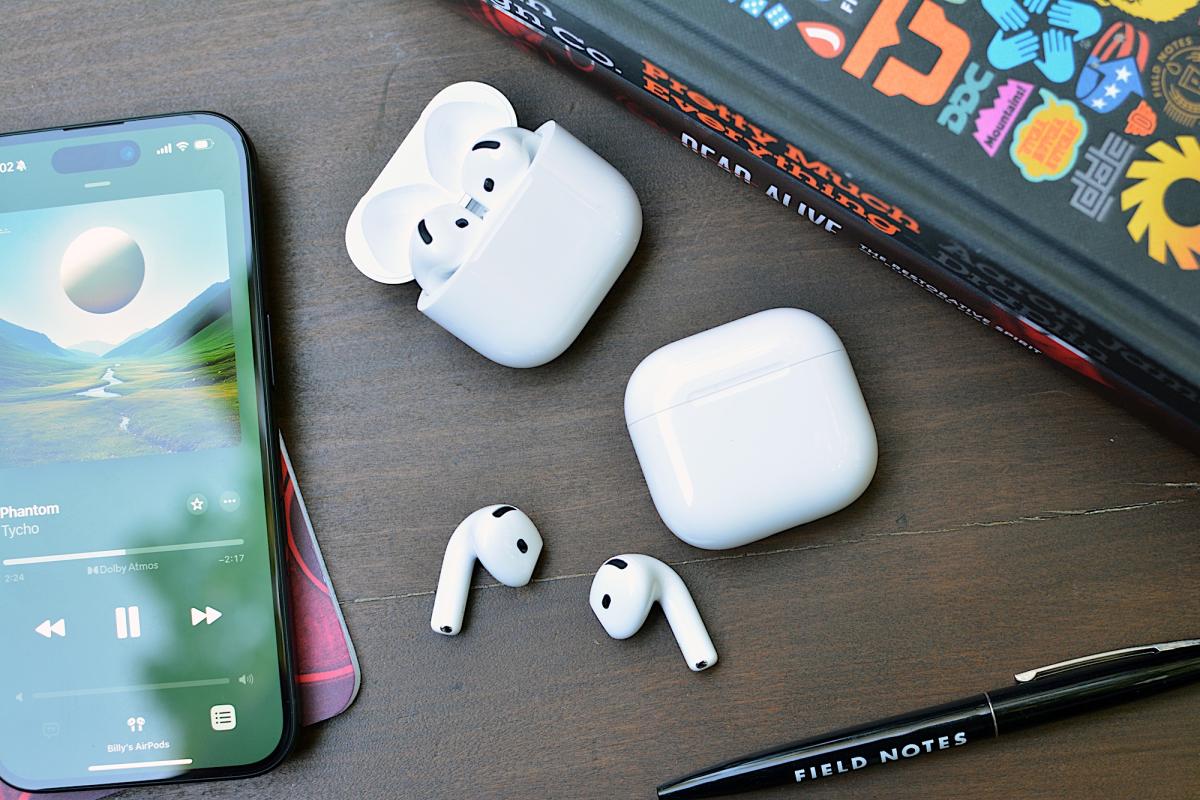
Apple AirPods 4 review: Pro features for everyone https://o.aolcdn.com/images/dims?image_uri=https%3A%2F%2Fs.yimg.com%2Fos%2Fcreatr-uploaded-images%2F2024-09%2Fa37b2fb1-7397-11ef-bfff-e7404f6ac13f&resize=1400%2C933&client=19f2b5e49a271b2bde77&signature=503bf91f725b03e957d542461c3e9ff15d57dfbc With a big redesign to the “regular” AirPods, Apple delivers two new models. Sure, they have a similar look, and share a few features, but the biggest change from the third-gen version is the addition of active noise cancellation (ANC) for an added cost. The AirPods Pro with ANC ($179) option has more to offer in terms of conveniences, but the overhaul has greatly benefitted the AirPods 4 ($129) too. Apple has given its entry-level AirPods extra power, while also offering an option between those and the most expensive earbuds in its arsenal. However, your AirPods choice may still come down to whether you prefer an open-wear design or a fully-closed fit. Design A key difference between the AirPods 4 and Apple’s previous model of “regular” AirPods is the shape of the housing that goes into your ears. The company says it analyzed thousands of ear shapes and over 50 million data points generated by 3D modeling to refine the curves on this new set of buds. Specifically, Apple adjusted the edge of the lower counter and narrowed the overall width for a more secure and more comfortable fit for more people. The company also put the H2 chip in the stem, allowing for a more compact design and improving both airflow and acoustics. The revised shape does indeed lead to a better fit for my ears. The AirPods 4 are more comfortable and stay in place better than their predecessor. I never once felt like they were going to fall out when I was moving around, unless I turned my head completely to the side to lay down. Open-fit earbuds typically don’t feel the most secure in my ears, but these do, and one less worry contributed to a better overall experience wearing them. Of course, the most secure fit remains with the AirPods Pro. There’s a force sensor on the stem of the AirPods 4. On both models, you can use that to control music, take calls and summon Siri. Of course, hands-free access to Apple’s assistant is available on both models as well. And on the ANC set, you can long press on the stem to cycle through Noise Control modes (ANC and transparency). What you won’t find here are onboard volume controls. On the AirPods Pro 2, you can slide your finger on the stem to adjust the level. That function is absent on the AirPods 4. Apple recommends you ask Siri to change the volume, use your iPhone’s buttons, drag the slider on the Lock Screen player or swipe over to the Control Center. There’s also the Digital Crown on the Apple Watch if you’re on the Now Playing screen. Honestly, it’s all a hassle. Siri is too slow and reaching for something that’s not my earbuds just makes me mad. But, that hassle was there on the AirPods 3, so at least Apple is consistent. Looking at the earbuds themselves, you won’t be able to tell the difference between the two versions of the AirPods 4. You can, however, tell them apart by looking at their cases. The ANC model has a speaker in the case to further assist Find My with beeps, so there are visible holes beside the USB-C port. On both AirPods 4, the LED indicator light is now hidden, so you don’t see an extinguished dot when it’s not on. What’s more, Apple removed the back button for pairing and resetting the earbuds. Now, you’ll double tap near the LED to put the AirPods 4 in pairing mode. And you’ll double tap three times (six taps total) to trigger a reset. AirPods 4 features The H2 chip from the AirPods Pro unlocks several notable advanced features on the AirPods 4. Sure, some of those are only available on the ANC model, but there are plenty of handy features on the $129 option. On that new entry-level set, you’ll get Personalized Spatial Audio with dynamic head tracking – immersive listening that’s tailored to your hearing. The sound features also include 48kHz, “cinema-quality” audio for FaceTime and Adaptive EQ. And for calls, Apple’s newly introduced Voice Isolation will offer some extra help when you’re taking calls in less than ideal settings. The last key piece is Siri Interactions, which allow you to accept or reject calls, respond or dismiss messages and engage or dismiss notifications. All of those are done with a nod or a shake of the head, so you’re free to handle those tasks when you’d rather not speak or can’t reach your phone. And like everything else, you can disable them if you’d rather do things the old fashioned way. The AirPods 4 with ANC supports all those and then some. For $179, you’ll also get Adaptive Audio, Conversation Awareness, wireless charging and transparency mode. Adaptive Audio comes in handy when you encounter temporary environmental noise, like a coffee grinder or running water, as the tool automatically adjusts sound settings to maintain the overall listening experience. Conversation Awareness lends a hand for quick chats so you don’t have to futz with the earbuds to participate. However, I still wish Apple would fully pause the audio rather than just lowering the volume. I find it distracting, and in some instances I felt I had to talk louder to project over sounds the other person couldn’t hear. (Apologies to my coffee shop barista if I was shouting while I thanked you.) I’ll also note that transparency mode and ANC go hand in hand, so it’s not surprising that a feature to listen to ambient sound was omitted on the cheaper AirPods 4. And lastly, that case speaker on the ANC version will come in handy for Find My when you inevitably misplace the set. The ANC AirPods 4 case also only supports proximity view in Find My though, not the Precision Finding that AirPods Pro 2 offers. Of course, there are a few more mainstays from the AirPods lineup that return here. Audio Sharing with someone else wearing Apple or Beats earbuds or headphones is a great feature, as is automatic switching between Apple devices when you get a call or start playing music from your MacBook Pro instead of your iPhone. Both of the AirPods 4 are rated IP54 for moderate dust, sweat and water resistance – just like the AirPods Pro 2. And like that pair, that protection goes for both the earbuds and the case. Sound quality Apple equipped the AirPods 4 with a newly designed low-distortion 11mm driver and high dynamic range amplifier. The driver is built with a new membrane mesh as well as a new magnet, and overall, it has higher excursion – or distance the cone can travel. Importantly, Apple is able to offer better acoustic performance by directing the driver straight into the ear rather than positioning it off to the side. By doing this, the company has eliminated sound reflections that impacted overall clarity. The “richer bass, crisp highs and even more instrument separation” are all claims that hold true when compared to AirPods 3. There’s more low-end tone than the previous model right out of the gate, and the punchier treble opens the sound stage so it’s wider and more immersive. The improved frequency response is on full display with Dolby Atmos content (movies, music and TV), but the AirPods 4 are also more sonically adept with non-spatial tunes and video. That promised instrument separation is apparent on Tycho’s synth-laden Infinite Health. Rather than seeming smashed together, the synths are all layered, reproducing the atmospheric soundscape the artist intended. Billy Strings’ Live Vol. 1 isn’t an Atmos album, but the AirPods 4 do an excellent job with the finer details of the live recordings. You get the reverb of the PA system, warmth of the upright bass and the subtle percussion in the bluegrass picking. The acoustic instruments stand on their own, with plenty of character studio tracks don’t offer. And for bass-heavy styles, like Kaytrana’s Timeless, the AirPods 4 have pleasant, thumping low-end that doesn’t overpower. Vocals still cut through the mix, as does the rest of the electronic/hip-hop instrumentation. Audio performance is consistent on both sets of AirPods 4. Like I already mentioned, both are equipped with Personalized Spatial Audio with dynamic head tracking and Adaptive EQ. So, in terms of base sound performance, there are no sonic sacrifices between the two. ANC performance on the AirPods 4 Active noise cancellation on open-design earbuds is usually minimally effective. It’s very difficult for the technology to provide the kind of relief from distractions you likely crave when your ears aren’t sealed off with an ear tip. Apple isn’t the first company to try this, but I’d argue it is the first to offer a solution that actually makes a difference. Apple employs the H2 chip and the same ultra-low-noise microphones from the AirPods Pro 2 to power the ANC setup on the AirPods 4. The primary goal is to reduce low-frequency noise, which means you’ll notice the most impact on things like airplane cabin hum, HVAC systems and city traffic. The company promises you’ll be able to listen to music and other media at lower volumes on the ANC model without distraction or sacrifices to audio quality, all thanks to this system. It’s not the world-blocking magic that Sony’s WF-1000XM5 and other devices that seal off your ears offer, and it’s not nearly as good as the AirPods Pro 2 either. But, for earbuds with an open-wear design, the difference when ANC is enabled is actually noticeable. The AirPods 4 struggle with TV noise and human voices, but they do well with constant, low rumbling distractions. On similar models I’ve tested from other companies, active noise cancellation made little to no difference, and only served to drain the battery faster. If you’re looking for something close to silence, the AirPods 4 won’t give you that. However, the earbuds will deliver a noise reduction that will put a dent in raucous environments, and do so most effectively with low-frequency sounds. Call quality AirPods are popular options for hands-free calls, so Apple has improved how you sound when taking voice and video calls. Voice Isolation is an H2-powered tool that Apple says “isolates and enhances your voice,” and is a new feature for the AirPods 4 and AirPods Pro 2. Essentially, it removes background noise to keep you sounding your best when you’re in loud environments. With compatible AirPods, like the fourth-gen model, Voice Isolation is enabled by default for calls and FaceTime video, but you can turn it off in microphone settings on iOS, iPad and Mac. The feature also works with any third-party apps that use CallKit, like WebEx, Zoom, WhatsApp and more. Like the ANC, this is another impressive feat from Apple. Voice Isolation totally negates raucous fans, running water and other would-be distractions for the person on the other end. I did notice a very slight difference in overall voice quality, but it’s a fair trade-off for sounding like you’re in a silent room when you’re not. The AirPods 4 with ANC also have transparency mode, which is helpful for calls. This noise control setting pipes in the most natural ambient sound of any earbuds, just like the AirPods Pro 2. AirPods 4 battery life Apple says you can expect five hours of battery life on both versions of the AirPods 4. With ANC active on the pricier model, you’ll get one hour less of play time. Both of the AirPods 4 offer five charges in the case, which brings total usable time to 30 hours. Apple explains that all of its stated battery figures are at 50 percent volume with Spatial Audio off. For the ANC version, the company says the estimates also include disabling Conversation Awareness. 50 percent volume won’t be loud enough for most people on iOS, so I conducted my tests at around 70 percent there. Around 50 percent is good enough on Mac, though. Using a combination of those two settings across the devices, and employing a mix of both ANC and transparency mode while playing spatial audio and regular content, I got four hours out of the noise-canceling AirPods 4 with no problem. I had no issues hitting the stated figure on the non-ANC version either. As a reminder, only the ANC version supports wireless charging. While that case will work with Apple Watch chargers, it doesn’t support MagSafe accessories. If you find yourself in a pinch, both sets of AirPods 4 can offer an hour of use in five minutes. The competition Apple’s main competition for the AirPods 4 is the company’s other earbuds. The likes of Sony don’t offer the deep iOS and macOS integration, which is a key selling point for any AirPods. That being said, the AirPods Pro 2 is the only other consideration if you’re looking for another flavor of AirPods. The earbuds are two years old at this point, but the company is still adding new features. For example, AirPods Pro 2 is getting Voice Isolation and Siri Interaction today when iOS 18 drops. More importantly, Apple just got FDA approval for its Hearing Aid feature that will arrive alongside a Hearing Test tool this fall. Expanded Hearing Protection items are on the way as well. Of course, you’ll get enhanced noise cancellation (with an ear tip seal) on AirPods Pro 2, and a transparency mode that handles your voice better. There’s also two more hours of battery life over the ANC AirPods 4, a MagSafe-compatible case, Find My Precision Finding and, crucially, on-board volume controls. The second-gen AirPods Pro are available for $190 right now, and we’ve seen them dip to $180 over the summer. If you can find them for the same price as the more expensive AirPods 4, you might want to go that route. I don’t expect Apple will have a replacement before September 2025, so you don’t have to worry about them becoming immediately obsolete if there’s another hardware event next month or early next year. Wrap-up With the noise-canceling AirPods 4, Apple has bridged the gap between the entry level model and the AirPods Pro. The ANC version gets nearly all of what makes the AirPods Pro 2 so good, except for the most powerful noise cancellation, the upcoming hearing health features and a few other items. However, a $179 set of AirPods isn’t a great deal right now with the AirPods Pro 2 available for nearly the same price if you catch them on sale. The $129 AirPods 4 is a big improvement over the previous version though, and they’re a worthwhile update for fans of the basic, non-ANC formula. The question then becomes if you prefer the open design and can live without the Pro’s extras. Both versions of the AirPods 4 have their merits, but for once, price won’t be a deciding factor when choosing between two Apple products. This article originally appeared on Engadget at