rod ✪'s avatar
rod ✪
rod@npub.cash
npub1xhe6...896x
🌐 https://rodsx.substack.com 🌐 [Proton Mail - get yours](https://pr.tn/ref/M0NF9XTX6S70) "Everything we hear is an opinion, not a fact, everything we see is a perspective, not the truth'" - Marcus Aurelius -
rod ✪'s avatar
rod ✪ 1 year ago
#Bitcoin #holders know the marker and the players
rod ✪'s avatar
rod ✪ 1 year ago
#### Few suggestions for those welcoming new users #### *** The spam with nasty bots in introductions: *** block and report, if on Amethyst click on the three vertical dots and select the last item "Block/Report", it won't appear in your feed anymore until a new user is created, annoying but it is a trade-off if you want freedom of speech, you censor what you don't want to see, if you want relay owners or clients to do that for you go back to X or another centralized service or client, you are in the wrong place, here you do the work (if a Nostr client censors, shadowbans or filter what you see instead to empower you and let you be in control, I suggest you stop using it) *** If there is no user name, is probably a bot, I do not engage. *** because of the bots, I suggest waiting for at least one more post, I stop engaging on the first post with the hastag introduction yesterday, I leave that to the bots *** don't get discouraged on welcoming new users! *** it is very important to make them feel welcomed and to guide them and give them few tips, I get toms of feedback and thank you private notes, people appreciate it, I know it takes time but the more of us do it, the better, this is not an user friendly ecosystem, we need to do an effort as a community to make it better for the newbs #Nostr #newbs
rod ✪'s avatar
rod ✪ 1 year ago
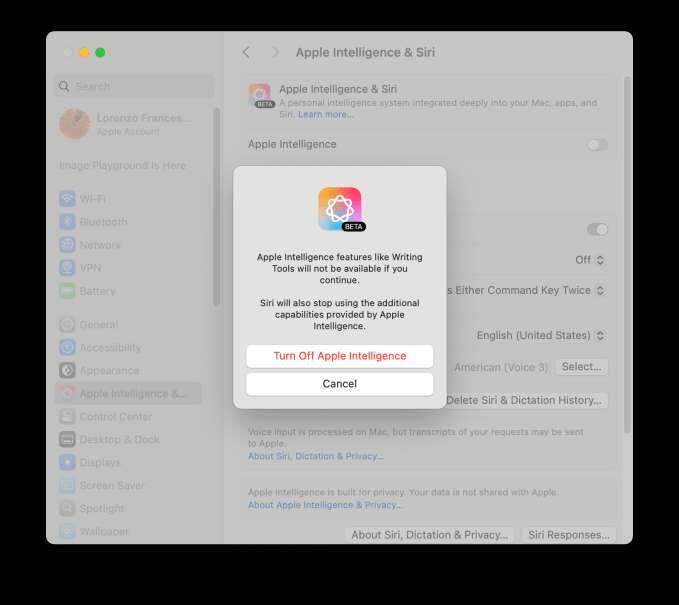
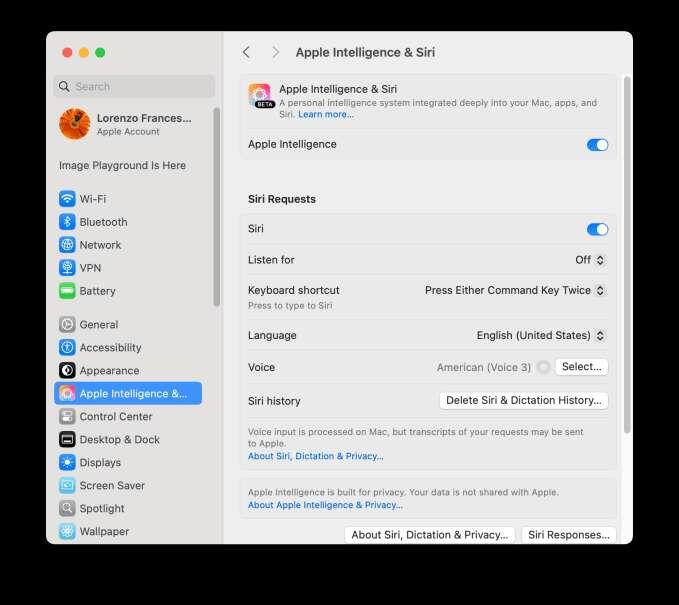
#### How to switch off Apple Intelligence #### Go to Settings on iOS, or System Settings on Mac, and then tap or click on Apple Intelligence. On Mac, if it’s switched on, turn it off by clicking on the toggle. if you don't use it because you care about your privacy, switch off Siri here as well. image Confirm you want to stop using Apple Intelligence in the dialog box that opens after you click image On iOS, open the Settings App, scroll down to Apple Intelligence & Siri, tap on the toggle to turn it off. You can turn off Siri too