
After such a downer regarding Bisq 1 on NixOS, I want to mention something positive.
I started a new Nix flake to bring amazing support for Squeak, Cuis, and Pharo Smalltalk to NixOS.
By amazing, I mean a level of seemlessness that is unmatched by any other operating system. The idea is to provide tooling and bundles to make it mind-blowingly easy to install and use different Smalltalk implementations and images, all at the same time.
For example, if you have a Smalltalk image, you can open it right from your file browser:
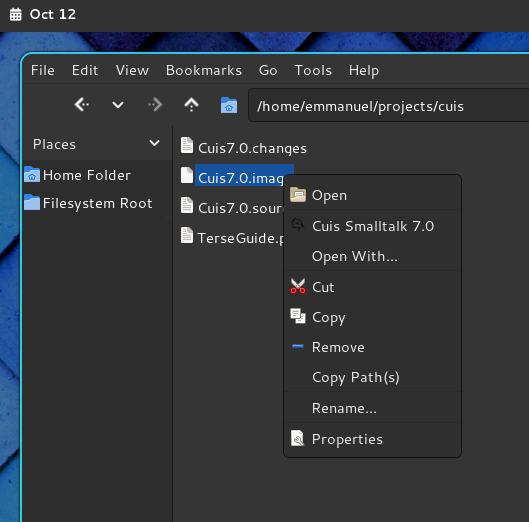 Right now I only have a "bundle" for Cuis 7, but soon it will be possible to install various versions of Cuis, Squeak, and Pharo Smalltalk, all at the same time without conflicts.
You can also launch a "bundle" using an app launcher or menu, which will then produce this Zenity prompt:
Right now I only have a "bundle" for Cuis 7, but soon it will be possible to install various versions of Cuis, Squeak, and Pharo Smalltalk, all at the same time without conflicts.
You can also launch a "bundle" using an app launcher or menu, which will then produce this Zenity prompt:
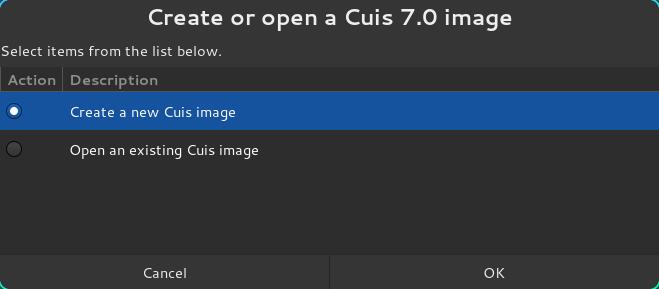 Creating a new Smalltalk image is damn fast because the image is already in the Nix store. Just choose a directory, or create a new one, and before you can blink your eyes the Smalltalk image will appear before you, executing with an appropriate Smalltalk virtual machine, ready to go.
Gone are the days of fumbling around, downloaded VMs and images, extracting them, .... boring.
Well, that's the idea. The project is still in it's infancy, but you can play with it here:
Creating a new Smalltalk image is damn fast because the image is already in the Nix store. Just choose a directory, or create a new one, and before you can blink your eyes the Smalltalk image will appear before you, executing with an appropriate Smalltalk virtual machine, ready to go.
Gone are the days of fumbling around, downloaded VMs and images, extracting them, .... boring.
Well, that's the idea. The project is still in it's infancy, but you can play with it here:  If you have the Nix package manager, and Nix flakes enabled, you can just do this: nix run github:emmanuelrosa/smalltalk-nix#cuis-7_0
Before you know it, you'll have Cuis Smalltalk 7.0 right in front of you.
#nixos #nix #smalltalk
If you have the Nix package manager, and Nix flakes enabled, you can just do this: nix run github:emmanuelrosa/smalltalk-nix#cuis-7_0
Before you know it, you'll have Cuis Smalltalk 7.0 right in front of you.
#nixos #nix #smalltalk
Right now I only have a "bundle" for Cuis 7, but soon it will be possible to install various versions of Cuis, Squeak, and Pharo Smalltalk, all at the same time without conflicts.
You can also launch a "bundle" using an app launcher or menu, which will then produce this Zenity prompt:
Creating a new Smalltalk image is damn fast because the image is already in the Nix store. Just choose a directory, or create a new one, and before you can blink your eyes the Smalltalk image will appear before you, executing with an appropriate Smalltalk virtual machine, ready to go.
Gone are the days of fumbling around, downloaded VMs and images, extracting them, .... boring.
Well, that's the idea. The project is still in it's infancy, but you can play with it here: GitHub
GitHub - emmanuelrosa/smalltalk-nix: NixOS packages for Squeak, Cuis, and Pharo Smalltalk
NixOS packages for Squeak, Cuis, and Pharo Smalltalk - emmanuelrosa/smalltalk-nix
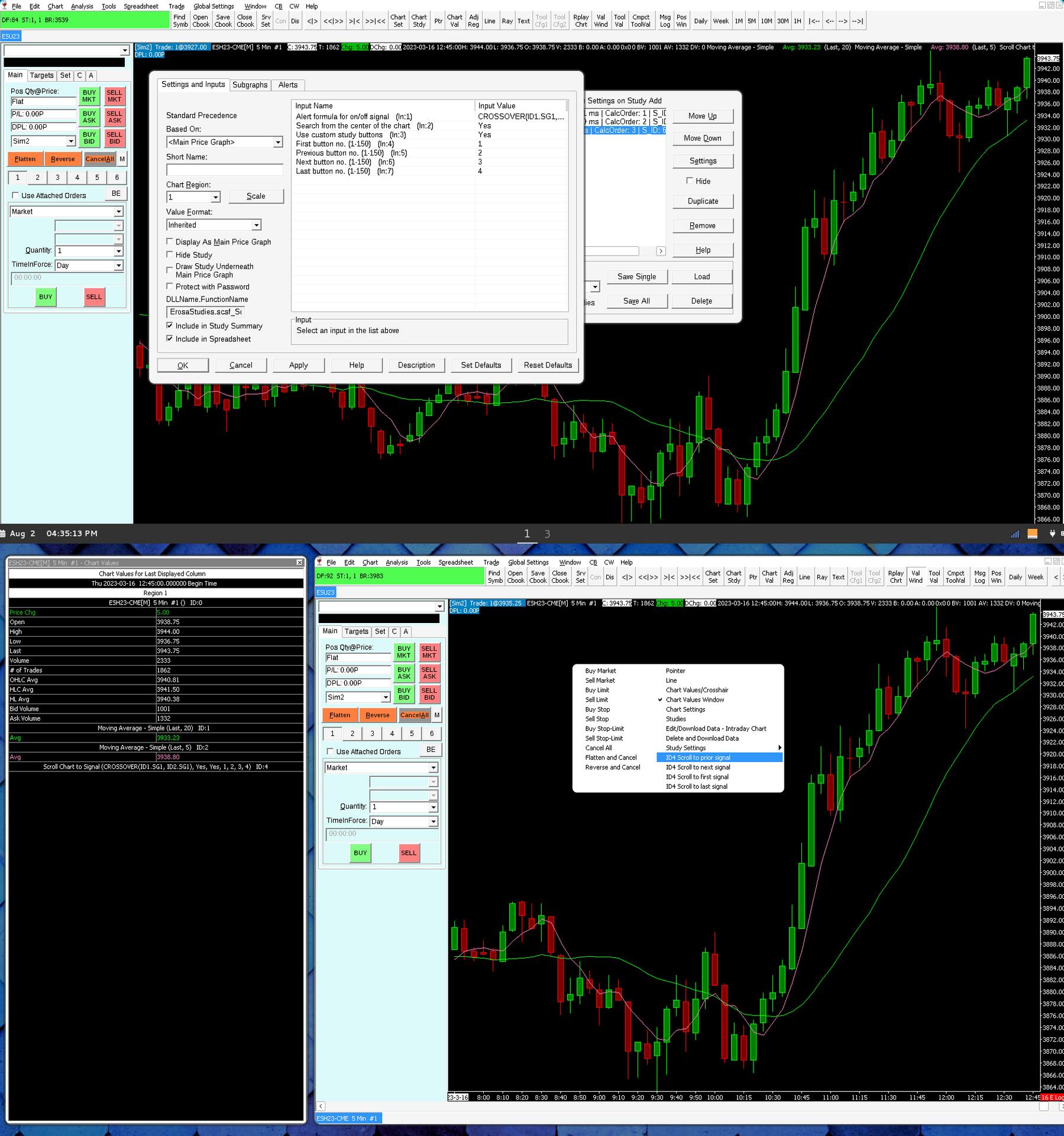 You basically enter an "alert formula" which produces an on/off state; non-zero = ON, 0 = OFF.
The study then provides chart menu options to scroll the chart to the next/previous occurence of the ON state.
The example shown in the screenshot uses a formula which produces an ON state when the two moving averages cross; The formula just uses Sierra Chart's CROSSOVER() function.
But the formula could be something more elaborate. For example... 3 consecutive higher-highs above the 20-period EMA. Whatever it is doesn't matter as long as it produces non-zero and zero values.
The study can fast-forward right through the chart, one mouse-click at a time, showing every single instance wherein the formula produces an ON/TRUE condition :)
You basically enter an "alert formula" which produces an on/off state; non-zero = ON, 0 = OFF.
The study then provides chart menu options to scroll the chart to the next/previous occurence of the ON state.
The example shown in the screenshot uses a formula which produces an ON state when the two moving averages cross; The formula just uses Sierra Chart's CROSSOVER() function.
But the formula could be something more elaborate. For example... 3 consecutive higher-highs above the 20-period EMA. Whatever it is doesn't matter as long as it produces non-zero and zero values.
The study can fast-forward right through the chart, one mouse-click at a time, showing every single instance wherein the formula produces an ON/TRUE condition :) Hint word: Language