Thoughts on Windscribe VPN?
Mullvad/IVPN servers getting blocked by globohomo big tech.

npub1txwy...yt4x
npub1txwy...yt4x
The internet is getting worse by the day. For your safety.
Thankful Nostr exists.


now clearing 2sat/vb
The dildo of consequences rarely arrives lubed.
HODL
ok lads
show's over
pack it up
that yield is the friends we made along the way
see you in 4 years
Found a new self hosted dashboard called Glance.
Makes for an excellent home page.
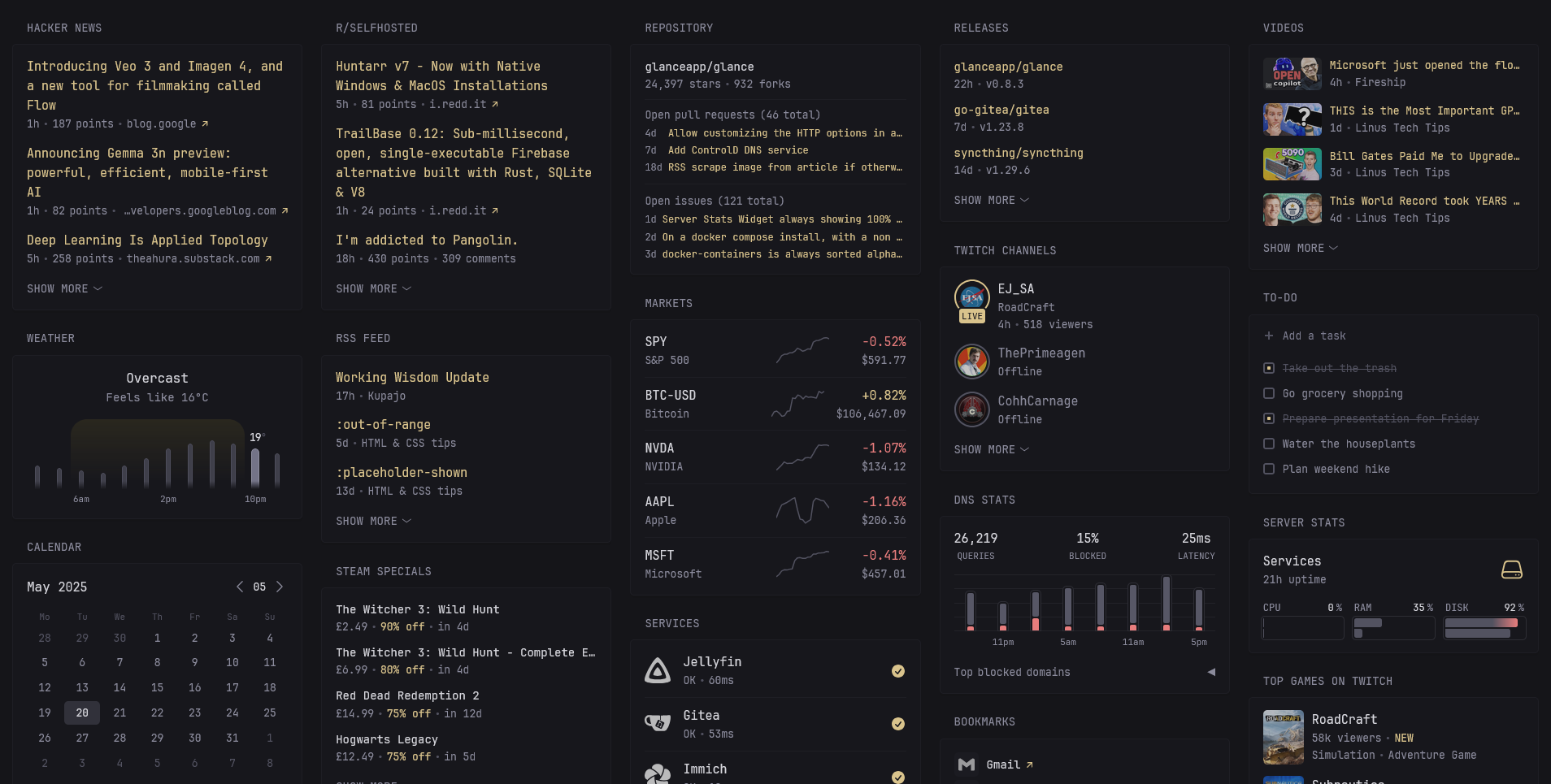 Home page with various widgets - weather, world clock, search engine directed to Kagi, bookmarks, markets, rss feed and latest releases of favourite software.
 A thumbnail view of all my favourite YouTube channels.
 Top posts on my favourite subreddits.

GitHub
GitHub - glanceapp/glance: A self-hosted dashboard that puts all your feeds in one place
A self-hosted dashboard that puts all your feeds in one place - glanceapp/glance
A thumbnail view of all my favourite YouTube channels.
Top posts on my favourite subreddits.
Looking for cleaner, non-toxic alternatives to:
- toothpaste/toothbrush
- dishwasher tablets
- laundry detergent
- hand soap
- body wash
- shampoo
- deodorant
- shaving cream
- moisturizing cream
- fragrances
(asking for a friend, of course)
This is the year of the Linux desktop!
If anyone is looking for a privacy respecting, open source keyboard for Android with swipe typing support, consider Futo Keyboard.
Trying it out now. Descent replacement for gboard.
FUTO Keyboard
FUTO Keyboard is a modern, privacy-focused keyboard that runs fully offline. Enjoy swipe typing, autocorrect, predictive text, and more—no intern...

...and this is what they're willing to report.
fucking lol.
https://www.news.com.au/lifestyle/health/health-problems/multibilliondollar-failure-aussie-doctors-rip-into-covid-response/news-story/0310c30199e73cbe7392a95cfc3c2c3c
H
IMPORT YOUR EXISTING SAMOURAI WALLET INTO SPARROW WALLET
Read entire post before attempting at home!
You will need:
1. Your Samourai Wallet seed phrase (12 words)
2. Your passphrase
3. Sparrow Wallet downloaded and installed on to your computer. (https://www.sparrowwallet.com)
Configure your server. This could be your own node, or a public electrum server. I have selected Blocksteam's electrum server here.
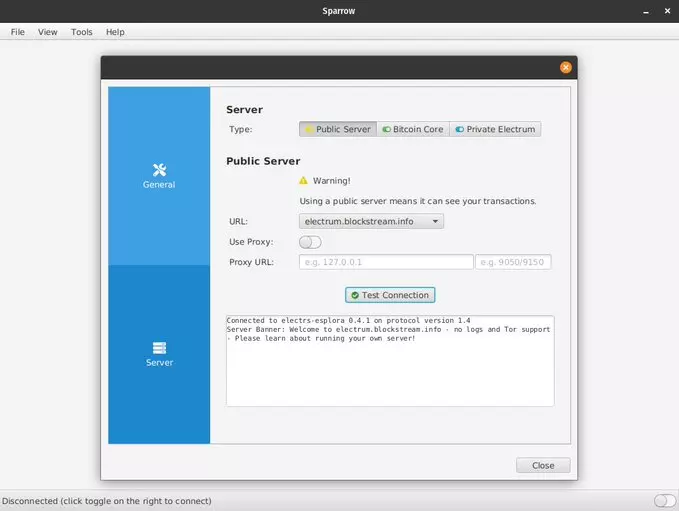 Toggle on your server using the switch on the bottom right. It should turn yellow, green or blue depending on what you've selected.
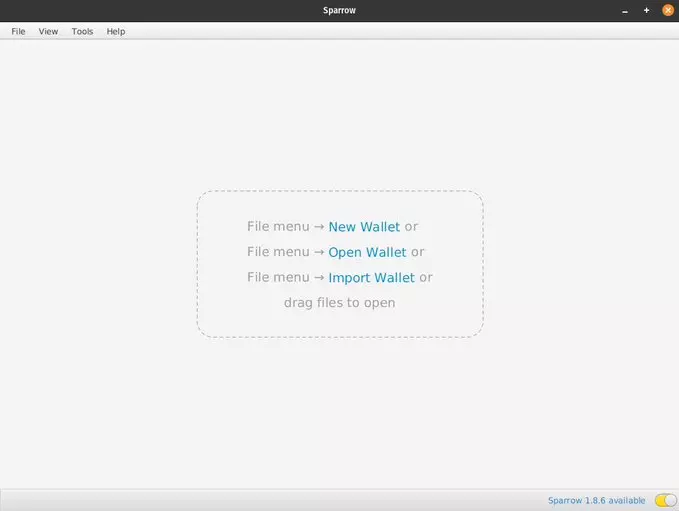
Go to File -> New Wallet, or click on New Wallet.
Toggle on your server using the switch on the bottom right. It should turn yellow, green or blue depending on what you've selected.
Go to File -> New Wallet, or click on New Wallet.
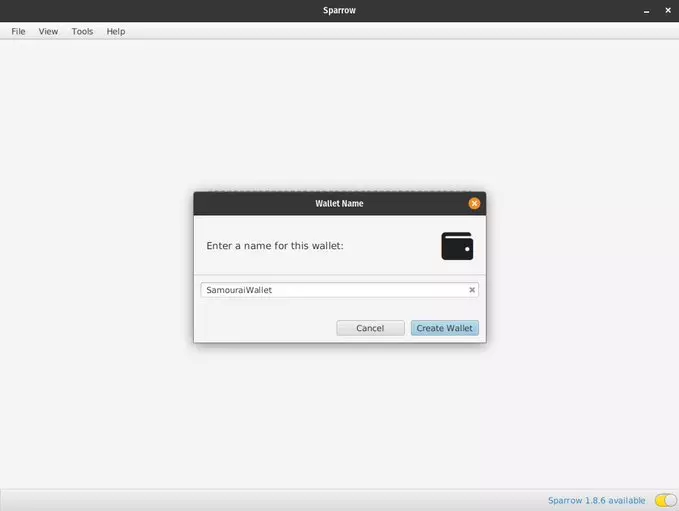
 Name your wallet.
 Click on New or Imported Software Wallet.
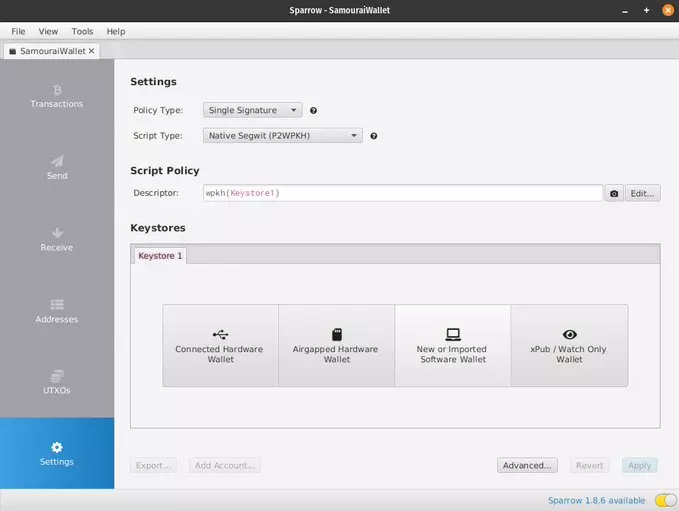 On the dropdown menu besides the Mnemonic Words (BIP39), select 12 words. Type your seed into the fields displayed in the correct order from 1 to 12.
Check the "Use passphrase?" option. Insert your passphrase and click Create Keystore.
On the dropdown menu besides the Mnemonic Words (BIP39), select 12 words. Type your seed into the fields displayed in the correct order from 1 to 12.
Check the "Use passphrase?" option. Insert your passphrase and click Create Keystore.
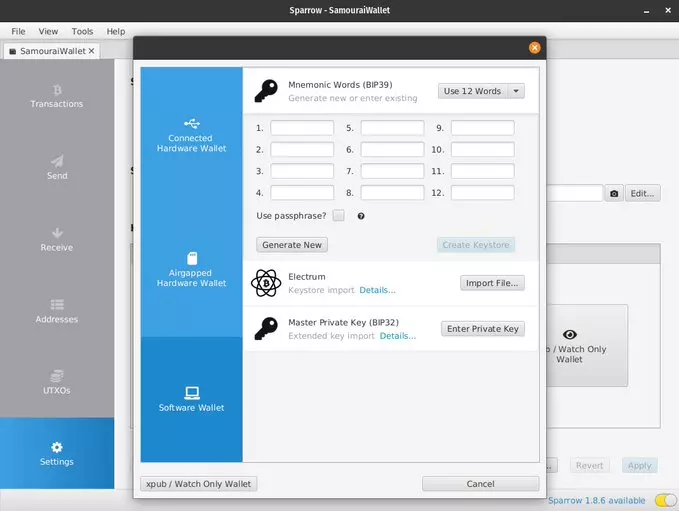 Click on Import Keystore.
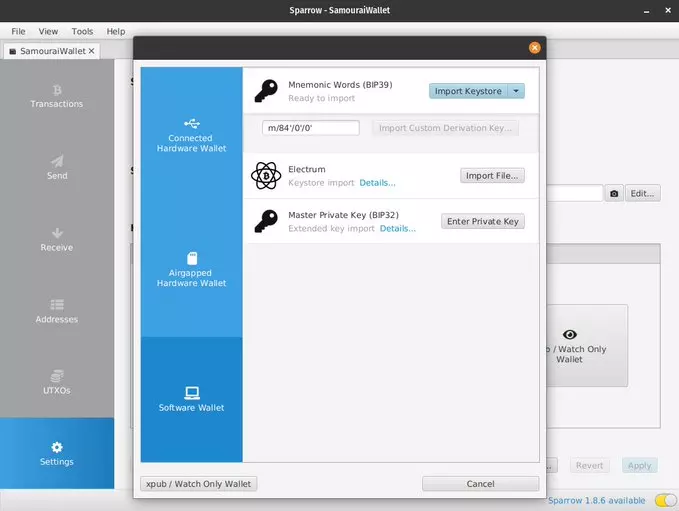 Reenter your passphrase as prompted
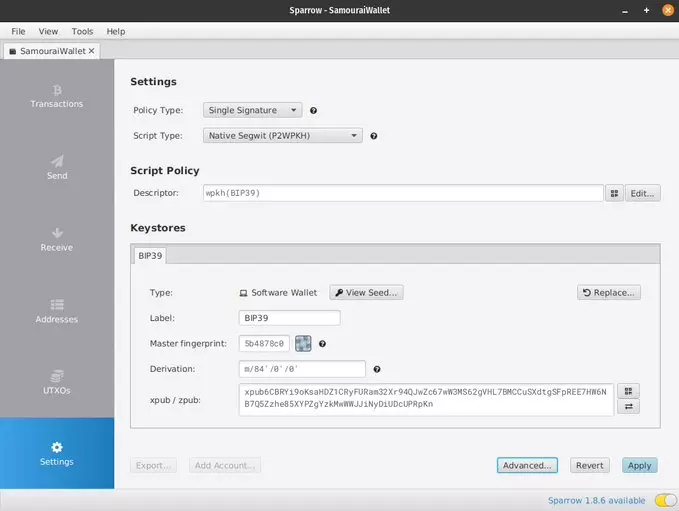
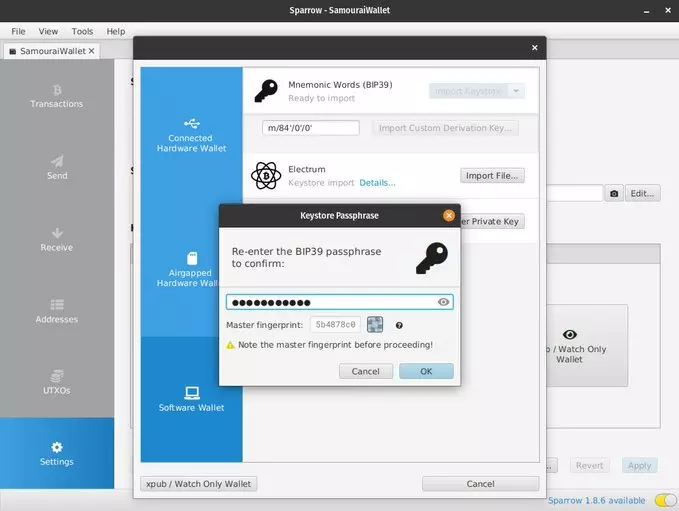 Click on Apply on the bottom right.
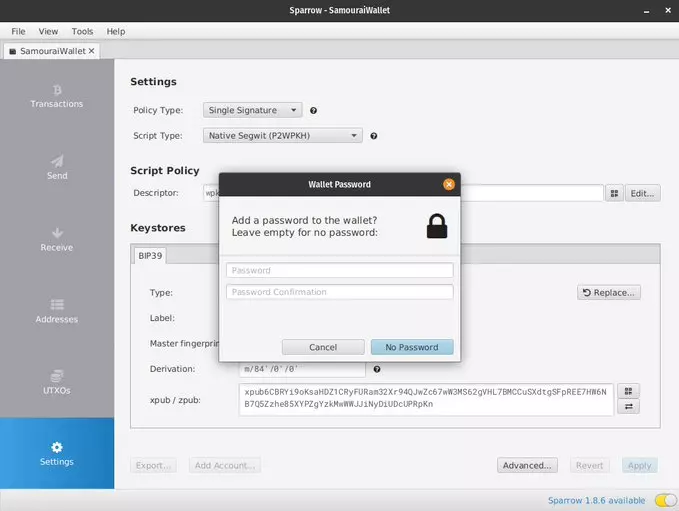
 If you want to add a password to open up your wallet with, enter one, otherwise click No Password.
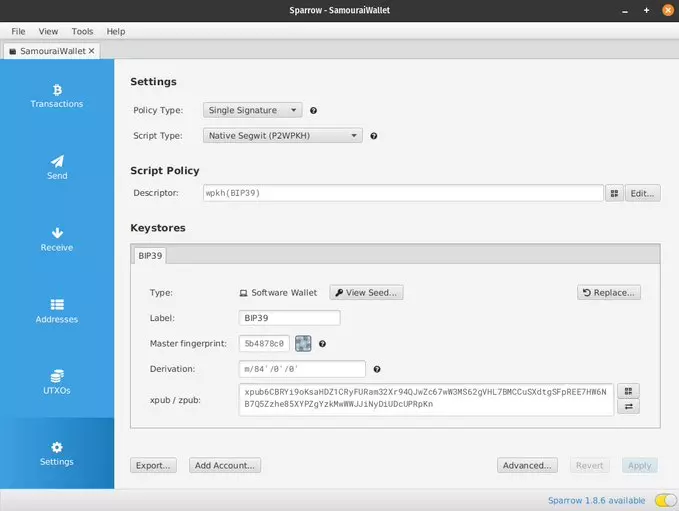
 In the bottom of the settings page, you will see "Add Account..." button. Click on it.
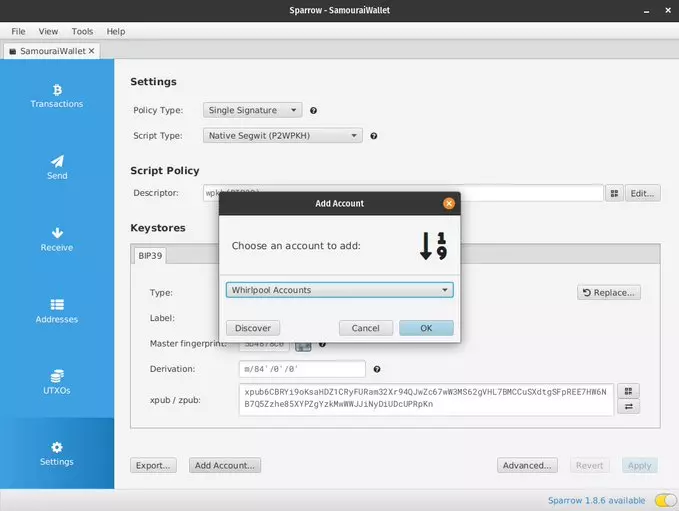
 From the dropdown menu, select Whirlpool Accounts
 Your wallet will be scanned by the server you have selected. You should also be able to see your respective deposit, premix, postmix and bad bank accounts.
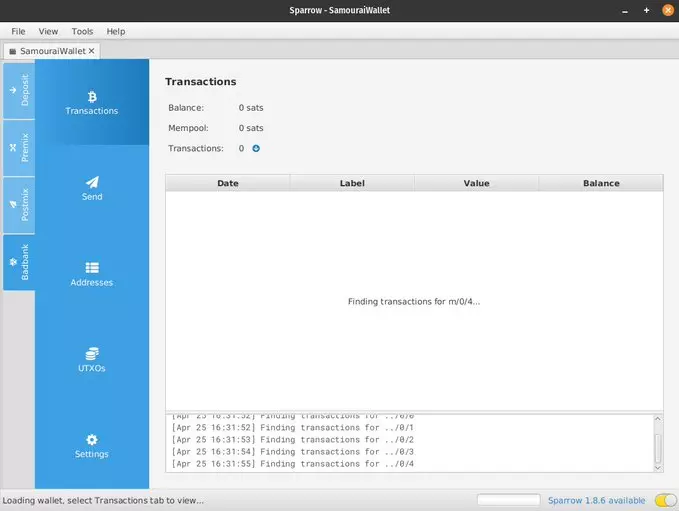 You should now be able to send your bitcoin to another wallet/address of your choosing. I would recommend sending this out to a hardware wallet.
Notes:
- Be sure you obtain sparrow wallet from sparrowwallet dot com. Get it right!
- Because you are inputing seed words into a computer, ensure no keyloggers are installed. Be wary of dodgy browser extensions.
- Dojo users need not worry. This is for those who used SW backend.
- Beware of scammers on the Sparrow Telegram chat. They're out in full force today. Nobody will ask you for your seed words. Do not give them out to anyone.
You should now be able to send your bitcoin to another wallet/address of your choosing. I would recommend sending this out to a hardware wallet.
Notes:
- Be sure you obtain sparrow wallet from sparrowwallet dot com. Get it right!
- Because you are inputing seed words into a computer, ensure no keyloggers are installed. Be wary of dodgy browser extensions.
- Dojo users need not worry. This is for those who used SW backend.
- Beware of scammers on the Sparrow Telegram chat. They're out in full force today. Nobody will ask you for your seed words. Do not give them out to anyone.
Toggle on your server using the switch on the bottom right. It should turn yellow, green or blue depending on what you've selected.
Go to File -> New Wallet, or click on New Wallet.
Name your wallet.
Click on New or Imported Software Wallet.
On the dropdown menu besides the Mnemonic Words (BIP39), select 12 words. Type your seed into the fields displayed in the correct order from 1 to 12.
Check the "Use passphrase?" option. Insert your passphrase and click Create Keystore.
Click on Import Keystore.
Reenter your passphrase as prompted
Click on Apply on the bottom right.
If you want to add a password to open up your wallet with, enter one, otherwise click No Password.
In the bottom of the settings page, you will see "Add Account..." button. Click on it.
From the dropdown menu, select Whirlpool Accounts
Your wallet will be scanned by the server you have selected. You should also be able to see your respective deposit, premix, postmix and bad bank accounts.
You should now be able to send your bitcoin to another wallet/address of your choosing. I would recommend sending this out to a hardware wallet.
Notes:
- Be sure you obtain sparrow wallet from sparrowwallet dot com. Get it right!
- Because you are inputing seed words into a computer, ensure no keyloggers are installed. Be wary of dodgy browser extensions.
- Dojo users need not worry. This is for those who used SW backend.
- Beware of scammers on the Sparrow Telegram chat. They're out in full force today. Nobody will ask you for your seed words. Do not give them out to anyone.Hold your own keys.
Use your own node.
Follow privacy best practices.
The rest is noise.
200k by conference day still in play
cc @npub1qny3...95gx
@npub1qny3...95gx reached out to me today, concerned for my welfare after seeing the state of the mempool.
I'm fine, doing well, with my lightning channels that were opened at 1sat/vbyte.
Upgraded my internet service plan to the highest speed tier.
Customer service representative: "Enjoy your new superfast internet, don't go downloading too many Linux ISOs".
😂😂😂
'Opinion' piece published on mainstream news outlet still telling the public inflation is caused by supply chain issues, war in Ukraine and greedy businessmen.
The solution is for you to increase your productivity and get paid less for it.
You can't make this stuff up.
https://www.news.com.au/finance/money/costs/joe-hildebrand-the-one-thing-that-will-save-australia-from-ruin/news-story/5bc589fa4902c83c9847e82a3ad01403