nym's avatar
nym
nym@primal.net
npub1hn4z...htl5
nym's avatar
nym 1 year ago
#Icomeinpeace image
nym's avatar
nym 1 year ago
The slow death of TuxFamily TuxFamily is a French free-software-hosting service that has been in operation since 1999. It is a non-profit that accepts "any project released under a free license", whether that is a software license or a free-content license, such as CC-BY-SA. It is also, unfortunately, slowly dying due to hardware failures and lack of interest. For example, the site's download servers are currently offline with no plan to restore them. originally posted at
nym's avatar
nym 1 year ago
The Great Unpermissioning It starts with a click: “Do you agree to our terms and conditions?” You scroll, you click, you comply. A harmless act, right? But what if every click was a surrender? What if every "yes" was another link in the chain binding you to a life where freedom requires approval? This is the age of permission. Every aspect of your life is mediated by gatekeepers. Governments demand forms, corporations demand clicks, and algorithms demand obedience. You’re free, of course, as long as you play by the rules. But who writes the rules? Who decides what’s allowed? Who owns your life? originally posted at
nym's avatar
nym 1 year ago
Good evening, Nostriches. image
nym's avatar
nym 1 year ago
RSYNC: 6 vulnerabilities Two independent groups of researchers have identified a total of 6 vulnerabilities in rsync. In the most severe CVE, an attacker only requires anonymous read access to a rsync server, such as a public mirror, to execute arbitrary code on the machine the server is running on. originally posted at
nym's avatar
nym 1 year ago
The future of gig economy runs on relays The employment trends in the gig economy are clear. More and more people take on some form of freelance or temporary work often on top of their full time job. In fact, according to recent estimates, approximately 1.57 billion people, or nearly half (46.4%) of the global workforce, engage in gig work. As gig platforms continue to expand across borders and sectors, this number is projected to keep rising. ![](https://m.stacker.news/72850) In the UK, the gig economy is particularly popular, with many workers supplementing their income with side gigs. According to a recent survey, almost half (48%) of UK gig workers have full-time jobs on top of their side gigs, while 71.5% use gig work to supplement their income rather than provide their sole earnings. The top gig occupation in the UK is online administrative work, with 39% of gig workers offering virtual assistance, data entry, clerical services, or similar computer-based tasks. Sounds like a great way to earn some sats, doesn't it? Despite the growth and popularity of the gig economy, traditional platforms like LinkedIn have reached their peak and become increasingly plagued by spam from aggressive recruiters and profiles of people with increasingly unverifiable experience. Meanwhile all the centralised platforms like Fiverr and Upwork take a significant cut from freelancers' pay, leaving many workers feeling undervalued and overworked. It's no wonder that many are looking for alternative solutions that prioritize fairness, transparency, trust and compensation paid in money that will last! Here comes Nostr, a decentralized, censorship-resistant protocol that's laying foundations for the future of the gig work. With its censorship-resistant, peer-to-peer approach, Nostr is poised to revolutionize the way we work and connect with each other. In this article, I'll explore why Nostr is an exciting development for the gig economy, what it means for the future of work and what platforms are already available. What makes Nostr different? It’s built on principles of decentralization, freedom, trust and Bitcoin as its native currency. Forget walled gardens; with Nostr, your identity is your own. Nobody’s mining your data, and no shadowy algorithms are deciding who sees your posts or what posts you should see. It's a perfect setup for a job marketplace where companies post jobs and freelancers get them done. All paid with Bitcoin with no middleman to take your money And it’s not just theory. Real solutions are already built, transforming how professionals connect, collaborate, and commit their skills, time and creativity. All open-source and Bitcoin/Nostr-centric. originally posted at
nym's avatar
nym 1 year ago
Challenges to funding open source I’ve had the good fortune to get paid to write open source as part of my job several times. For more than 15 years, I’ve also done a lot of open source development in my free time as a volunteer. Along the way, there’s been a fairly constant refrain that it’d be better if more open source maintainers were paid to maintain their projects. And I’ve seen a lot of ideas for how that could happen. While some of these ideas were successful, many more were not. I’m writing this post to explain three reasons that I’ve seen open source funding concepts fail. These aren’t the only reasons, but they’re reasons that I think are often ignored in the discourse. This is not a normative piece, I’m not expressing an opinion on if anything here is good or bad. This is entirely descriptive of the things I have seen. **You can’t articulate what it is people are funding** Specifically, you can’t articulate how the world with funding would be different than the world without it. For many maintainers, the ideal form of open source funding is something like: instead of working on my project in my spare time, I get paid to do it and I can do it during the work day instead of stealing time from my other hobbies and personal obligations. Unfortunately, if you’re asking someone for money, this doesn’t tell them anything they’re getting for their money. The underlying premise here is that if you can maintain your project without stealing time from other activities that the project will be more sustainable. This is a better premise, but still falls short, because sustainability is not about anything being different, it’s in fact about things being able to stay the same more predictably. Rationally, this sort of risk mitigation may make sense to invest in, but practically its a very difficult to assess risk (What are the odds that the existing maintainers will stop doing so as volunteers? Who knows! Many open source projects go years, if not decades, with exclusively volunteer maintainers). This explains why we see so little of the open-source funding that does occur is justified in this way. If you are an open-source maintainer, be prepared to articulate: what will be different from the status quo if you have more time and money to work on your project. Is there a major feature that needs dedicated design and implementation time? A queue of bugs that need to be triaged and fixed? All of these are concrete things that can motivate people to support an open source project. **Many open source maintainers do not want to be paid** Or more accurately, they don’t want the expectations that come with taking money. If you’ve accepted money, that generally comes with some expectations (see the previous section). However, for many open source maintainers, having no expectations is the point. For many folks, open source is enjoyable to work on precisely because you can reject features that offend your sensibilities, even if many users want them. You can take as long as you want until you find a design you like, you don’t have to ship something “good enough”. You can walk away for months if you’re bored, frustrated, or just don’t feel like working on the project. There’s nothing wrong with this mode of maintainership (indeed, in my experience, having this approach makes my own open-source work more sustainable, even if it is entirely nights and weekends). But if this is why you love open-source, it is going to be challenging to find a way to take money for it without compromising some of what makes it enjoyable for you. **Time and money are not interchangeable** For open-source developers with a full time job, money does not translate into significantly more time for their project, unless the money is at the level of replacing a full time salary. It can offset some costs in life, and may be very appreciated. But the largest time obligation most people have is their day job, and for folks with full time jobs, a fraction of their salary doesn’t buy them extra hours in a week. This means that for many open-source developers, small sums of money do not substantially increase their capacity to maintain their project. It doesn’t give them additional time to implement features, fix bugs, or triage issues. This means that to have an impact, open-source maintainers often need to find salary-replacement level funding for their open-source work. This combines poorly with another simple observation: many open-source projects, including critical ones, do not make particular sense to fund at a full time level. A library for a stable compression format, for example, does not make sense to staff for 40 hours a week, that much time cannot be used efficiently. Of course, even if the format is stable there’s more than 0 hours a week of work! There’s porting to new platforms, updating for yet another backwards incompatible change in a dependency or CI platform, triaging bug reports, performance improvements, etc. Perhaps some projects are so critical that as a society that we should fund them as a full-time endeavor even though the scope doesn’t justify it. However, one risk this carries is that developers who find themselves in such a position will need to be on guard against the temptations that more time provides, such as backwards incompatible changes for limited value and adding features of marginal value but with substantial new attack surface. As an open-source maintainer, ask yourself how your life situation allows you to channel money effectively into work on your project, and what the scope of your project reasonably justifies in terms of hours spent on it. originally posted at
nym's avatar
nym 1 year ago
@BTC Sessions you mentioned on your latest pod you could just use a Coldcard Q, three batteries, and tap-signer for a completely air-gapped Colcard. Do you have a guide or video using a high security setup like that, or air-gapped computer, could be in the same video. #asknostr
nym's avatar
nym 1 year ago
Viewing images How hard would it be to display the contents of an image file on the screen? You just load the image pixels somehow, perhaps using a readily available library, and then display those pixels on the screen. Easy, right? Well, not quite, as it turns out. I may have some experience with this, because I made an image viewer that displays images in the terminal emulator. But why do such a thing, there are countless image viewers already available, including those that work with terminal emulators, why write yet another one? That’s an excellent question! As always2, the answer is because no other viewer was good enough for me. For example, catimg uses stb_image to load images. While stb_image is an outstanding library that can be integrated very quickly, it doesn’t really excel in the number of image formats it supports. There’s the baseline of JPEG, PNG, GIF, plus a few other more or less obscure formats. Another example is viu, which again is limited to the well-known baseline of three “web” formats, with the modern addition of WebP. Following the dependency graph of the program shows that the image loading library it uses should support more formats, but ultimately I’m interested in what the executable I have on my system can do, not what some readme says. The overall situation is that there is widespread expectation and support for viewing PNG files (1996), JPEG files (1992) and GIF files (1987). So… what happened? Did image compression research fizzle out in the XXI century? Of course not. There’s JPEG XL (2022), AVIF (2019), HEIC (2017),3 WebP (2010). The question now is, why is there no wide support for these image codecs in software?4 Because nobody uses them. And why is nobody using them?5 Because there’s no software support. So maybe these new formats just aren’t worth it, maybe they don’t add enough value to be supported? Fortunately, that’s easy to answer with the following image. Which of the quality + size combinations do you prefer? ![](https://m.stacker.news/72844) But that’s not all. There is a variety of image formats that are arguably intended for more specialized use. And these formats are old, too. Ericsson Texture Compression (ETC) was developed in 2005, while Block Compression (BC) and OpenEXR date back to 1999. BC is supported by all desktop GPUs, and virtually all games use it. ETC is supported by all mobile GPUs. So why is it nearly impossible to find an image viewer for them? And speaking of texture compression, I also have an ETC/BC codec which is limited in speed by how fast the PNG files can be decoded. There are some interesting observations if you look into it. For example, PNG has two different checksums to calculate, one at the zlib data stream level, and the second at the PNG data level. Another one is that zlib is slooow. The best you can do is replace zlib with zlib-ng, which provides some much-needed speed improvements. Yet how much better would it be to replace the zlib (deflate) compression in PNG files with a more modern compression algorithm, such as Zstd or LZ4? The PNG format even supports this directly with a “compression type” field in the header, but there’s only one value it can be set to. And it’s not going to change, because then you’d have to update every single program that can load a PNG file to support it. Which is hopeless. originally posted at
nym's avatar
nym 1 year ago
What's involved in getting a "modern" terminal setup? Hello! Recently I ran a terminal survey and I asked people what frustrated them. One person commented: > There are so many pieces to having a modern terminal experience. I wish it all came out of the box. My immediate reaction was “oh, getting a modern terminal experience isn’t that hard, you just need to….”, but the more I thought about it, the longer the “you just need to…” list got, and I kept thinking about more and more caveats. So I thought I would write down some notes about what it means to me personally to have a “modern” terminal experience and what I think can make it hard for people to get there. --- ## what is a “modern terminal experience”? Here are a few things that are important to me, with which part of the system is responsible for them: - **multiline support for copy and paste**: if you paste 3 commands in your shell, it should not immediatly run them all! That’s scary! (shell, terminal emulator) - **infinite shell history**: if I run a command in my shell, it should be saved forever, not deleted after 500 history entries or whatever. Also I want commands to be saved to the history immediately when I run them, not only when I exit the shell session (shell) - **a useful prompt**: I can’t live without having my current directory and current git branch in my prompt (shell) - **24-bit colour**: this is important to me because I find it MUCH easier to theme neovim with 24-bit colour support than in a terminal with only 256 colours (terminal emulator) - **clipboard integration** between vim and my operating system so that when I copy in Firefox, I can just press p in vim to paste (text editor, maybe the OS/terminal emulator too) - **good autocomplete**: for example commands like git should have command-specific autocomplete (shell) - **having colours in ls** (shell config) - **a terminal theme I like**: I spend a lot of time in my terminal, I want it to look nice and I want its theme to match my terminal editor’s theme. (terminal emulator, text editor) - **automatic terminal fixing**: If a programs prints out some weird escape codes that mess up my terminal, I want that to automatically get reset so that my terminal doesn’t get messed up (shell) - **keybindings**: I want Ctrl+left arrow to work (shell or application) - **being able to use the scroll wheel** in programs like less: (terminal emulator and applications) There are a million other terminal conveniences out there and different people value different things, but those are the ones that I would be really unhappy without. --- ## how I achieve a “modern experience” My basic approach is: 1. use the fish shell. Mostly don’t configure it, except to: - set the EDITOR environment variable to my favourite terminal editor - alias `ls` to `ls --color=auto` 2. use any terminal emulator with 24-bit colour support. In the past I’ve used GNOME Terminal, Terminator, and iTerm, but I’m not picky about this. I don’t really configure it other than to choose a font. 3. use neovim, with a configuration that I’ve been very slowly building over the last 9 years or so (the last time I deleted my vim config and started from scratch was 9 years ago) 4. use the base16 framework to theme everything --- ## some “out of the box” options for a “modern” experience What if you want a nice experience, but don’t want to spend a lot of time on configuration? Figuring out how to configure vim in a way that I was satisfied with really did take me like ten years, which is a long time! My best ideas for how to get a reasonable terminal experience with minimal config are: - **shell**: either fish or zsh with oh-my-zsh - **terminal emulator**: almost anything with 24-bit colour support, for example all of these are popular: - linux: GNOME Terminal, Konsole, Terminator, xfce4-terminal - mac: iTerm (Terminal.app doesn’t have 256-colour support) - cross-platform: kitty, alacritty, wezterm, or ghostty - **shell config**: - set the EDITOR environment variable to your favourite terminal text editor - maybe alias `ls` to `ls --color=auto` - **text editor**: this is a tough one, maybe micro or helix? I haven’t used either of them seriously but they both seem like very cool projects and I think it’s amazing that you can just use all the usual GUI editor commands (Ctrl-C to copy, Ctrl-V to paste, Ctrl-A to select all) in micro and they do what you’d expect. I would probably try switching to helix except that retraining my vim muscle memory seems way too hard. Also helix doesn’t have a GUI or plugin system yet. Personally I wouldn’t use xterm, rxvt, or Terminal.app as a terminal emulator, because I’ve found in the past that they’re missing core features (like 24-bit colour in Terminal.app’s case) that make the terminal harder to use for me. I don’t want to pretend that getting a “modern” terminal experience is easier than it is though – I think there are two issues that make it hard. Let’s talk about them! --- ## issue 1 with getting to a “modern” experience: the shell bash and zsh are by far the two most popular shells, and neither of them provide a default experience that I would be happy using out of the box, for example: - you need to customize your prompt - they don’t come with git completions by default, you have to set them up - by default, bash only stores 500 (!) lines of history and (at least on Mac OS) zsh is only configured to store 2000 lines, which is still not a lot - I find bash’s tab completion very frustrating, if there’s more than one match then you can’t tab through them And even though I love fish, the fact that it isn’t POSIX does make it hard for a lot of folks to make the switch. Of course it’s totally possible to learn how to customize your prompt in bash or whatever, and it doesn’t even need to be that complicated (in bash I’d probably start with something like `export PS1='[\u@\h \W$(__git_ps1 " (%s)")]\$ '`, or maybe use starship). But each of these “not complicated” things really does add up and it’s especially tough if you need to keep your config in sync across several systems. An extremely popular solution to getting a “modern” shell experience is oh-my-zsh. It seems like a great project and I know a lot of people use it very happily, but I’ve struggled with configuration systems like that in the past – it looks like right now the base oh-my-zsh adds about 3000 lines of config, and often I find that having an extra configuration system makes it harder to debug what’s happening when things go wrong. I personally have a tendency to use the system to add a lot of extra plugins, make my system slow, get frustrated that it’s slow, and then delete it completely and write a new config from scratch. --- ## issue 2 with getting to a “modern” experience: the text editor In the terminal survey I ran recently, the most popular terminal text editors by far were vim, emacs, and nano. I think the main options for terminal text editors are: - use vim or emacs and configure it to your liking, you can probably have any feature you want if you put in the work - use nano and accept that you’re going to have a pretty limited experience (for example I don’t think you can select text with the mouse and then “cut” it in nano) - use micro or helix which seem to offer a pretty good out-of-the-box experience, potentially occasionally run into issues with using a less mainstream text editor - just avoid using a terminal text editor as much as possible, maybe use VSCode, use VSCode’s terminal for all your terminal needs, and mostly never edit files in the terminal --- ## issue 3: individual applications The last issue is that sometimes individual programs that I use are kind of annoying. For example on my Mac OS machine, `/usr/bin/sqlite3` doesn’t support the Ctrl+Left Arrow keyboard shortcut. Fixing this to get a reasonable terminal experience in SQLite was a little complicated, I had to: - realize why this is happening (Mac OS won’t ship GNU tools, and “Ctrl-Left arrow” support comes from GNU readline) - find a workaround (install sqlite from homebrew, which does have readline support) - adjust my environment (put Homebrew’s sqlite3 in my PATH) I find that debugging application-specific issues like this is really not easy and often it doesn’t feel “worth it” – often I’ll end up just dealing with various minor inconveniences because I don’t want to spend hours investigating them. The only reason I was even able to figure this one out at all is that I’ve been spending a huge amount of time thinking about the terminal recently. A big part of having a “modern” experience using terminal programs is just using newer terminal programs, for example I can’t be bothered to learn a keyboard shortcut to sort the columns in `top`, but in `htop` I can just click on a column heading with my mouse to sort it. So I use htop instead! But discovering new more “modern” command line tools isn’t easy (though I made a list here), finding ones that I actually like using in practice takes time, and if you’re SSHed into another machine, they won’t always be there. --- ## everything affects everything else Something I find tricky about configuring my terminal to make everything “nice” is that changing one seemingly small thing about my workflow can really affect everything else. For example right now I don’t use tmux. But if I needed to use tmux again (for example because I was doing a lot of work SSHed into another machine), I’d need to think about a few things, like: - if I wanted tmux’s copy to synchronize with my system clipboard over SSH, I’d need to make sure that my terminal emulator has OSC 52 support - if I wanted to use iTerm’s tmux integration (which makes tmux tabs into iTerm tabs), I’d need to change how I configure colours – right now I set them with a shell script that I run when my shell starts, but that means the colours get lost when restoring a tmux session. and probably more things I haven’t thought of. “Using tmux means that I have to change how I manage my colours” sounds unlikely, but that really did happen to me and I decided “well, I don’t want to change how I manage colours right now, so I guess I’m not using that feature!”. It’s also hard to remember which features I’m relying on – for example maybe my current terminal does have OSC 52 support and because copying from tmux over SSH has always Just Worked I don’t even realize that that’s something I need, and then it mysteriously stops working when I switch terminals. --- ## change things slowly Personally even though I think my setup is not that complicated, it’s taken me 20 years to get to this point! Because terminal config changes are so likely to have unexpected and hard-to-understand consequences, I’ve found that if I change a lot of terminal configuration all at once it makes it much harder to understand what went wrong if there’s a problem, which can be really disorienting. So I usually prefer to make pretty small changes, and accept that changes can might take me a REALLY long time to get used to. For example I switched from using `ls` to `eza` a year or two ago and while I like it (because `eza -l` prints human-readable file sizes by default) I’m still not quite sure about it. But also sometimes it’s worth it to make a big change, like I made the switch to fish (from bash) 10 years ago and I’m very happy I did. --- ## getting a “modern” terminal is not that easy Trying to explain how “easy” it is to configure your terminal really just made me think that it’s kind of hard and that I still sometimes get confused. I’ve found that there’s never one perfect way to configure things in the terminal that will be compatible with every single other thing. I just need to try stuff, figure out some kind of locally stable state that works for me, and accept that if I start using a new tool it might disrupt the system and I might need to rethink things. originally posted at
nym's avatar
nym 1 year ago
Distro.Moe - Find Me a Linux Distro Linux Live Kit is a set of shell scripts which allows you to create your own Live Linux from an already installed Linux distribution. The Live system you create will be bootable from CD-ROM or USB Flash Drive. 1. **Install your favourite distro to disk partition, or into a folder on your existing system.** - Debian is recommended but not required. 2. **Make sure that squashfs and either aufs or overlayfs kernel modules are supported by your kernel.** - Chances are your distribution supports them automatically. 3. **Remove all unnecessary files, to make your Live Linux system as small as possible (this step is optional).** - It is recommended to remove udev's persistent net rules and other settings of your distro, which may prevent it from functioning correctly on different hardware. 4. **Download Linux Live Kit from GitHub and put it in /tmp.** - Read files in `./DOC/` to learn how it works (this step is optional). - Edit `.config` file if you need to modify some variables. 5. **Finally log in as root and run the `./build` script.** - Your Live Kit ISO image will be created in `/tmp`. 6. **To make bootable USB, unpack the generated TAR archive (also from `/tmp`) to your USB device and run `bootinst.sh` from the boot sub-directory.** originally posted at
nym's avatar
nym 1 year ago
I Quit! The Tsunami of Burnout Few See By now, we all know the name of the game is narrative control: we no longer face problems directly and attempt to solve them at their source, we play-act "solutions" that leave the actual problems unrecognized, undiagnosed and unaddressed, on the idea that if cover them up long enough they'll magically go away. The core narrative control is straightforward: 1) everything's great, and 2) if it's not great, it's going to be great. Whatever's broken is going to get fixed, AI is wunnerful, and so on. All of these narratives are what I call Happy Stories in the Village of Happy People, a make-believe staging of plucky entrepreneurs minting fortunes, new leadership, technology making our lives better in every way, nonstop binge-worthy entertainment, and look at me, I'm in a selfie-worthy mis en scene that looks natural but was carefully staged to make me look like a winner in the winner-take-most game we're all playing, whether we're aware of it or not. Meanwhile, off-stage in the real world, people are walking off their jobs: I quit! They're not giving notice, they're just quitting: not coming back from lunch, or resigning without notice. We collect statistics in the Village of Happy People, but not about real life. We collect stats on GDP "growth," the number of people with jobs, corporate profits, and so on. We don't bother collecting data on why people quit, or why people burn out, or what conditions eventually break them. Burnout isn't well-studied or understood. It didn't even have a name when I first burned out in the 1980s. It's an amorphous topic because it covers such a wide range of human conditions and experiences. It's a topic that's implicitly avoided in the Village of Happy People, where the narrative control Happy Story is: it's your problem, not the system's problem, and here's a bunch of psycho-babble "weird tricks" to keep yourself glued together as the unrelenting pressure erodes your resilience until there's none left. Prisoners of war learn many valuable lessons about the human condition. One is that everyone has a breaking point, everyone cracks. There are no god-like humans; everyone breaks at some point. This process isn't within our control; we can't will ourselves not to crack. We can try, but it's beyond our control. This process isn't predictable. The Strong Leader everyone reckons is unbreakable might crack first, and the milquetoast ordinary person might last the longest. Those who haven't burned out / been broken have no way to understand the experience. They want to help, and suggest listening to soothing music, or taking a vacation to "recharge." They can't understand that to the person in the final stages of burnout, music is a distraction, and they have no more energy for a vacation than they have for work. Even planning a vacation is beyond their grasp, much less grinding through travel. They're too drained to enjoy anything that's proposed as "rejuvenating." We're trained to tell ourselves we can do it, that sustained super-human effort is within everyone's reach, "just do it." This is the core cheerleader narrative of the Village of Happy People: we can all overcome any obstacle if we just try harder. That the end-game of trying harder is collapse is taboo. But we're game until we too collapse. We're mystified by our insomnia, our sudden outbursts, our lapses of focus, and as the circle tightens we jettison whatever we no longer have the energy to sustain, which ironically is everything that sustained us. We reserve whatever dregs of energy we have for work, and since work isn't sustaining us in any way other than financial, the circle tightens until there's no energy left for anything. So we quit, not because we want to per se, but because continuing is no longer an option, and quitting is a last-ditch effort at self-preservation. Thanks to the Happy Stories endlessly repeated in the Village of Happy People, we can't believe what's happening to us. We think, this can't be happening to me, I'm resourceful, a problem-solver, a go-getter, I have will power, so why am I banging my head against a wall in frustration? Why can't I find the energy to have friends over? All these experiences are viewed through the lens of the mental health industry which is blind to the systemic nature of stress and pressure, and so the "fixes" are medications to tamp down what's diagnosed not as burnout but as depression or anxiety, in other words, the symptoms, not the cause. And so we wonder what's happening to us, as the experience is novel and nobody else seems to be experiencing it. Nobody seems willing to tell the truth, that it's all play-acting: that employers "really care about our employees, you're family," when the reality is we're all interchangeable cogs in the machine that focuses solely on keeping us glued together to do the work. Why people crack and quit is largely unexplored territory. In my everyday life, three people I don't know quit suddenly. I know about it because their leaving left their workplaces in turmoil, as there are no ready replacements. One person was working two jobs to afford to live in an expensive locale, and the long commute and long hours of her main job became too much. So the other tech is burning out trying to cover her customer base. In another case, rude / unpleasant customers might have been the last straw, along with a host of other issues. In the moment, the final trigger could be any number of things, but the real issue is the total weight of stress generated by multiple, reinforcing sources of internal and external pressure. There's a widespread belief that people will take whatever jobs are available when the economy slumps into recession. This presumes people are still able to work. Consider this chart of disability. Few seem interested in exploring this dramatic increase. If anyone mentions it, it's attributed to the pandemic. But is that the sole causal factor? ![](https://m.stacker.news/72538) We're experiencing stagflation, and it may well just be getting started. If history is any guide, costs can continue to rise for quite some time as the purchasing power of wages erodes and asset bubbles deflate. As noted in a previous post, depending on financial fentanyl to keep everything glued together is risky, because we can't tell if the dose is fatal until it's too late. ![](https://m.stacker.news/72539) A significant percentage of the data presented in my posts tells a story that is taboo in the Village of Happy People: everyday life is much harder now, and getting harder. Life was much easier, less overwhelming, more stable and more prosperous in decades past. Wages went farther--a lot farther. I have documented this in dozens of posts. My Social Security wage records go back 54 years, to 1970, the summer in high school I picked pineapple for Dole. Being a data hound, I laboriously entered the inflation rate as calculated by the Bureau of Labor Statistics (which many see as grossly understating actual inflation) to state each year's earnings in current dollars. Of my top eight annual earnings, two were from the 1970s, two were from the 1980s, three from the 1990s and only one in the 21st century. Please note that the nominal value of my labor has increased with time / inflation; what we're measuring here is the purchasing power / value of my wages over time. That the purchasing power of my wages in the 1970s as an apprentice carpenter exceeded almost all the rest of my decades of labor should ring alarm bells. But this too is taboo in the Village of Happy People: of course life is better now because "progress is unstoppable." But is it "progress" if our wages have lost value for 45 years? If precarity on multiple levels is now the norm? If the burdens of shadow work are pushing us over the tipping point? This is systemic, it's not unique to me. Everyone working in the 70s earned more when measured in purchasing power rather than nominal dollars, and the prosperity of the 80s and 90s was widespread. In the 21st century, not so much: it's a winner-take-most scramble that most of us lose, while the winners get to pull the levers of the narrative control machinery to gush how everything's great, and it's going to get better. I've burned out twice, once in my early 30s and again in my mid-60s. Overwork, insane commutes (2,400 miles each way), caregiving for an elderly parent, the 7-days-a-week pressures of running a complex business which leaks into one's home life despite every effort to silo it, and so on. I wrote a book about my experiences, Burnout, Reckoning and Renewal, in the hopes that it might help others simply knowing others were sharing their experiences. What's taboo is to say that the source is the system we inhabit, not our personal inability to manifest god-like powers. The system works fine for the winners who twirl the dials on the narrative control machinery, and they're appalled when they suffer some mild inconvenience when the peasantry doing all the work for them break down and quit. A tsunami of burnout and quitting, both quiet and loud, is on the horizon, but it's taboo to recognize it or mention it. That the system is broken because it breaks us is the taboo that is frantically enforced at all levels of narrative control. That's the problem with deploying play-acting as "solutions:" play-acting doesn't actually fix the problems at the source, it simply lets the problems run to failure. The dishes at the banquet of consequences are being served cold because the staff quit: as Johnny Paycheck put it, Take This Job And Shove It. The peasants don't control the narrative control machinery, and so we ask: cui bono, to whose benefit is the machinery working? The New Nobility, perhaps? originally posted at
nym's avatar
nym 1 year ago
Listing all mounts in all mount namespaces A little while ago we added a new API for retrieving information about mounts. ## `listmount(2)` and `statmount(2)` To make it easier to interact with mounts, the `listmount(2)` and `statmount(2)` system calls were introduced in Linux `v6.9`. They both allow interacting with mounts through the new `64 bit` mount ID (unsigned) that is assigned to each mount on the system. The new mount ID isn’t recycled and is unique for the lifetime of the system, whereas the old mount ID was recycled frequently and maxed out at `INT_MAX`. To differentiate the new and old mount ID, the new mount ID starts at `INT_MAX + 1`. Both `statmount(2)` and `listmount(2)` take a `struct mnt_id_req` as their first argument: ```c /* * Structure for passing mount ID and miscellaneous parameters to statmount(2) * and listmount(2). * * For statmount(2) @param represents the request mask. * For listmount(2) @param represents the last listed mount ID (or zero). */ struct mnt_id_req { __u32 size; __u32 spare; __u64 mnt_id; __u64 param; __u64 mnt_ns_id; }; ``` The struct is versioned by size and thus extensible. ### `statmount(2)` `statmount()` allows detailed information about a mount to be retrieved. The mount to retrieve information about can be specified in `mnt_id_req->mnt_id`. The information to be retrieved must be specified in `mnt_id_req->param`. ```c struct statmount { __u32 size; /* Total size, including strings */ __u32 mnt_opts; /* [str] Options (comma separated, escaped) */ __u64 mask; /* What results were written */ __u32 sb_dev_major; /* Device ID */ __u32 sb_dev_minor; __u64 sb_magic; /* ..._SUPER_MAGIC */ __u32 sb_flags; /* SB_{RDONLY,SYNCHRONOUS,DIRSYNC,LAZYTIME} */ __u32 fs_type; /* [str] Filesystem type */ __u64 mnt_id; /* Unique ID of mount */ __u64 mnt_parent_id; /* Unique ID of parent (for root == mnt_id) */ __u32 mnt_id_old; /* Reused IDs used in proc/.../mountinfo */ __u32 mnt_parent_id_old; __u64 mnt_attr; /* MOUNT_ATTR_... */ __u64 mnt_propagation; /* MS_{SHARED,SLAVE,PRIVATE,UNBINDABLE} */ __u64 mnt_peer_group; /* ID of shared peer group */ __u64 mnt_master; /* Mount receives propagation from this ID */ __u64 propagate_from; /* Propagation from in current namespace */ __u32 mnt_root; /* [str] Root of mount relative to root of fs */ __u32 mnt_point; /* [str] Mountpoint relative to current root */ __u64 mnt_ns_id; /* ID of the mount namespace */ __u32 fs_subtype; /* [str] Subtype of fs_type (if any) */ __u32 sb_source; /* [str] Source string of the mount */ __u32 opt_num; /* Number of fs options */ __u32 opt_array; /* [str] Array of nul terminated fs options */ __u32 opt_sec_num; /* Number of security options */ __u32 opt_sec_array; /* [str] Array of nul terminated security options */ __u64 __spare2[46]; char str[]; /* Variable size part containing strings */ }; ``` ### `listmount(2)` `listmount(2)` allows the (recursive) retrieval of the list of child mounts of the provided mount. The mount whose children are to be listed is specified in `mnt_id_req->mnt_id`. For convenience, it can be set to `LSTMT_ROOT` to start listing mounts from the rootfs mount. A nice feature of `listmount(2)` is its ability to iterate through all mounts in a mount namespace. For example, a buffer for `100` mount IDs is passed to `listmount(2)`, but the mount namespace contains more than `100` mounts. `listmount(2)` will retrieve `100` mounts. Afterwards, the `mnt_id_req->param` can be set to the last mount ID returned in the previous request. `listmount(2)` will return the next mount after the last mount. `listmount(2)` also allows iterating through subtrees. This is as simple as setting `mnt_id_req->mnt_id` to the mount whose children are to be retrieved. By default, `listmount(2)` returns earlier mounts before later mounts. This can be changed by passing `LISTMOUNT_REVERSE` to `listmount(2)`. `LISTMOUNT_REVERSE` will cause it to list later mounts before earlier mounts. ## Listing mounts in other mount namespaces Both `listmount(2)` and `statmount(2)` by default operate on mounts in the caller’s mount namespace. But both support operating on another mount namespace. Either the unique `64-bit` mount namespace ID can be specified in `mnt_id_req->mnt_ns_id` or a mount namespace file descriptor can be set in `mnt_id_req->spare`. In order to list mounts in another mount namespace, the caller must have `CAP_SYS_ADMIN` in the owning user namespace of the mount namespace. ### Listing mount namespaces The mount namespace ID can be retrieved via the new `NS_MNT_GET_INFO` nsfs `ioctl(2)`. It takes a `struct mnt_ns_info` and fills it in: ```c struct mnt_ns_info { __u32 size; __u32 nr_mounts; __u64 mnt_ns_id; }; ``` The mount namespace ID will be returned in `mnt_ns_info->mnt_ns_id`. Additionally, it will also return the number of mounts in the mount namespace in `mnt_ns_info->nr_mounts`. This can be used to size the buffer for `listmount(2)`. This is accompanied by two other `nsfs` ioctls. `ioctl(fd_mntns, NS_MNT_GET_NEXT)` returns the mount namespace after `@fd_mntns`, and `ioctl(fd_mntns, NS_MNT_GET_PREV)` returns the mount namespace before `@fd_mntns`. These two ioctls allow iterating through all mount namespaces in a backward or forward manner. Both also optionally take a `struct mnt_ns_info` argument to retrieve information about the mount namespace. All three ioctls are available in Linux `v6.12`. ## Conclusion Taken together, these pieces allow a suitably privileged process to iterate through all mounts in all mount namespaces. Here is a (dirty) sample program to illustrate how this can be done. Note that the program below assumes that the caller is in the initial mount and user namespace. When listing mount namespaces, a mount namespace will only be listed if the caller has `CAP_SYS_ADMIN` in the owning user namespace; otherwise, it will be skipped. ```c // SPDX-License-Identifier: GPL-2.0-or-later // Copyright (c) 2024 Christian Brauner <brauner@kernel.org> #define _GNU_SOURCE #include <errno.h> #include <limits.h> #include <linux/types.h> #include <stdio.h> #include <sys/ioctl.h> #include <sys/syscall.h> #define die_errno(format, ...) \ do { \ fprintf(stderr, "%m | %s: %d: %s: " format "\n", __FILE__, \ __LINE__, __func__, ##__VA_ARGS__); \ exit(EXIT_FAILURE); \ } while (0) /* Get the id for a mount namespace */ #define NS_GET_MNTNS_ID _IO(0xb7, 0x5) /* Get next mount namespace. */ struct mnt_ns_info { __u32 size; __u32 nr_mounts; __u64 mnt_ns_id; }; #define MNT_NS_INFO_SIZE_VER0 16 /* size of first published struct */ /* Get information about namespace. */ #define NS_MNT_GET_INFO _IOR(0xb7, 10, struct mnt_ns_info) /* Get next namespace. */ #define NS_MNT_GET_NEXT _IOR(0xb7, 11, struct mnt_ns_info) /* Get previous namespace. */ #define NS_MNT_GET_PREV _IOR(0xb7, 12, struct mnt_ns_info) #define PIDFD_GET_MNT_NAMESPACE _IO(0xFF, 3) #ifndef __NR_listmount #define __NR_listmount 458 #endif #ifndef __NR_statmount #define __NR_statmount 457 #endif /* @mask bits for statmount(2) */ #define STATMOUNT_SB_BASIC 0x00000001U /* Want/got sb_... */ #define STATMOUNT_MNT_BASIC 0x00000002U /* Want/got mnt_... */ #define STATMOUNT_PROPAGATE_FROM 0x00000004U /* Want/got propagate_from */ #define STATMOUNT_MNT_ROOT 0x00000008U /* Want/got mnt_root */ #define STATMOUNT_MNT_POINT 0x00000010U /* Want/got mnt_point */ #define STATMOUNT_FS_TYPE 0x00000020U /* Want/got fs_type */ #define STATMOUNT_MNT_NS_ID 0x00000040U /* Want/got mnt_ns_id */ #define STATMOUNT_MNT_OPTS 0x00000080U /* Want/got mnt_opts */ #define STATX_MNT_ID_UNIQUE 0x00004000U /* Want/got extended stx_mount_id */ struct statmount { __u32 size; __u32 mnt_opts; __u64 mask; __u32 sb_dev_major; __u32 sb_dev_minor; __u64 sb_magic; __u32 sb_flags; __u32 fs_type; __u64 mnt_id; __u64 mnt_parent_id; __u32 mnt_id_old; __u32 mnt_parent_id_old; __u64 mnt_attr; __u64 mnt_propagation; __u64 mnt_peer_group; __u64 mnt_master; __u64 propagate_from; __u32 mnt_root; __u32 mnt_point; __u64 mnt_ns_id; __u64 __spare2[49]; char str[]; }; struct mnt_id_req { __u32 size; __u32 spare; __u64 mnt_id; __u64 param; __u64 mnt_ns_id; }; #define MNT_ID_REQ_SIZE_VER1 32 /* sizeof second published struct */ #define LSMT_ROOT 0xffffffffffffffff /* root mount */ static int __statmount(__u64 mnt_id, __u64 mnt_ns_id, __u64 mask, struct statmount *stmnt, size_t bufsize, unsigned int flags) { struct mnt_id_req req = { .size = MNT_ID_REQ_SIZE_VER1, .mnt_id = mnt_id, .param = mask, .mnt_ns_id = mnt_ns_id, }; return syscall(__NR_statmount, &req, stmnt, bufsize, flags); } static struct statmount *sys_statmount(__u64 mnt_id, __u64 mnt_ns_id, __u64 mask, unsigned int flags) { size_t bufsize = 1 << 15; struct statmount *stmnt = NULL, *tmp = NULL; int ret; for (;;) { tmp = realloc(stmnt, bufsize); if (!tmp) goto out; stmnt = tmp; ret = __statmount(mnt_id, mnt_ns_id, mask, stmnt, bufsize, flags); if (!ret) return stmnt; if (errno != EOVERFLOW) goto out; bufsize <<= 1; if (bufsize >= UINT_MAX / 2) goto out; } out: free(stmnt); return NULL; } static ssize_t sys_listmount(__u64 mnt_id, __u64 last_mnt_id, __u64 mnt_ns_id, __u64 list[], size_t num, unsigned int flags) { struct mnt_id_req req = { .size = MNT_ID_REQ_SIZE_VER1, .mnt_id = mnt_id, .param = last_mnt_id, .mnt_ns_id = mnt_ns_id, }; return syscall(__NR_listmount, &req, list, num, flags); } int main(int argc, char *argv[]) { #define LISTMNT_BUFFER 10 __u64 list[LISTMNT_BUFFER], last_mnt_id = 0; int ret, pidfd, fd_mntns; struct mnt_ns_info info = {}; pidfd = sys_pidfd_open(getpid(), 0); if (pidfd < 0) die_errno("pidfd_open failed"); fd_mntns = ioctl(pidfd, PIDFD_GET_MNT_NAMESPACE, 0); if (fd_mntns < 0) die_errno("ioctl(PIDFD_GET_MNT_NAMESPACE) failed"); ret = ioctl(fd_mntns, NS_MNT_GET_INFO, &info); if (ret < 0) die_errno("ioctl(NS_GET_MNTNS_ID) failed"); printf("Listing %u mounts for mount namespace %llu\n", info.nr_mounts, info.mnt_ns_id); for (;;) { ssize_t nr_mounts; next: nr_mounts = sys_listmount(LSMT_ROOT, last_mnt_id, info.mnt_ns_id, list, LISTMNT_BUFFER, 0); if (nr_mounts <= 0) { int fd_mntns_next; printf("Finished listing %u mounts for mount namespace %llu\n\n", info.nr_mounts, info.mnt_ns_id); fd_mntns_next = ioctl(fd_mntns, NS_MNT_GET_NEXT, &info); if (fd_mntns_next < 0) { if (errno == ENOENT) { printf("Finished listing all mount namespaces\n"); exit(0); } die_errno("ioctl(NS_MNT_GET_NEXT) failed"); } close(fd_mntns); fd_mntns = fd_mntns_next; last_mnt_id = 0; printf("Listing %u mounts for mount namespace %llu\n", info.nr_mounts, info.mnt_ns_id); goto next; } for (size_t cur = 0; cur < nr_mounts; cur++) { struct statmount *stmnt; last_mnt_id = list[cur]; stmnt = sys_statmount(last_mnt_id, info.mnt_ns_id, STATMOUNT_SB_BASIC | STATMOUNT_MNT_BASIC | STATMOUNT_MNT_ROOT | STATMOUNT_MNT_POINT | STATMOUNT_MNT_NS_ID | STATMOUNT_MNT_OPTS | STATMOUNT_FS_TYPE, 0); if (!stmnt) { printf("Failed to statmount(%llu) in mount namespace(%llu)\n", last_mnt_id, info.mnt_ns_id); continue; } printf("mnt_id:\t\t%llu\nmnt_parent_id:\t%llu\nfs_type:\t%s\nmnt_root:\t%s\nmnt_point:\t%s\nmnt_opts:\t%s\n\n", stmnt->mnt_id, stmnt->mnt_parent_id, stmnt->str + stmnt->fs_type, stmnt->str + stmnt->mnt_root, stmnt->str + stmnt->mnt_point, stmnt->str + stmnt->mnt_opts); free(stmnt); } } exit(0); } ``` originally posted at
nym's avatar
nym 1 year ago
Python HTML components https://about.fastht.ml/components Why FastHTML embeds HTML generation inside Python code. The idea of embedding an HTML generator inside a programming language is not new. It is a particularly popular approach in functional languages, and includes libraries like: Elm-html (Elm), hiccl (Common Lisp), hiccup (Clojure), Falco.Markup (F#), Lucid (Haskell), and dream-html (OCaml). But the idea has now gone far beyond the functional programming world— JSX, an embedded HTML generator for React, is one of the most popular approaches for creating web apps today. However, most Python programmers are probably more familiar with template-based approaches, such as Jinja2 or Mako. Templates were originally created for web development in the 1990s, back when web design required complex browser-specific HTML. By using templates, designers were able to work in a familiar language, and programmers could “fill in the blanks” with the data they needed. Today this is not needed, since we can create simple semantic HTML, and use CSS to style it. Templates have a number of disadvantages, for instance: - They require a separate language to write the templates, which is an additional learning curve - Template languages are generally less concise and powerful than Python - Refactoring a template into sub-components is harder than refactoring Python code - Templates generally require separate files - Templates generally do not support the Python debugger. By using Python as the HTML-generation language, we can avoid these disadvantages. More importantly, we can create a rich ecosystem of tools and frameworks available as pip-installable Python modules, which can be used to build web applications. ## How FastHTML’s underlying component data structure is called `FT` (“FastTag”). To learn how this works in detail, see the [Explaining FT Components](https://docs.fastht.ml/explains/explaining_xt_components.html) page. `FT` objects can be created with functions with the Capitalized name of each HTML tag, such as `Div`, `P`, and `Img`. The functions generally take positional and keyword arguments: - Positional arguments represent a list of children, which can be strings (in which case they are text nodes), FT child components, or other Python objects (which are stringified). - Keyword arguments represent a dictionary of attributes, which can be used to set the properties of the HTML tag. - Keyword arguments starting with `hx_` are used for HTMX attributes. Some functions, such as `File`, have special syntax for their arguments. For instance, `File` takes a single filename argument, and creates a DOM subtree representing the contents of the file. Any FastHTML handler can return a tree of `FT` components, or a tuple of FT component trees, which will be rendered as HTML partials and sent to the client for processing by HTMX. If a user goes directly to a URL rather than using HTMX, the server will automatically return a full HTML page with the partials embedded in the body. Much of the time you’ll probably be using pre-written FastHTML components that package up HTML, CSS, and JS. Often, these will in turn hand off much of the work to some general web framework; for instance, the site you’re reading now uses Bootstrap (and the `fh-bootstrap` FastHTML wrapper). At first, moving from HTML to FT components can seem odd, but it soon becomes natural – as Audrey Roy Greenfeld, a hugely experienced Python web programmer author, and educator, told us: > _“In my head I had resistance and initial scepticism to converting all my HTML to FT. When I realised that working with the tags in Python is like the elegance of working in the frequency domain after Fourier transform vs. working with time series data in the time domain, I finally gave in, let go, started enjoying the FT tags. The first few times I thought the approach of conversion and then copy-pasting was crazy. It was only when I started to understand how to organise the tags into components that it suddenly felt elegant and templates felt crazy.”_ One good approach to creating components is to find things you like on the web and convert them to FastHTML. There’s a simple trick to doing this: 1. Right-click on the part of a web page that you want to use in your app, and choose ‘Inspect.’ 2. In the elements window that pops up, right-click on the element you want, choose ‘Copy,’ and then ‘Outer HTML.’ 3. Now you’ve got HTML in your clipboard, you can automatically convert it to FastHTML: go to [h2f.answer.ai](https://h2x.answer.ai/), paste the HTML into the text area at the top, then the FastHTML code will appear at the bottom. Click the Copy icon at the top right of that code and then paste it into your Python app. BTW, the h2f app mentioned above is written in around a dozen lines of code! You can see the [source code here](https://github.com/AnswerDotAI/fasthtml-example/blob/main/h2f/main.py). ## The Future We want your help! FastHTML is very new, so the ecosystem at this stage is still small. We hope to see FastHTML Python versions of style libraries like Bootstrap, DaisyUI, and Shoelace, as well as versions of all the most popular JavaScript libraries. If you are a Python developer, we would love your help in creating these libraries! If you do create something for FastHTML users, let us know, so we can link to your work (or if you think it would be a useful part of the FastHTML library itself, or one of our extension libraries, feel free to send us a pull request). We would also like to see Python modules that hook into FastHTML’s and Starlette’s extensibility points, such as for authentication, database access, deployment, multi-host support, and so forth. Thanks to Python’s flexibility and the power of ASGI, it should be possible for a single FastHTML server to replace a whole stack of separate web servers, proxies, and other components. originally posted at
nym's avatar
nym 1 year ago
Portals and Quake Ever wanted to know how exactly did Quake’s precomputed visibility work? I did, so I wrote vis.py, a reimplementation of their algorithm in Python. This guide has all the information you need to understand vis, the tool used by Quake, Half-Life and Source Engine games. During the development of Quake, overdraw became a concern. It means the same pixel getting written many times during the rendering of a frame. Only the last color stays visible and the earlier writes go to waste. This is bad if your game is software rendered and already pushing the mid 90’s PCs to their limits. ![](https://m.stacker.news/72409) How to reduce overdraw? Let’s begin with a very high-level overview of the solution landscape. **Portal culling helps with overdraw** In 3D games, it’s a good idea to reduce the number of drawn objects. Frustum culling is one fundamental method for this, in which objects confirmed to be outside the virtual camera’s view are skipped during rendering. This can be done for example with object bounding boxes or bounding spheres. Frustum culling still leaves some performance on the table. Many objects may still be within the field of view of the camera even if they don’t contribute any pixels to the final image. This is not a performance catastrophe if everything is rendered from front to back. GPU’s early-z testing will help here. Still, in large worlds it would be faster to never submit these objects for rendering in the first place. Occlusion culling is a process where you discard objects that you deem to lie behind other objects in the scene. Its purpose is to discard as many occluded objects as possible. It’s not strictly needed, since you’ll get the correct image thanks to the z-buffer anyway. There are a few ways to do this such as the hierarchical z-buffer, occlusion queries, portal culling, and potentially visible sets (PVS). In this article I talk about the last two: portals and the PVS. In portal culling, the world is divided into spaces where the virtual camera can move around and the openings between them. The spaces are called cells, viewcells, zones, clusters or sectors, and the openings portals. This is a useful split especially in architectural models with cleanly separated rooms connected by doorways or windows. It also works for mostly-indoor video game levels :) ![](https://m.stacker.news/72412) Portal rendering starts from the camera’s cell. The game renders everything inside that cell, and then recursively looks into portals leading away from that first cell to find out what else to draw. It renders all objects in every cell and then examines the cell’s portals. If a portal doesn’t line up with another one on screen, it won’t be visited. Each successive portal shrinks the visible screen area smaller and smaller until the whole portal is clipped away. A straightforward way to test portals for visibility is to intersect their screenspace bounding boxes. Those are shown in white in the picture below. If two bounding boxes overlap, we can see through the respective portals. More accurate tests can be performed with 3D clipping or per-pixel operations. ![](https://m.stacker.news/72413) The Quake engine uses portals but only during map preparation time. At runtime, the portals are nowhere to be seen. This technique is a variant of Seth Teller’s PVS method presented in his 1992 dissertation that only worked with axis-aligned walls. **Portals of a Quake map disappear** Often portals are placed by hand by a level designer. Quake’s bsp map compilation tool places portals automatically, which is nice, but unfortunately it creates a lot of them! ![](https://m.stacker.news/72414) You see, in Quake the cells are very small. But no portals are tested at runtime. Instead, each cell gets a precomputed list of other cells that can been seen from it. This is the Potentially Visible Set (PVS) for that cell. In Quake, a cell is a small convex volume of space, so a single room will usually get split into multiple cells. These cells correspond to leaves of a binary space partitioning (BSP) tree. The BSP tree was used to divide the map into cells and portals. For us, the exact method is irrelevant though. But BSP does make it easy to find the cell the camera is in at runtime. Since we have now entered the Quake territory in our discussion, I’ll start calling a cell a leaf. Leaf is the term used in all source code, level editors, error messages, and other resources on Quake. The meaning stays exactly the same though, it’s just a convex cell connected to other cells via portals. This is how leaves look in our example level: ![](https://m.stacker.news/72415) The portals appear in between leaves, as expected: ![](https://m.stacker.news/72416) Nothing would’ve stopped them from grouping multiple leaves to form larger cells with fewer portals in between. In fact, this is exactly what they did for Quake 2 with its “clusters” of leaves. With larger clusters of leaves, you do get more overdraw. Also, a cluster made of convex leaves may not be convex itself any more. But even in that case you can still act as if it still is, and assume the portals inside can be seen from anywhere in the cluster. It’s less accurate but works. **High-level overview of vis** The Quake map tool vis takes in portals generated by another tool, bsp, precomputes a leaf-to-leaf visibility matrix, and writes the matrix back to the compiled map file. This article series describes how vis functions. We know that leaves can see each other only through portals. So we don’t even need to know how exactly the leaves look like, only how they are connected together. At its most basic level, vis does two recursive depth-first traversals, followed by a quick resolve pass before writing the visibility results back to a compiled map file. Three steps: - Base visibility. Estimate a coarse leaf-to-portal visibility. - Full visibility. Refine the coarse results via portal clipping. - Resolve. Combine the refined portal-to-leaf results to the final leaf-to-leaf visibility. For a quick visual overview, I can recommend Matthew Earl’s great video on Quake’s PVS. Portals have a direction In a portal system, the cells and portals are structured as a cell-and-portal graph. Quake’s map tooling follows this pattern and connects leaves with portals, even though this structure isn’t present at runtime. Leafs are connected by portals: ![](https://m.stacker.news/72417) Since portals are interfaces between convex leaves, the polygons are also convex. In 3D, a portal looks like this: ![](https://m.stacker.news/72418) Conceptually, each portal is a two way opening. You can see through it in both directions. However, it’s convenient to make the portals directed. This way we can keep track on what’s visible in different directions. We give each portal a normal vector, the direction the portal can be seen through. Now a single input portal becomes two directed portals: ![](https://m.stacker.news/72419) Therefore the graph will now have directed edges instead: ![](https://m.stacker.news/72420) Note that a leaf stores only indices of portals leading away from that leaf. The graph is stored in two global arrays called portals and leaves with objects of the respective types. Since the graph is accessed both via indices and direct object references, I came up with the following naming convention: - pi is the index of a portal, Pi is the actual object Pi = portals[pi], and - li is the index of a leaf, Li is the actual object Li = leaves[li]. Our goal is to compute which nodes can reach each other in this graph while honoring the 3D visibility relations between portals associated with each edge. But what on earth are those “visibility relations”? originally posted at
nym's avatar
nym 1 year ago
Crypto Wallet Makers Metamask, Phantom May Be Liable for Lost User Funds A Hail Mary filing by an appointee of Joe Biden’s outgoing presidential administration seeks to hold crypto walletdevelopers liable for any fraud or erroneous transactions impacting users—but the move is almost certain to be quashed once Donald Trump takes office later this month. The Consumer Financial Protection Bureau today announced a new proposed interpretive rule that would grant it the authority to regulate digital asset wallets as financial institutions offering electronic funds transfers. Doing so would allow the Bureau to hold wallet providers like MetaMask and Phantom responsible for fraudulent or erroneous, “unauthorized” transactions. The agency, which was created to protect consumers in the wake of the 2008 financial crisis, says it is legally permitted to make these adjustments, but is opening the proposed rule to two months of public comment as a courtesy. “When people pay for their family expenses using new forms of digital payments, they must be confident that their transactions are not tainted by harmful surveillance or errors,” the Bureau’s director, Rohhit Chopra, said today in a statement. The response to the proposed rule by crypto policy leaders was swift and critical. “Hacked because you… believed that fashion model in Malaysia needed 5,000 bucks to fly to see you? Don’t worry your wallet might have to cover it,” Bill Hughes, senior counsel at MetaMask creator Consensys, quipped sarcastically in a post to X on Friday. (Disclosure: Consensys is one of 22 investors in Decrypt.) “This is like holding a hammer manufacturer (who in many cases gives hammers away for free) liable for the misuse of a hammer,” Joey Krug, a partner at Peter Thiel's tech-focused venture firm Founders Fund, posted in response. Many in crypto saw the move, if galling, as unsurprising—given the deep connections between the Consumer Financial Protection Bureau and Elizabeth Warren, perhaps the industry’s most hated villain. Warren herself proposed the creation of the Bureau back in 2007, while still a professor at Harvard. Rohit Chopra, the agency’s current director, is a longtime Warren ally who was nominated to the position by Joe Biden in 2020. If crypto leaders are frustrated about Friday’s proposed rule, though, they don’t seem overly concerned about its potential harm. In 2020, the U.S. Supreme Court ruled that the president can dismiss the Bureau’s director without cause. Given the incoming Trump Administration’s intensely pro-crypto positioning—and Republicans' long-simmering anger at the mere existence of the Consumer Financial Protection Bureau—it appears likely that Chopra, and his efforts to rein in crypto wallet providers, are living on borrowed time. originally posted at
nym's avatar
nym 1 year ago
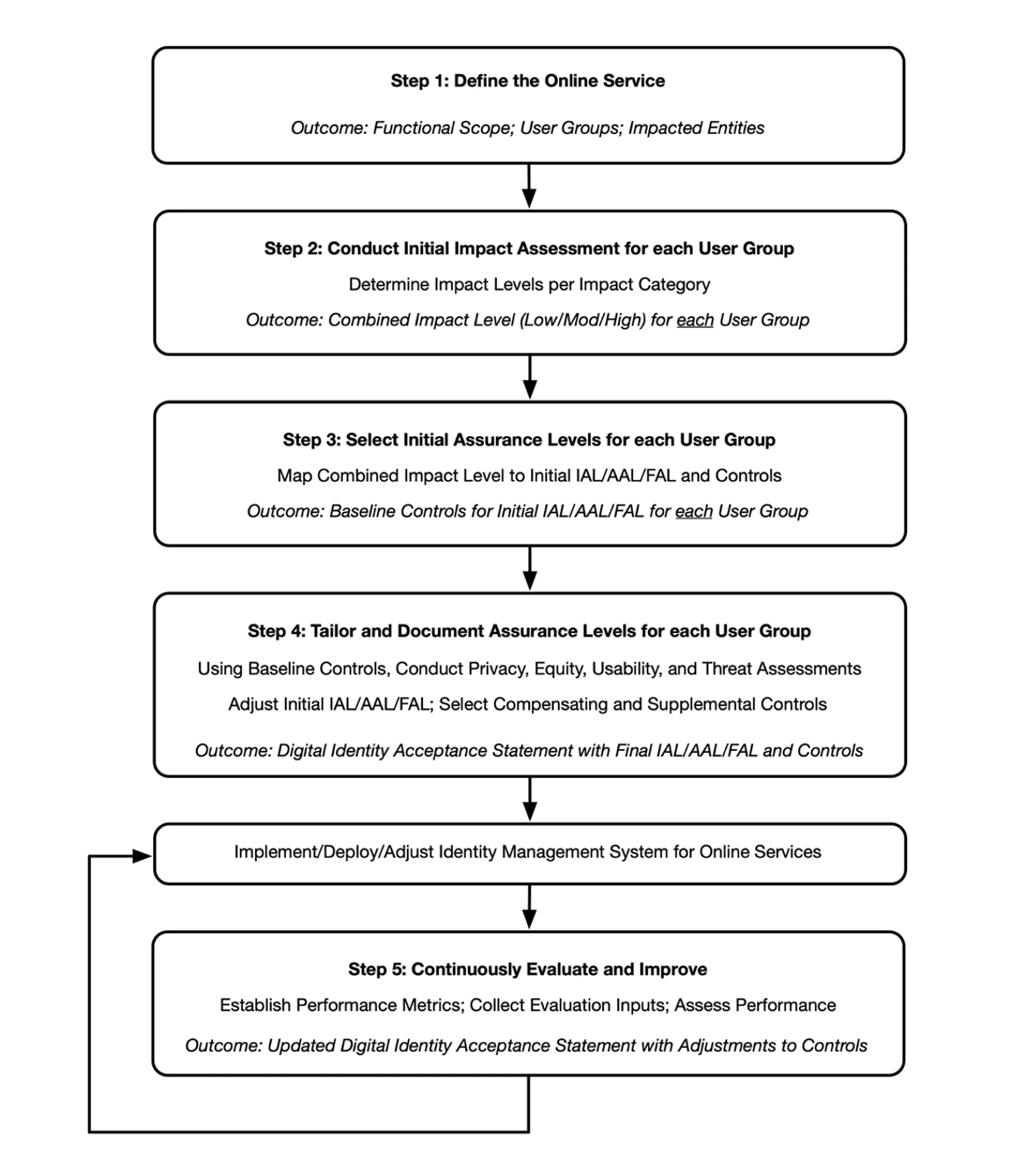
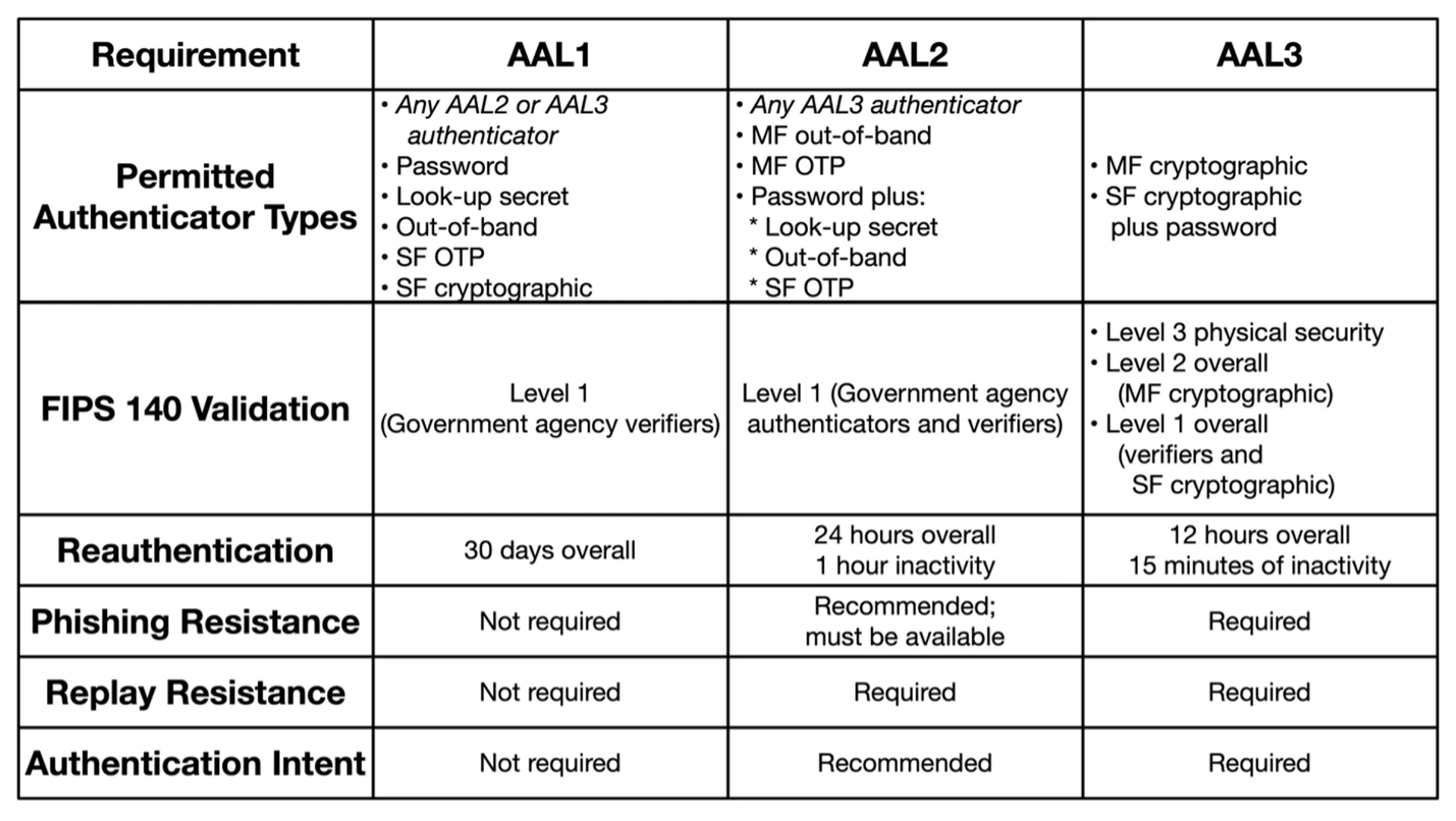
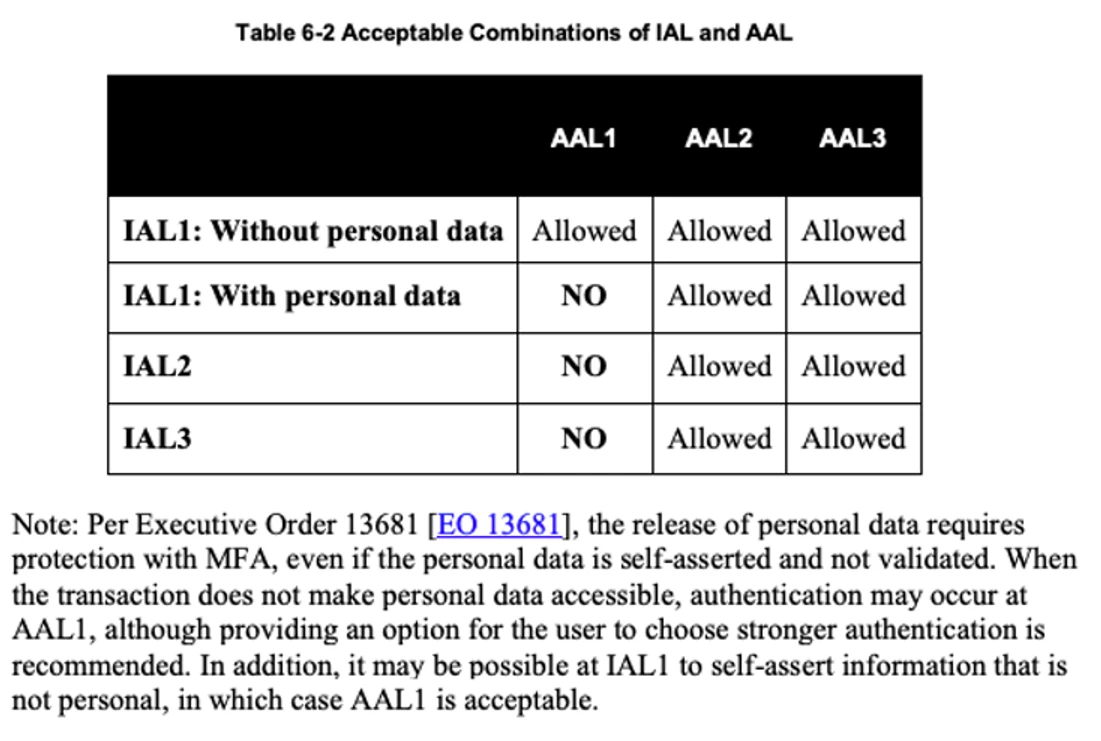
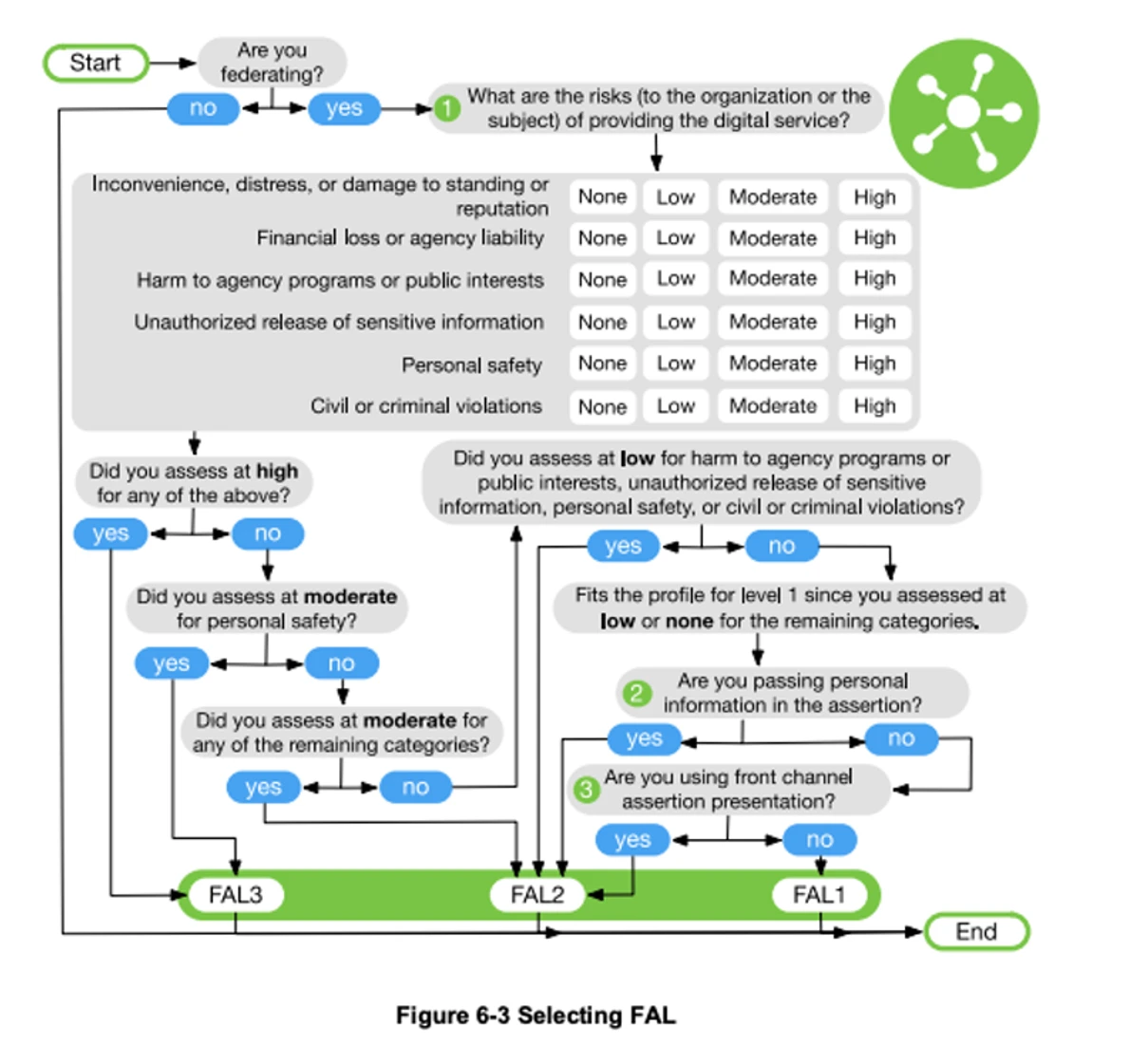
Solving NIST Password Complexities: Guidance From a GRC Perspective Not another password change! Isn’t one (1) extra-long password enough? As a former Incident Response, Identity and Access Control, and Education and Awareness guru, I can attest that password security and complexity requirement discussions occur frequently during National Institute of Standards and Technology (NIST) assessments. Access Control is typically a top finding in most organizations, with the newest misconception being, “NIST just told us we don’t have to change our passwords as often and we don’t need to use MFA or special characters!” This is almost as scary as telling people to put their Post-it notes under the keyboard so they’re not in plain sight. In an article Titled, "NIST-proposes-barring-some-of-the-most-nonsensical-password-rules", it was stated that NIST’s “. . . document is nearly impossible to read all the way through and just as hard to understand fully.” This is leading some in the IT field to reconsider or even change password policies, complexities, and access control guidelines without understanding the full NIST methodology. This blog post will provide an understanding of the context and complexities of the NIST password guidance in addition to helping better guide organizations in safe password implementation guidance and awareness. No one wants to fall victim to unintended security malpractice when it comes to access control. **Understanding the NIST Password Guidance in Context** The buzz around the NIST password guidance is frustrating because everyone seems to zoom right down to the section with the password rules and ignore the rest of the guidelines. The password rules are part of a much larger set of digital identity guidelines, and adopting the password rules without considering their context is counterproductive and potentially dangerous. The Scope and Applicability section of the new NIST guidelines, formally known as NIST Special Publication 800-63 Digital Identity Guidelines (NIST SP 800-63), states “These guidelines primarily focus on organizational services that interact with external users, such as residents accessing public benefits or private-sector partners accessing collaboration spaces.” In plain English: the guidance in NIST SP 800-63 is not intended for internal users’ accounts or sensitive internal systems, and organizations implementing the password rules on their internal systems are misusing the guidance. For organizations that are planning to use this guidance to secure their external-facing service accounts, NIST SP 800-63 spends 26 pages defining a risk-based process for selecting and tailoring appropriate IALs, AALs, and FALs, respectively, for systems, with three (3) assurance levels defined in each of those categories (see NIST SP 800-63 Section 3). It goes on to provide guidance on user identification, authentication, and federation controls appropriate for each assurance level in three (3) additional documents—NIST SP 800-63A, B, and C, respectively. The new password guidance is meant to support the AALs (defined in NIST SP 800-63B). Only AAL1, the lowest of the AALs defined in the guidelines, allows passwords to be used alone and still states that multi-factor options should be available. AAL1 is defined as providing “basic confidence that the claimant controls an authenticator bound to the subscriber account.” Organizations that adjust their rules for passwords to match the NIST guidelines without performing the risk-based analysis and selecting an appropriate AAL are naively implementing what NIST intended only for the most basic protection. This is an inappropriate use of this guidance document, as many systems will present significantly more risk to the organization than AAL1 was designed to address and would be more appropriately protected by AAL2 or AAL3 controls. In short, the NIST SP 800-63 password guidance (when used properly with a risk analysis) is intended and appropriate for external user accounts on public-facing services, e.g., customer accounts on a public portal. However, organizations should think twice before applying it to their own internal systems and users, because that was not its intended purpose. It’s also worth pointing out that, as of this post, the guidance that is making so many headlines is a draft and is subject to change before finalization. **Using the NIST Guidance** The two (2) most frequently asked password questions as auditors or GRC consultants we get at TrustedSec are, “Do we really need Multifactor Authentication (MFA) everywhere?” and “What is the best practice for the implementation of passwords?” For any organization that logs into a network, starting with a framework is a must for successful governance and cybersecurity foundations. Additionally, organizations must adhere to password and access guidelines based on the legal and regulatory requirements they must follow to keep their businesses running. Some examples are various NIST security control frameworks (e.g., CSF or SP 800-171), PCI-DSS, HIPAA, NERC-CIP, ISO 27001, SOX, etc. Many of these frameworks include specific requirements for utilizing complex passwords, rotation of passwords or passphrases, enabling MFA, determining access levels, and performing access reviews appropriate for the types of information and/or systems these frameworks are designed to protect. This NIST SP 800-63 guidance does not in any way override or supersede any of these more specific requirements, so organizations should continue meeting existing framework requirements. You might be asking, “How does this apply to my organization?” Most organizations question if their situation is applicable, due to the term “online service.” In today’s society, when users think of an “online service,” most would think shopping portals or online goods. However, as NIST defines it in the Glossary of SP 800-63, an online service is “A service that is accessed remotely via a network, typically the internet.” This is important to clarify that any organization that has an Internet-facing network is using an online service and can adhere to the digital guidelines and implement best practices for security, based on their risk profile or digital risk in the absence of other compliance requirements. What is digital risk? NIST describes Digital Identity Risk as management flow to help perform the risk assessment or risk impact. As seen with the new release of NIST CSF 2.0, Governance and Risk Assessments are the core to a healthy cybersecurity program. Organizations can begin to perform the risk (impact) assessment, as defined in SP 800-63 Section 3, by defining the scope of the service that they are trying to protect, identifying the risks to the system, and understanding what categories and potential harms the organization possesses. Identifying the baseline controls to use in the risk formula will assist with selecting the appropriate level. Identity Assurance or proofing is about a person proving who they say they are. A useful example: I sign up for a web service and enter an email address and new password—how does the service know I actually control that email? If they're smart, they will send a confirmation email to that address before setting up the account to prove my identity. This gets more complex when a user ID needs to be associated with a specific named individual, e.g., when retrieving medical information from a portal. Authentication is the process of confirming a user’s identity prior to allowing them access to a system or network, such as through a password. Federation is a process that allows access based on identity and authentication across a set of networked systems. Each level will have a severity rating, e.g., Low, Moderate, or High. Starting with the user groups and entities, thinking of people and assets, and then determining a category or categories will help identify harms or risks. Some examples are listed in SP 800-63. Next is evaluating the impact that improper access would have on an organization. This assists in identifying the impact level. Impacts such as reputation, unauthorized access to information, financial loss/liability, or even loss of life or danger to human safety can be included to help determine the impact level for each user group and organizational entity. Using the impact level leads to determining the IAL and then the AAL. When determining the AAL, the intent is to mitigate risk from authentication failures such as tokens, passwords, etc., whereas IAL is aligned with identity proofing and individuals. Certain factors, such as privacy, fraud, or regulatory items, may require a specific AAL. NIST references these in SP 800-63A, SP 800-63B, and SP 800-63C. Once the AAL is established, referencing SP 800-63C can be helpful in the next step for selection of the FAL. This assists in identifying the identity federation, which uses the Low, Moderate, and High impact criteria. Once IAL, AAL, and FAL have been established for each user group or entity, an Initial AAL can be selected. Of course, this will also need to take into consideration baseline controls, compensating controls, or supplemental controls, if needed. Also keep in mind, as with all NIST processes, that continuous evaluation and improvement are critical to staying secure, making this a recurring process. ![](https://m.stacker.news/72372) Now that the calculated AAL has been established, the chart in Section 3.5 of SP 800-63b will help with understanding some of the requirements. ![](https://m.stacker.news/72373) Most systems would be a Level 2 or 3, considering what the organization would be storing, processing, or transmitting. Things like sensitive data such as personally identifiable information (PII) during onboarding, payment card data, and PHI subject to HIPAA for places like hospitals or service providers might help align with each AAL. Instances where Level 1 might be utilized could be a website that would not store payment data but requires a user to log in with a user ID and password. Understand that risk for the website is minimal, and therefore a Level 1 for that specific system may be deemed appropriate. But the organization may have corporate network controls set to Level 2, due to HR or doing business with certain service providers. It’s perfectly fine to have various levels assigned to different groups and assets or entities. A similar process to define the IAL and FAL as noted in NIST’s Digital Identity Guidelines (NIST SP 800-63-3) is depicted below: **IAL:** ![](https://m.stacker.news/72374) **FAL:** ![](https://m.stacker.news/72375) So, after all of this, is one (1) super-long password really enough? It depends on the AAL and what other legal and regulatory requirements an organization is expected to adhere to. The highest level should always be implemented where possible, if the risk is present in the organization. For example, if the organization processes credit card data, PCI-DSS standards would prevail, meaning that passwords pertaining to the CDE must follow all PCI guidance and likely would be considered a Level 3 after performing the risk assessment. The key to the AALs, really, is determining the most sensitive data our organization has and aligning it with that level. Now, let’s put the AAL to use. I always consider Incident Response and Education and Awareness as my lead examples behind why we do security. If an organization becomes compromised, are all passwords and access controls properly aligned with the risk, and do they adhere to all legal and regulatory controls? Lastly, always implement MFA where possible; after all, NIST does strongly suggest it SHOULD be available, even at AAL 1! Be proactive on how to report an incident if your password is suspected to be compromised, change it immediately—even if NIST has a different idea—and communicate it to all users. All users and organizations should understand the risk to their specific organization and be compliant. Security is everyone’s responsibility—don’t let your organization’s password hygiene be the cause of the next big breach. originally posted at