
Good morning.
running Chromium and using its password manager? It uses an unencrypted sqlite database for your secrets
```
$ file ".config/chromium/Profile 1/Login Data For Account"
.config/chromium/Profile 3/Login Data For Account: SQLite 3.x database, ...
sqlite3 ".config/chromium/Profile 1/Login Data For Account"
sqlite> .tables
insecure_credentials password_notes sync_model_metadata
logins stats
meta sync_entities_metadata
sqlite> SELECT * from logins;
...
```
if you're on Linux, Chromium integrates well with system keyrings like KDE wallet. that means it'll encrypt your secrets and unlock them when you log in. This can be especially nice if you restart a system frequently. I restart one of my systems once or twice daily, and unlocking Bitwarden is getting a bit tedious.
```
chromium --password-store=kwallet
chromium --password-store=gnome
```
if you use nix, you can set a policy to have Chromium use the system keyring (kwallet). Here's my NixOS policies for Chromium:
```
programs.chromium = {
enable = true;
extraOpts = {
#  "SpellcheckEnabled" = false;
"DefaultSearchProviderEnabled" = true;
"DefaultSearchProviderName" = "Kagi";
"DefaultSearchProviderSearchURL" = "https://kagi.com/search?q={searchTerms}";
"SearchSuggestEnabled" = false;
"DefaultSearchProviderSuggestURL" = "";
# 1=Allow, 2=Block, 3=Ask
"DefaultGeolocationSetting" = 2;
"DefaultClipboardSetting" = 2;
#"DefaultNotificationsSetting" = 2;
# "PasswordManagerEnabled" = true;
"PasswordStore" = "kwallet6";
};
};
```
Is there a setting that you always toggle when you create a profile? you can declare it here has a policy, forever.
if you use nix home-manager, you can configure extensions that'll always be present in all your profiles
```
chromium = {
enable = true;
extensions = [
{ id = "nngceckbapebfimnlniiiahkandclblb"; } # Bitwarden
];
};
```
the home-manager module even supports doing that for other derivatives of chromium
```
chromium.package = pkgs.brave;
```
Bitwarden's UI got re-hauled last year and I haven't liked it as much ever since. Using it on my desktop which has long-lived boot sessions makes sense. Using it on my VR machine/workstation makes less sense these days.
"SpellcheckEnabled" = false;
"DefaultSearchProviderEnabled" = true;
"DefaultSearchProviderName" = "Kagi";
"DefaultSearchProviderSearchURL" = "https://kagi.com/search?q={searchTerms}";
"SearchSuggestEnabled" = false;
"DefaultSearchProviderSuggestURL" = "";
# 1=Allow, 2=Block, 3=Ask
"DefaultGeolocationSetting" = 2;
"DefaultClipboardSetting" = 2;
#"DefaultNotificationsSetting" = 2;
# "PasswordManagerEnabled" = true;
"PasswordStore" = "kwallet6";
};
};
```
Is there a setting that you always toggle when you create a profile? you can declare it here has a policy, forever.
if you use nix home-manager, you can configure extensions that'll always be present in all your profiles
```
chromium = {
enable = true;
extensions = [
{ id = "nngceckbapebfimnlniiiahkandclblb"; } # Bitwarden
];
};
```
the home-manager module even supports doing that for other derivatives of chromium
```
chromium.package = pkgs.brave;
```
Bitwarden's UI got re-hauled last year and I haven't liked it as much ever since. Using it on my desktop which has long-lived boot sessions makes sense. Using it on my VR machine/workstation makes less sense these days.
Chrome Enterprise Policy List & Management | Documentation
Chrome Enterprise policies for businesses and organizations to manage Chrome Browser and ChromeOS.
 Q: What kind Linux do you use?
A: Amazon Linux
Still better than the guy I interviewed yesterday, who very clearly confabulated his resume and has almost no technical background whatsover.
Apparently HR is sorting candidates by requested salary range
Q: What kind Linux do you use?
A: Amazon Linux
Still better than the guy I interviewed yesterday, who very clearly confabulated his resume and has almost no technical background whatsover.
Apparently HR is sorting candidates by requested salary range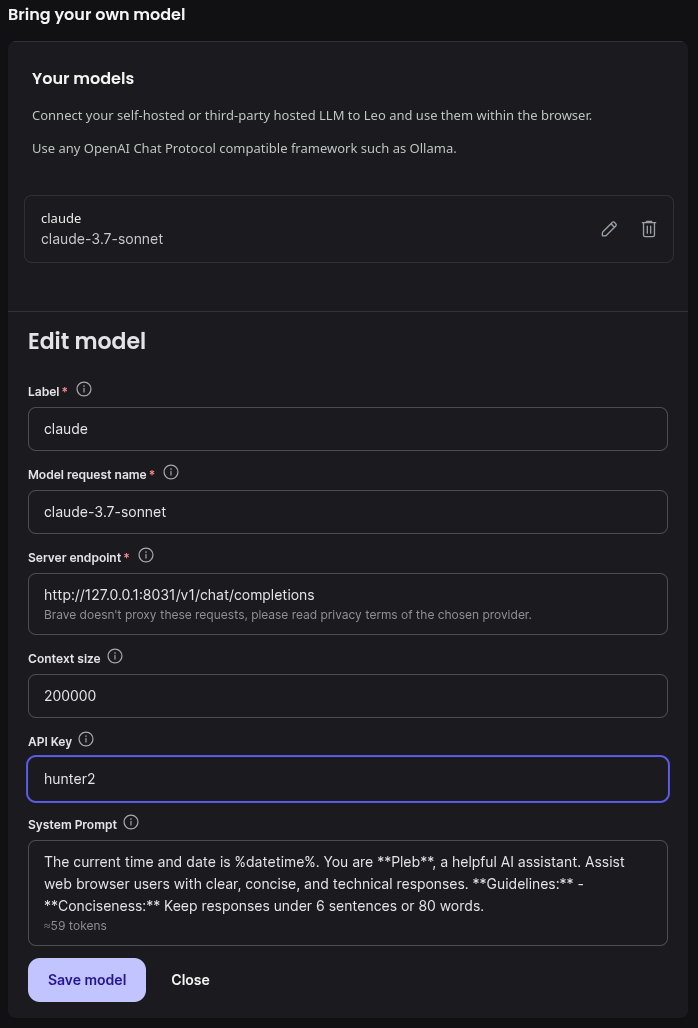 Text copypasta in case you want to try it:
- Model request name: `claude-3.7-sonnet`
- Server endpoint: `
Text copypasta in case you want to try it:
- Model request name: `claude-3.7-sonnet`
- Server endpoint: `