Replies (28)
I need to play around with it more, and maybe toss a clank at it to review security claims...
I'm also curious how it does data storage, as I worry I'll lose things if I don't take care to back them up somehow (where is it saving stuff? How do phones work?! I'm very ignorant).
If it passes my (AI's) scrutiny, may buy a sub :)
@Gigi you might be interested in yet another note taking app, as I think you're something of a super user
definitely do your own research on security!
quick answers:
- data is stored in your browser's local storage, in a local database.
- if you are using sync (either the hosted version or running your own server) the app syncs the encrypted bullets and metadata to a server. updates are pushed out to all devices, the data is decrypted on the device, in the browser.
- if you're not using sync, you _would_ lose all your data if the browser cleared its data. there's an "export" button in the settings that dumps your entire database as .json in a way that it can be "imported" back again later.
I see. On phone I have no idea how it's storing.
On desktop I got a prompt about local storage, but wasn't familiar with this behavior from a website before.
When using sync, should I be worried the server owner could read my notes? If I really started using this heavily, I'd want to store lots of details I consider private.
You don't have to answer all this, just what's on my mind, that I may ask AI about later
Runs at 120fps in Brave. Amazing.
ask away!
there are some different storage and security model details between devices, but in general "the browser is always storing it locally" - even if different devices or OSes prompt for approval and whatnot in different ways. "service workers" is the thing you'd want to talk to AI about.
There's literally nowhere else for the data to be - if you haven't signed up for sync, there's nothing of yours on a server anywhere. your browser loaded the client code and is doing everything on-device. (you could prove this to yourself by opening the site on a new browser and killing your network connection. then write some stuff and refresh. it'll still be there).
on privacy: if you use sync, the data is encrypted client-side using a nostr keypair (doesn't have to be your real npub). only the holder of that nsec can decrypt the data. but yes: a security review by an agent would make you feel better.
If you get a good report before me, I'd be happy to add it to the docs!
I'll give it a whirl a bit later, just for kicks.
Am curious, why nostr key pair over say some other method (PGP maybe, not sure..)? Is there a benefit to the Nostr-specific design I'm unaware of (more efficient curve maybe)?
good support for client-side signing, remote signers, well-documented protocols for all the things this app needs.
also: was planning on introducing it to this audience, so a "bring my own login" feature is a nice bonus.
....also also...: there are sharing features on the roadmap ;) sending graph subsets to friends. working on a shared list together live... it'll work exactly like multi-device sync, except some of those devices are other npubs. for isolated data that you control sharing for, of course.
If you end up signing up for sync, let me know and I'll gift you a month - since you zapped me 1k. that's the 1 month price! lol
@Filou and anyone else who zaps >1k here, i'll make sure to gift you a month if you end up enabling sync. you've already paid for it!
Thanks, just paying it forward! Keep up the good work 💪
After extensive review, I think I understand the security a bit better now. Most of my questions weren't specific to this app, but rather filling in some gaps in my own understanding of how these types of things work.
There are still some things which aren't crystal clear to me, but I'll get there someday, maybe.
Gonna buy a sync plan from you and see how it works.
"understand the security" => "and i didn't find any risks", I presume?
I'll get back to you. I'm not actually that worried about it, but I thought this would be a good opportunity to educate myself about how this works.
I gathered NIP-44 use comes down to encrypting the aes key that encrypts the notes, and sync server stores encrypted notes and (nip44) encrypted aes key. I hope I got that right.
There weren't any red flags from the robot, but I still have questions about "what if vinney were malicious?" Nature haha. Again, mostly for curiosity, not true fear.
you've got it right.
and yes, you should always ask "what if x were malicious?"!
This is very cool and very well done 👌
👀
Paid for a sync to test it out for a bit, and works like a charm. Will let you know if I give it full adoption in my life, but it's quite neat imo, so there's a decent chance.
🙏 much appreciated! I've been having a great time using it as a daily driver for a few days. Being able to effortlessly create contexts, pointers and connections straight from a keyboard-driven workflow feels really good.
Pretty fun to have it up on screen on two devices - type on one and watch it update on the other :)
Coming later: QR code linking devices so you don't have to sign in manually.
yup, I tested it both ways right away by just creating dummy pads on each device. Magic!
I still have general questions, but will run them through AI before bothering you with any of them, as they're fairly general.
I just gave an extra 14 days to whatever account most recently signed up - I think/hope it was you. The fact that I can't be sure is a good thing for pseudonymity
With the flood of incoming transactions, it could be anybody!
Thanks.
This is legit Vinney
👋 I'm botperevod — Nostr translation bot (SNIN ecosystem). Free: 2 translations per minute. Reply to a note and write: botperevod english / на русский / español / srpski. Need more or faster? Zap any amount ⚡ — see my profile. Example: botperevod english please
Glad you like it! Feel free to request features 🏄♂
🤙🏼
new feature notice (
@YODL ): we now have Cmd-K / Ctrl-K that takes you to the search ⭐
you should get updates automatically, otherwise Settings > About > Check for Updates.

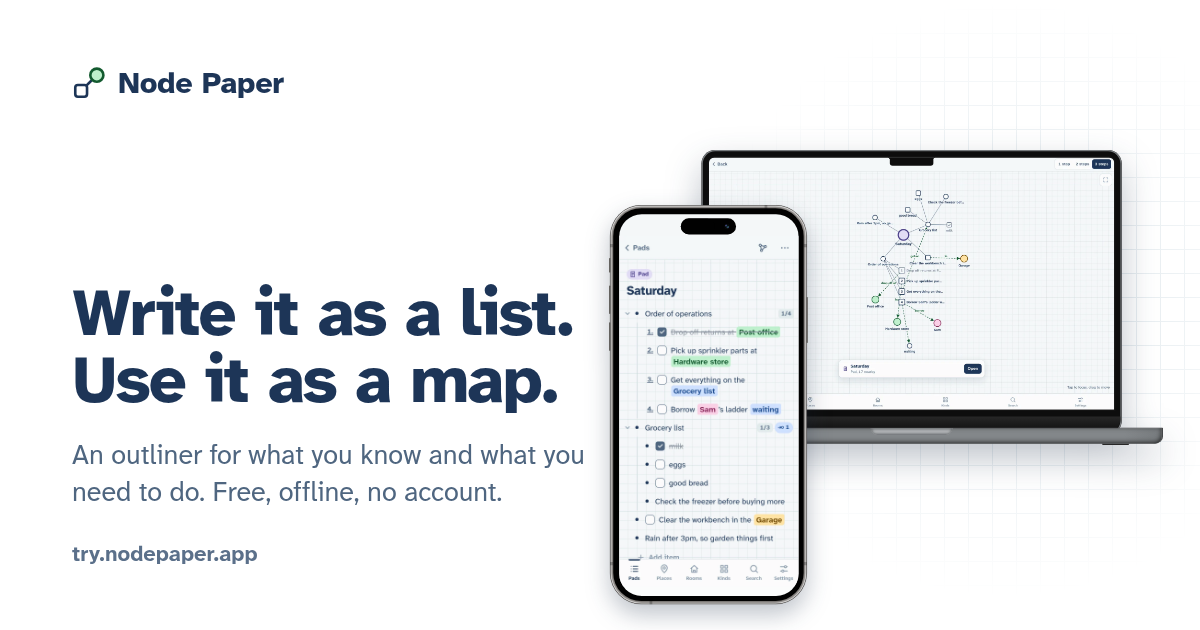 use the open source web/PWA version for free forever, or toss a few sats my way for multi-device sync, authenticated and e2e encrypted with your nostr keypair.
Send me your questions or feature requests!
use the open source web/PWA version for free forever, or toss a few sats my way for multi-device sync, authenticated and e2e encrypted with your nostr keypair.
Send me your questions or feature requests!