Replies (62)
(Speaking from experience obviously; someone reached out to me and I wasn't able to help them recover. All they had was the npub)
Exactly 🫡
Look that note1kq9rftjj6mly6uddu2fn6yffe89jzsgrrpzyu05jecjpy95kv9zquyhkg0
I have my nsec in a PDF in cloud storage (One Drive)
ALTERNATIVELY, "IF THEY'RE A NOOB, CUSTODY THEIR NSEC FOR THEM AND CHARGE RENTS." - FIAT SMOOTH BRAINS
My "similar".

What are thoughts on stamping nsec on the same piece of steel that seed phrase is on?
There is no perfect. Password manager setup is the most well tested robust solution we have. Nostr specific solutions are experimental and attempts to create a nostr convenient solution.
True. Even me…
Universal adoption of NIP-06 plzkthx.
Yes, good advice but don’t forget to tell them not to do this for their Bitcoin seed phrases ;)
Indeed this is a critical point. There's nothing worse than using your Nostr app for 3 months and then losing your account because your phone breaks and you haven't saved your password anywhere.
Do you have any suggestion to improve this aspect on Nstart?
Encrypted, right?
(And why a PDF?)
Nope, not encrypted 🤔
I would encourage the nsec to be stored in multiple places (and different mediums), just like any critical/important data.
I have mine written on paper, in a ziplock, in a "fire proof" safe, along with ascii txt files on external drives.
Extremely risky.
Use the ncryptsec format.
Or also a password protected zip is fine.
For backup, that's fine. No one should be comfortable moving their nsec around. It should never leave the password manager unless there is an issue.
The user is already instructed to do so and must confirm the step:
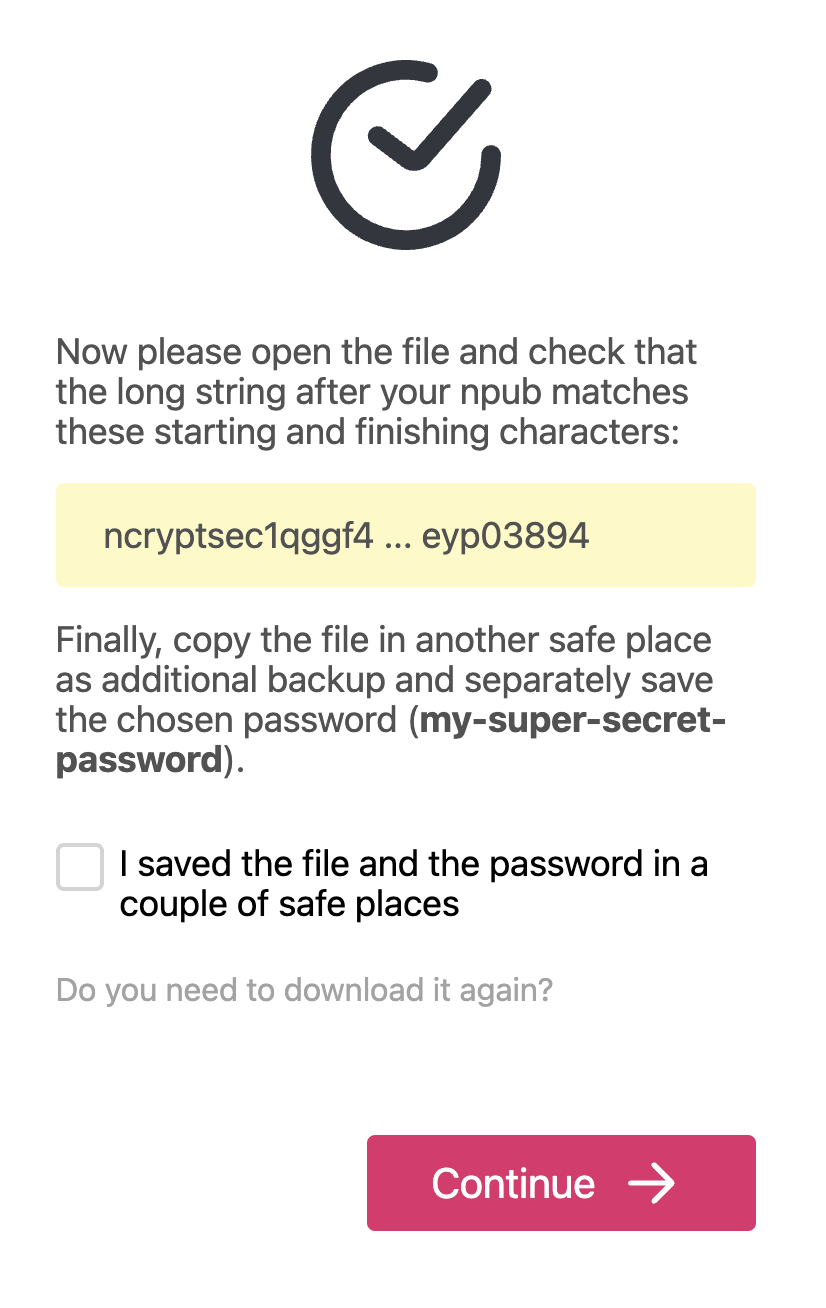
I would not want to block it too much at this point with specific instructions on how/where to save it. Maybe it could be added at the end.
we have this option but people skip it a lot. may need to remind them often like signal does with pin reminders.
Great UX for solving this problem
That looks great!
If you want to provide more details, I'm thinking an external link for "Best practices for securing a key" would do the trick.
I think what you have now is fine without it though.
#touchpaper
Hodl your nsec like a seed phrase 🙏
Most people don‘t even use a password manager. One size fits all.
Would it be too paranoid to save the nsec only in offline devices and use it only with a hardware signer? Just like it is advised to do with Bitcoin. Impersonation could be a potential source of problems, specially if you are a well known person
if not for this feature i would have long gone lost my first nsec.
but now i know whats going on so i know how to manage it.
Just memorize the nsec 🤷♂️
Yes, periodic reminders are a good idea imho. Get reminded or get rekt
Absolutely possibly if you convert it to 12 words. I might do this for this one, now that you mention it 🤔
Haha, I was being silly and then realized I wasn’t sure if a 12 word standard method existed
I'm talking about noobies that have absolutely no idea what's going on. If they get rekt, they will reach out to the person that onboarded them. Or if they onboard themselves, they might remember that they put it somewhere.
That's good. Mutiny did this well too. They had 3 checkboxes, the last one being "I am NOT just checking this checkbox to get it over with" or something like that 😅
"or similar" = notes, or a msg to themselves, etc
Yes.
#YESTR
I know. Newbies are the most likely to get rekt pasting nsecs all over the place. That's what makes me the most nervous.
Hahahaha, clever!
Working on a simple ed. platform for the new comers. Will cover.
Loss is more likely than compromise imho. At least that's what I've learned from onboarding people to bitcoin.
ya, helpz
+1
Tony made a video for Android users
View quoted note →
 Gigi
Gigi
If you onboard a newbie to nostr, make sure to help them get the nsec into a password manager or similar.
Phones will be lost. Apps deleted. They don't know what they do, and with this (imperfect) backup in place they won't have to start from scratch.
View quoted note →
^
pow-WOW
POW/*
Yes, and also share this video:
 Omar-VgWs ⓥ ₿
A good day to join Nostr.
I share with you here a simple guide in English for your first registration.
#Nostr #English #Guide #AskNostr
View quoted note →
Yup already happened to me lol. Got a new phone and never saved my keys so know I have two account one with no access just floating in the nostr ether.
If I lost my phone and there’s some Sats in the Primal Lightening wallet, would I use my nsec private key to recover them? Or another recovery method?
Thanks 🙏
👀
Coinbase can store these too
I worry about the password manager being hacked one day… as you say an (imperfect)
Great advice. I lost my first two NOSTR accounts due to this. I just save my nsec to notes😀
can we convert nsec into mnemonic phrases?
Misplaced worry. It's similar to worrying about bitcoin being hacked.
Use a local only password manager, such as keepass, and then back it up to a flash drive and other devices in your possession. At least that's how I handle my database. And I've never lost access to it.
👆👆👆👆👆✅
Thoughtful “worry” saves lives.
Misplaced worry drains all energy & eventually kills.
I use keepassxc on one of my computers but I also self host a vaultwarden instance
I use keepassxc for my laptop and keepassdx on lineageos. I have been using it that way since 2019 and find that it works well. Since my phone is my primary computing device, that is where the main database lives. And then, about twice a year, I back it up onto two separate flash drives. I also have a copy on my laptop, but that one only gets updated if I specifically need something newer that I don't have already. I will do another backup if I make a very large change to it, such as adding a new crypto wallet or something so that I make sure not to lose that. But otherwise I found that it works quite well.
We should stamp seed it on a plate, tbh
No, but you can go the other way.